 132
Camera [Pebble Rocker]
Remotes- Use your Pebble watch to take photos with your phone. - Take an instant photo or use a timer from 5-30 seconds. - Turn flash on/off/auto from your Pebble. - Switch between rear/front camera from your Pebble. - Turn camera sounds on/off from your Pebble. - Preview taken photo on your watch. IMPORTANT: This watch app requires the Pebble Rocker companion app available via Google Play.
 131
Here To There
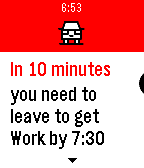
DailyNeed to stop for coffee before heading to work? Or want to make sure your home before dinner? Here To There is the watchapp for you. Input your home and work locations and it will let you know how long it will take you to get there. (Includes traffic delays). Also works with Pebble Timeline. Have the app send a Timeline pin to notify you when to leave.
 130
Pebble Racer
GamesStay between the lines while you drive your F1 car around the track.
 129
Hebrew and Arabic support for Pebble - e
DailyelbbeP lets you read Arabic and Hebrew everywhere on your Pebble smartwatch: text messages, calendar alerts, apps & more. Any Pebble can be upgraded to display Hebrew and Arabic, and there's no extra phone app required. Tap "Website Link" below to get started.
 129
Square Tube 3D
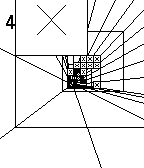
GamesYou are falling down the Square Tube. How long will you survive? Tilt your watch to avoid obstacles.
 129
TravelCrumbs
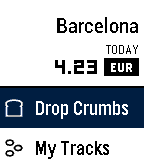
Daily"Fantastic Travel Currency App!" - Eric Migicovsky (Pebble CEO) If you like my app could you please give ❤️ ==New Features== 1. App Glance Mode : Total Spent Money / Today Currency Rates 2. Offline Mode : You don't need to internet! 3. Support for Spanish, French, English, Italian and German is coming soon TravelCrumbs helps people spend their money while traveling. It shows the exchange rates of the current location while it keeps tracking the locations using GPS. As you travel from country to country, all you need to do is to set your currency in your own country. And wherever you are in, TravelCrumbs will detect your location and automatically change the currency. In case you travel domestically TravelCrumbs will be still helpful for tracking where you have visited and checking the amount of money you spend each time. Users can easily input via voice or button control and check the price directly. They can also see an overview of their total expenditure for the day and the places that they have visited. TravelCrumbs is able to detect any value that you have said. We have the accurate exchange rates and location datas for over 39 countries worldwide. **Voice Input Guide** e.g 102.77 USD -> Say "one hundred two dollars and seventy seven cents" or "one hundred two point seventy seven" ==KIEZEL PAY== Travel Crumbs is no longer free, a one time purchase using KiezelPay at $2.99 is required to continue using Travel Crumbs. Thank you. email : travelcrumbs@yahoo.com twitter : @travelcrumbs
 129
North Pole
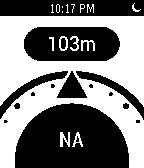
Tools & UtilitiesNorth Pole is an altimeter and compass for your Pebble watch. Put your phone's GPS and internal compass within a hand's reach
 129
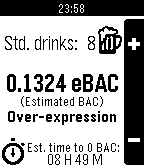
SoberUp
Tools & UtilitiesCount your drinks, estimate your BAC, and learn about the effects of alcohol on your body.
 129
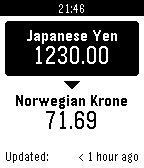
Quick Currency Converter
Tools & UtilitiesLets you quickly convert between any two currencies, easily configurable. It is designed for travel and keeps the last loaded rate so it can be used without connection to the internet, or even your phone.
 128
Braci - Snoring Detector PRO
NotificationsDescription Braci - Snoring Detector App able to detect snoring during night using ( Braci -Snoring Detector App on google store ) using microphone to detect the snore & notify you by short vibration pulses just to notify you to change the wrong position of sleeping,very useful app can solve snoring problem,Make sure download the companion App on Google Store https://www.youtube.com/watch?v=q5n9aK6dVVM For more in info visit our website : www.braci.co
 128
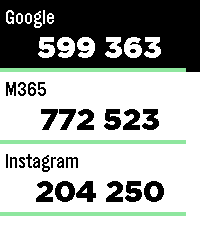
Authenticator
Tools & UtilitiesPebble Authenticator brings your two-factor authentication (2FA/TOTP) codes directly to your Pebble smartwatch. No need to reach for your phone to unlock your accounts, just glance at your wrist. Key Features: • Easy Setup: Import several accounts at once with otpauth:// links, or add them manually in the app settings. • Backup & Restore: Save all your accounts as a backup, optionally protected with a password (AES-256). Unencrypted backups use standard otpauth:// links, so you can also move your accounts to or from other authenticator apps. • Works on Every Pebble: Supports all Pebble watches, including the new Pebble Time 2 and Pebble Round 2 with touch scrolling. • High Capacity: Store up to 100 accounts. Watches with the original Pebble firmware have room for about 50. • Flexible Codes: 6- and 8-digit codes, custom time periods and secret keys of up to 256 characters. • Privacy First: Works completely offline. Your secret keys stay on your phone and your watch. No account, no tracking, no cloud and no external servers. • Easy Management: View and delete accounts in the settings page. The watch confirms when your accounts have been saved. Disclaimer: This app was developed with the help of Anthropic's Claude, which helped bridge the gap between modern JavaScript configuration tools (Clay) and the Pebble C SDK. If you find a bug, have an idea for a new feature or want to suggest an improvement, feel free to send me a message. I'm always happy to get feedback and make the app even better!
 127
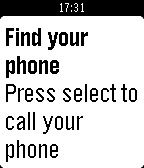
Find my Phone
Tools & UtilitiesThanks for 100 ❤'s! If you like Find My Phone give it a ❤! Do you misplace your phone often, or just want to be ready just in case you do? Then Find my Phone is the right app for you. At the push of a button, an automated bot will call your phone so you can hear it from wherever you put it. Unfortunately, you must be in Bluetooth range (About 150 ft.) for it to work. Estimated time to set up is 5 minutes. To set up: 1) Go to https://ifttt.com/join and make an account 2) Go to https://ifttt.com/recipes/407620-find-my-phone-pebble-app (Linked below) 3) Connect the Maker and Phone Call Channel (This will not work for people that do not use a +1 phone number (USA)) 4) In the box that says "Event Name" type "finding_phone" without the quotes 5) Click "Add" 6) Go to ifttt.com/maker and copy your key. DO NOT SHARE THIS KEY WITH ANYONE (Ex: tTfXIFRVJzu9suVW1K0g4k) 7) Install this app to your pebble 8) In the settings paste your key and click "Submit" 9) All done! If you have problems setting up, go to the video tutorial for help: https://youtu.be/VZQzZnMtvQE Or, if that doesn't help go to the troubleshooter: https://goo.gl/K8xeER After you have set the app up, you can re-open the app, and when you click select, your phone will start ringing!
 127
Billy
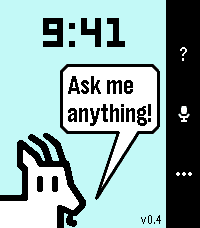
Tools & UtilitiesBilly is a spiritual successor to the legendary Bobby, itself an homage to the mythical Snowy the Dog. Katherine Berry has stepped away from Pebble development, but she generously left Bobby open source. I have attempted to take the reins and update it with my own spin. Billy has several modes. Just install it, and it's Bobby with a more powerful, up to date Gemini model and a few other tricks. Good for iPhone users. Install it with the companion app, and it gets WAY more powerful. Great for Android users who are willing to sideload, because I'm too lazy to publish on Google Play. But there's a third mode. One to really knock your socks off if you're willing to do the nerdy setup. Provide your own API keys and Google permissions, and, while also preserving what made Bobby so special - timeline pins and timers and alarms handled by PebbleOS -this app attempts to recreate a Pixel Watch Gemini experience on Pebble. With full Gemini, you can invoke almost anything your Phone Gemini can do. Ask it to find you an ancient email and reply to it for you. Ask it to search Google Photos for a 10 year old picture of a bird and it will show you in the watch. Ask for directions somewhere and get a map on your watch. Ask for it to make you a Google Sheets spreadsheet with... you get the point. The companion app walks you though the steps for setup.
 127
NetAtmo for Pebble
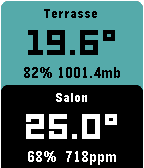
DailyThis watchapp displays data from your NetAtmo® stations. Open the configuration page, enter your credentials and select your default NetAtmo station. The outdoor module is displayed on top. Press the middle button to display the additional modules. Press up/down buttons to display awesome graphs (last 24 hours measures). Do a long press on the middle button to display your other stations. If you like it, feel free to donate by clicking on the website link below or contact me. This app and developer are not associated with NetAtmo® (http://www.netatmo.com/)
 126
Prayer Times
DailyShows all prayer times for your location, updated automatically.