 123
123Icon Pop Quiz
GamesICON POP Quiz challenges players to name famous characters using imaginative, handcrafted visual clues inspired by each answer. Can you guess all the icons?
 123
123QuickTimer
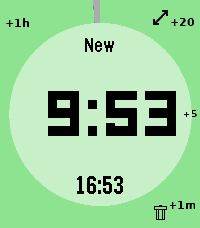
Tools & Utilities# pebble-timer-quick QuickTimer is a timer app for the Pebble Smartwatch, intended to be the fastest way to start a timer or stopwatch. Made for people that think needing 5 seconds to set a countdown timer or stopwatch is far too long. With QuickTimer, rest assured that you are not fiddling away precious moments of your life. QuickTimer starts counting as soon as you open the app. First press the button, then think how long the timer needs to be. If you want a timer for 1 minute and it takes you 6 seconds to start the timer, then your timer will be off by 10%, and that can be life or death. If you like your soft boiled eggs cooked for exactly 6 minutes and 20 seconds, QuickTimer will help you get the gooey texture you desire. QuickTimer works by pressing buttons to increment the countdown timer by set amounts (1, 5, 20, 60). Once you get used to this, you can set a timer without even looking at your watch. Here's how it works: - Open the app - You enter new timer mode where each button press adds a given amount of minutes to the total countdown time - After 3 seconds of inactivity your timer is set - If you don't press anything, QuickTimer goes into stopwatch mode instead - Once you are in counting mode, you can edit your timer, restart your timer, or you can enable repeat timers - Timers that are in alarm can be repeated, snoozed for 5 minutes, or silenced to become post timer stopwatches. ## Features ### Run several timers at once Need to track more than one thing? Turn on **Multiple Timers** in the settings and QuickTimer can keep up to five timers and stopwatches running at the same time. When you open the app it shows a list of everything that's running — scroll to one and select it to jump straight in, or pick **New Timer** to start another. Hold Down on a timer in the list to delete it. ### Every timer has a name — and you can speak a new one So you never lose track of which timer is which, QuickTimer automatically gives each one a short, memorable name the moment it's created. On Pebbles with a microphone, you can rename the active timer with your voice: while you're setting a timer, hold **Up** first and then press **Back**, then just say the new name. (Requires the **Voice naming** setting to be enabled and a connected phone.) ### Millisecond stopwatch Timing something precise? Pause a stopwatch while it's under an hour and QuickTimer shows the milliseconds too (e.g. `1:23.456`), so you can read off an exact split. The milliseconds disappear once it passes an hour to keep the display readable, and they only ever show on stopwatches — never on countdown timers. Based on [YclepticStudios/pebble-timer-plus](https://github.com/YclepticStudios/pebble-timer-plus).   ## Buttons ### New timer mode - Back: Add 1 hour - Up: Add 20 mins - Select: Add 5 mins - Down: Add 1 min - Hold Up: Toggle reverse direction (increments become decrements) - Hold Select: Switch to EditSec mode (seconds granularity) - Hold Up then press Back: Voice rename the timer (microphone models, when Voice naming is enabled) - Hold Down: Quit app and delete timer After 3 seconds of inactivity, the timer is set and transitions to counting mode. ### EditSec mode (seconds granularity) - Back: Add 60 seconds - Up: Add 20 seconds - Select: Add 5 seconds - Down: Add 1 second - Hold Up: Toggle reverse direction - Hold Select: Switch back to New mode (minutes granularity) - Hold Up then press Back: Voice rename the timer (microphone models, when Voice naming is enabled) - Hold Down: Quit app and delete timer ### EditRepeat mode Entered by holding Up while in counting mode (countdown timers only). - Back: Reset repeat count to 0 - Up: Add 20 repeats - Select: Add 5 repeats - Down: Add 1 repeat - Hold Down: Quit app and delete timer ### Counting mode - Up: Enter edit mode - Select: Toggle play/pause - Down: Extend high-refresh display rate - Back: Quit app - Hold Up: Toggle repeat mode on/off (countdown only) - Hold Select (running): Restart timer to original length - Hold Select (paused): Reset to 0:00 and enter EditSec mode - Hold Down: Quit app and delete timer When a stopwatch is paused and under an hour, the display shows milliseconds (e.g. `1:23.456`). ### Alarm mode When a countdown timer expires, it enters alarm mode (vibrating). - Up: Silence alarm and enter edit mode - Select: Silence alarm and toggle play/pause - Down: Snooze (add 5 minutes) - Back: Silence alarm (timer continues as stopwatch) - Hold Up: Repeat timer (restart with original length) - Hold Select: Restart timer from original length (running) - Hold Down: Quit app and delete timer ## Quickness The table below compares the number of button presses required to set timers in QuickTimer versus in the default Pebble timer. ``` | Timer Amount | QuickTimer | Default Pebble Timer | |--------------|------------|----------------------| | 1 min | 2 | 5 | | 2 min | 3 | 6 | | 3 min | 4 | 7 | | 4 min | 4 | 8 | | 5 min | 2 | 5+ | | 6 min | 3 | 5+ | | 7 min | 4 | 5+ | | 8 min | 5 | 5+ | | 9 min | 5 | 5+ | | 10 min | 3 | 5+ | | 11 min | 4 | 5+ | | 12 min | 5 | 5+ | | 13 min | 6 | 5+ | | 14 min | 5 | 5+ | | 15 min | 4 | 5+ | | 16 min | 5 | 5+ | | 17 min | 6 | 5+ | | 18 min | 5 | 5+ | | 19 min | 4 | 5+ | | 20 min | 2 | 5+ | | 25 min | 3 | 5+ | | 30 min | 4 | 5+ | | 35 min | 5 | 5+ | | 40 min | 3 | 5+ | | 45 min | 4 | 5+ | | 50 min | 5 | 5+ | | 55 min | 4 | 5+ | | 59 min | 4 | 5 | | 60 min | 2 | 5 | | stopwatch | 1 | x | ```
 122
122Quoble
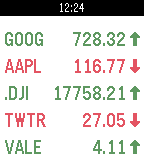
DailyDisplays your current stock quotes. Now in colour! Supports multiple stock quotes and displays up to 5 stocks per screen (up/down buttons to switch screens). Automatic stock updates can be enabled in the settings, including automatic rotation between screens and values (current, absolute and percent change)
 122
122Rx Navigait
Health & FitnessWalk tracking health device
 122
122Battery Leak
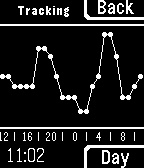
Tools & UtilitiesRunning out of battery? Wondering when your losing it or how much to expect? Battery Leak provides true background battery tracking, using Pebble's activity tracking abilities. View the past 24 hours or even a week, and choose between three different tracking modes. - Fore: Tracks only while app is open - Back: Tracks continually in the background - Off: Tracks... Nothing!
 122
122SmSOS
NotificationsPebble SOS is an emergency SMS service which sends out a virtual cry for help upon user request. To send an SOS request, simply press the select button once, and a safety contact will receive a text message with your latitude and longitude coordinate as well as a Google map link with your location inputted. This goal of this app is to give people whom are injured to the point of limited movement, the ability to call for help. Useful purposes for this app include: • skiing / snowboarding / mountain biking / etc. • camping / rock climbing / trail tracking / etc. • Tracking your children (see where they really are) • tracking parked vehicles • Meeting others at outdoor events • Hide and seek daredevils
 122
122Calendar
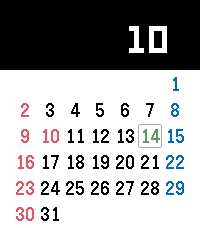
Tools & UtilitiesThis is calendar application. It is enable to show Japanese holiday and United States holiday. (Holidays display will change with pebble's language setting) [UP,DOWN] Change month. [CENTER] Today [Long-pressed UP] Show holiday / Not show holiday [Long-pressed DOWN] Sunday start / Monday start
 122
122PebbleQuest
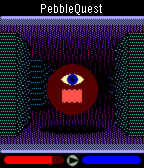
GamesA 3D fantasy action-RPG! Explore dungeons, slay monsters, level up, and wield Pebbles of Power to cast spells or enchant your weapons and armor. How long will you last in the dark, cavernous depths of PebbleQuest? UP: Press/hold to step forward. Press twice to turn left. SELECT: Press to use your current weapon/spell. DOWN: Press/hold to step back. Press twice to turn right.
 121
1212048 Touch
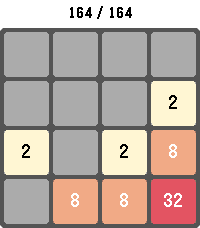
GamesPlay the classic 2048 sliding-tile puzzle on your Pebble. Combine matching numbered tiles to add them together and work your way up to the 2048 tile — and beyond. Swipe to move on touch-capable Pebbles, or use the physical buttons on every other model. Your board, score, and high score are saved automatically, so you can put the watch down and pick the game back up anytime. Long-press SELECT to start a new game, long-press BACK to exit. Supports Pebble Classic, Pebble Time, Pebble Time Round, Pebble 2, Pebble Time 2, Pebble 2 Duo, and Core Devices Pebble.
 121
121MOYORIEKI
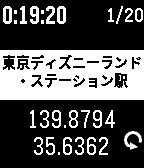
Tools & UtilitiesMOYORIEKI shows you nearest train station. This app functions only in Japan. features: - display 2 nearest station name and distance - selectable language Japanese or English - you can reload geo info with button - you can change font size of station name - you can select showing on/off of distance - you can save geo information and push to notification or timeline(PT/PTS) - you can get saved informations up to 20 on configuration page displays: (*1 : 2nd display mode when up button clicked) - 1st line -- display current time -- display elapsed time from recent time of information loaded -- saved history numbers *1 - 2nd line -- phone disconnected icon -- error status message - 3rd line -- most nearest station name - 4th line -- distance and direction to 1st station - 5th line -- 2nd nearest station name -- longitude *1 - 6th line -- distance and direction to 2nd station -- latitude *1 -- request icon button: - up button -- change display mode -- change from/to Station with long press - middle button -- change font size of station name -- toggle showing of distance with long press - down button -- reload geo information -- save current information with long press Japanese: 電車に乗っていて、ふと今どこの駅(の近く)なのか知りたくなったことはありませんか? このアプリは最寄り駅を表示するアプリです。 一番近い駅と2つ目に近い駅の名前と距離、方向を表示します。 また、現在時刻と最後に情報取得してからの経過時間を表示します。 上ボタンで画面モード切り替え、長押しで駅まで/駅から切り替え、 中ボタンで駅名の文字サイズ切り替え、長押しで距離表示有無切り替え、 下ボタンで情報の再取得、長押しで情報の保存を行えます。 情報の保存は notificationやtimelineにプッシュでき、さらに configuration page で過去最大20個の保存した情報をGoogle mymap に読み込める CSV形式やメモ形式で取り出せます。
 120
120Unified Remote
RemotesTurns your Android device into a remote control for your Windows PC. Control your favorite programs like Power, Power Point, Spotify, Pandora, FooBar2000,Media Monkey,VLC (Keyboard), YouTube, Chrome , Firefox, iTunes, Monitor, Netflix, XBMC and more. ATTENTION THIS IS NOT OFFICIAL APP. Unified Remote for Pebble , need companion app for Android, and you need to have Unified Remote Full.
 119
119Couch To 5K
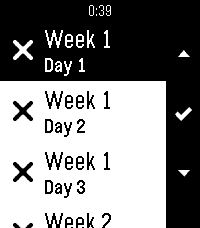
Health & FitnessCouch to 5K (C25K) Training app. Multi lanauge support: English, Français, Deutsche, Español. Supports a list of 24 days, all with individual progress indicators. Select a day to see the steps for that day, proceed to get a countdown clock with feedback for each step along the way. Open source, check description for github link.
 119
119World Cup 2026
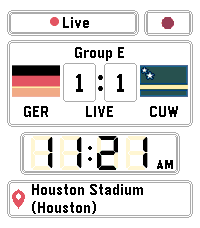
Tools & UtilitiesPebble's back just in time for World Cup 2026! Keep track of your favorite teams using this handy watchapp. Whether you love football, soccer or fútbol, this is the app for you! Created by Harvey Perks for Pebble
 118
118CityBuddy
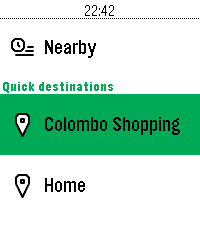
DailyPlan your public transit routes directly from your Pebble with CityBuddy. Quickly choose a destination, select a route, and check detailed stop information, all powered by the Transit API. Whether you're commuting to work or exploring a new city, CityBuddy is your wrist-based transit guide. Features: - Choose destinations from quick access options or by voice/typing. - Get route details and stop information. - Get the times for nearby transit. - Powered by real-time data from Transit. Public transit icons Copyright Jay Michalska <jay@michalska.cc> (CC BY-SA 4.0)
 118
118Activity (Inspired by Apple)
Health & FitnessDisplay your activity (and sleep) and receive a "Health" percentage. The "Health" percentage gives you a completion percentage of all three rings combined. -------------------- The red ring, shows you your active calories burned. (Default goal of 300 active calories) The green ring, shows you your active minutes. (Default goal of 60 minutes or 1 hour) The blue ring, shows you your sleep minutes. (Default goal of 480 minutes or 8 hours) -------------------- Each goal is customizable with rings that go darker when goal is met.