 30
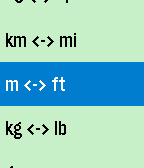
30UnitVersal
Tools & UtilitiesUnitVersal converts between common SI (metric) and US units, plus the Celsius and Fahrenheit temperature scales. Just scroll up or down. Select button: Single-click: Switch the unit whose quantity you're scrolling. Double-click: Jump back to the default quantities. Long-press: Access the menu to choose different units for conversion.
 30
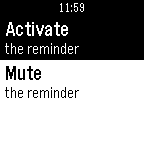
30HydrateUp
Health & FitnessHyreatedUp is a water-drinking reminder.
 30
30Letterfall
GamesTEST YOUR BOOKWORM SKILLS! 📝 "Letterfall" is a word-building game. The longer word you make the more scoring points you get. As you add points - you advance in ranks. ⛓️ To create a word - tap anywhere on the game field to select first letter and then build a chain of letters by tapping tiles next to previous one - above/below/left/right/diagonal. You can unselect tiles in reverse order. 🅰️ Watch out for red tiles! They appear if you make too many short words (3-4 letters). If red tile burns to bottom row - the game is over! 👑 Use gold tiles multiply the score. They appear if you make enough long words (5+ letters) If you're stuck - use game option "Flick wrist to reset board"
 30
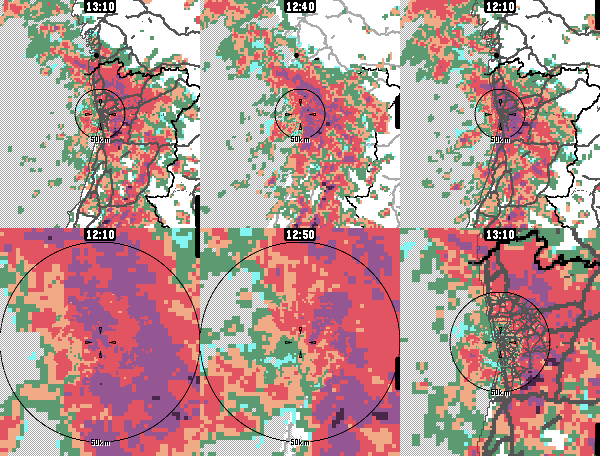
30Rain Map
DailyApp for viewing recent rain radar data. For the most accurate near-future rain forecast. The app features proximity-based resolution, to give you the most detailed data closest to your location. Radar data sources: - Rainviewer, https://www.rainviewer.com/ - Finnish Meteorological Institute, https://en.ilmatieteenlaitos.fi/open-data-manual-radar-data - Maybe others in the future Map data sources: - Geoapify for live raster tiles - OpenStreetMap & Natural Earth for static vector maps App controls: - Select timestep: Press up/down or touch the screen - Switch zoom level: Press select/back - Highlight map features: Long-press select - Show legend: Zoom too much Configure units, (free) Geoapify API keys etc. from the app's phone-side settings page.
 30
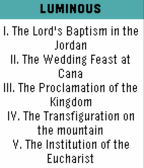
30Orémus
DailyThis app was an endeavor to provide a Catholic prayer guide for daily use. All of the basics are found in this app for your daily prayer life. The rosary updates daily to show you the current mysteries for that day. Other items include Divine Mercy chaplet how to, basic prayers, a confession guide, and stations of the cross. Future plans to add daily readings and saint of the day.
 30
30Hopper
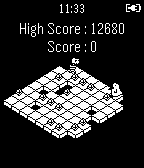
GamesHelp Sigmund the penguin hop around collecting treasure while avoiding shiny pebble stealing enemies
 30
30MEmagotchi - Time Tracker
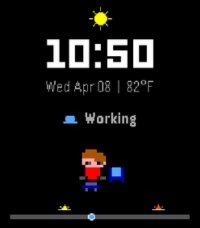
DailyYour day, as a tiny living avatar. Switch activities, watch it change, and see your whole day at a glance—now with live weather, temperature, and sunrise/sunset references.
 30
30Terrible Towel Twirl Tracker
Tools & UtilitiesCheer on the Pittsburgh Steelers and track how many times you're twirling that Terrible Towel. Yoi and double yoi! It should only count for twirls and not steps. Everyone twirls differently so over time I hope to optimize the accelerometer logic for all members of Steeler Nation. Press the down button to reset. Here We Go Steelers!
 30
30RhinoFeeds
DailyRead headlines and short articles from your favorite RSS feeds directly on your wrist - with RhinoDevel's RHINOFEEDS! No need for another helper app on your phone, just enter a feed's URL at the watchapp's config. site on your phone and enjoy being as up-to-date as it gets. :-) Uses Wikinews by default for your convenience! RhinoFeeds will be improved heavily, if enough Pebble users LOVE it! :)
 30
30Indigo Remote
RemotesA remote control for Perceptive Automation's excellent Indigo home automation server for Mac OS X. New in Version 1.1: More robust configuration, faster loading Please note: Perceptive Automation didn't develop this Watchapp; please don't contact them for support. I created this Watchapp because I'm a huge fan of their product.
 30
30Music Assistant Control
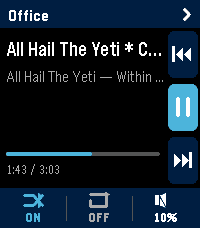
RemotesMusic Assistant Remote turns your Pebble Time 2 into a proper remote for your Music Assistant server. Transport, volume, multi-room grouping, and one-tap shortcuts to your library — all from your wrist. It's built specifically for the Time 2's touchscreen and four buttons. Music Assistant works either as a standalone server or as a Home Assistant add-on; either is fine. The now-playing screen shows the current track, artist, album, elapsed and total time, and a progress bar. The right edge of the screen has a column of three icons for previous, play-pause, and next — they're tap targets, but the watch's UP, SELECT, and DOWN buttons do the same things. Along the bottom is a strip showing whether shuffle and repeat are on, plus the current volume. Tap the shuffle bit to flip it. Tap repeat to cycle off, all, one. Tap the volume bit to jump into a full-screen volume control where UP and DOWN nudge the level and SELECT mutes. Switching players is easy. Tap the player name at the top of the screen and you get a list of every player your server knows about, sorted alphabetically, with a green/amber/grey dot showing whether each one is playing, paused, or idle. By default the watch sticks to whatever player is currently playing, but tap any row to take over a different one. Long-press any player row in that list and you get an action sheet for grouping. If the player is on its own, you'll see a list of every other player it can join. If it's already in a group, you'll see options to leave, add another player, or tear the whole group down. Members appear indented underneath their master in the list, with a chain badge on the master so you can read the setup at a glance. Quick Play is the shortcuts feature. Long-press SELECT on the now-playing screen and you get a menu of up to ten things you've pinned — albums, artists, playlists, whatever your library has. Tap one and it starts playing on whichever player you're currently controlling. You set the shortcuts up on the settings page from your phone: type into the search box, the page hits your Music Assistant server directly, you tap a result to pin it. The shortcuts live on the watch too, so the menu still works even if your phone hasn't synced yet. A few things worth knowing before you configure it. The settings page is served from GitHub Pages, so your Music Assistant server needs to accept CORS requests from that origin. If you're running MA as a Home Assistant add-on the easiest fix is a small bit of config on whatever reverse proxy you have in front of it.
 30
30Typing In Morse
Tools & UtilitiesTyping In Morse (Beta) is a fun and quick way to write text with the Pebble via Morse Code. Future updates hopefully will feature different fonts/background color, texting through phone, and much more. Top: + (Dot) / Hold for Backspace (currently only deletes last letter typed) Middle: - (Dash) / Hold for Space Bottom: Enter / Hold to erase all text OR if no input is entered, it changes cases (uppercase/lowercase) To open the reference sheet, flick your wrist when the input is empty! Scroll through the pages as you deign fit, and then flick again to return to the main text interface.
 30
30Solitaire
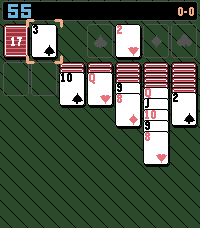
GamesA simple solitaire game with a twist
 30
304-7-8 Breathing
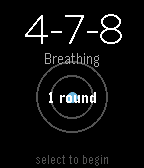
Health & Fitness4-7-8 Breathing Find calm in minutes with the proven 4-7-8 breathing technique. A simple breathing app for your Pebble watch. Practice 4-7-8 breathing to reduce stress, ease anxiety, and improve sleep. Features: Guided 4-7-8 breathing: Inhale for 4, hold for 7, exhale for 8 Visual breathing circle that expands and contracts with your breath Customizable rounds: Choose 1-10 rounds (default: 4) Progress tracking shows which round you're on Haptic feedback at phase transitions Clean, minimal design Why 4-7-8? Developed by Dr. Andrew Weil, this technique activates your body's relaxation response. Use it to calm down when stressed, fall asleep faster, manage anxiety, or reset during the day. How to Use: Open the app Adjust rounds with UP/DOWN buttons Press SELECT to begin Follow the visual guide and breathe Perfect for quick sessions at your desk, before bed, or whenever you need a moment of calm. Take a breath. Find your center.
 30
30TaiwanNewsMessage
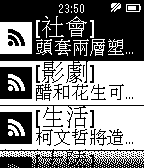
Tools & Utilities台灣新聞快訊,台灣重大新聞標題,快速瀏覽!!