 16
16OsmAnd Pebble Companion
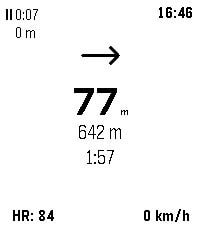
Health & Fitness# OsmAnd Pebble Companion OsmAnd Pebble Companion is a bridge application that connects the [OsmAnd](https://osmand.net/) navigation app on Android with Pebble smartwatches. It allows users to view essential navigation information and trip statistics directly on their wrist, reducing the need to check their phone while cycling, hiking, or driving. ## Features - **Real-time Navigation**: View turn-by-turn instructions, distance to the next maneuver, and directional arrows. - **Trip Statistics**: Monitor current speed, remaining distance to destination, and estimated time of arrival (ETA). - **GPX Recording Control**: Start, stop, and pause GPX track recording directly from the watch. View live recording duration and distance. - **Heart Rate Integration**: For Pebble models with heart rate sensors, the app can send heart rate data back to OsmAnd to be recorded with your track. - **Reliable Background Operation**: Runs as an Android foreground service to maintain a stable connection between OsmAnd and your Pebble watch even when the phone screen is off.
 16
16Subnet Helper
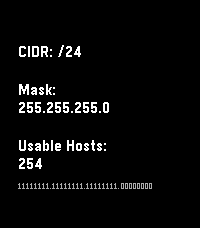
Tools & UtilitiesRemember subnets on your wrist, not in your head. Main purpose is translating between CIDR notation and traditional masks. Also shows some other useful info, especially on Chalk, Emery, and Gabbro.
 17
17Lichess TV
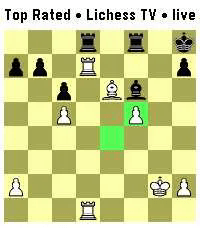
GamesWatch live chess, on your wrist! Lichess TV streams a live game position to your watch as it happens: every move, both players' names, titles, and ratings, and clocks that count down in real time. FEATURES • Live board, updated the instant a move is played • Player titles, names, ratings, and Patron status • Watch Lichess TV, Broadcasts and Streamers • Last-move and check highlighting • 9 board color themes, plus a choice of board size • Flip the board with a double-press of Select, or a flick of your wrist • Pause the board by holding Select and cycle though recorded moves • Optional inactivity timeout to save battery CONTROLS • Down: show player names, ratings, score and clocks • Up: pick a live game/stream from selected type • Back: close the info panel, or exit • Double-press Select, or flick your wrist: flip the board • Hold Select: Pause the feed and cycle through move history. No account or setup required — just install and watch. Requires a Bluetooth connection to a phone running the Pebble app, with internet access for the live feed using Lichess's API. This project is not affiliated with Lichess.org
 7
7Track your Flight
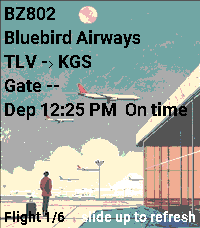
Tools & UtilitiesYou can track your flight by entering your flight code in the settings. To access full flight‑related data, register at https://aviationstack.com/dashboard and obtain a free API key (includes 100 requests per month). Copy that key into the app’s settings to enable all features. Press Select to view your boarding pass. To access it, open the pass in Apple Wallet, Google Wallet, or as a PDF. Retrieve the raw barcode text (it begins with M1). You can do this by: Using a barcode‑scanner app that displays the raw text, not just the image. Some airline apps let you copy or export pass data. Decoding the PDF417 or Aztec barcode from a PDF version of your boarding pass. Paste the full string into the Boarding Pass Barcode (BCBP) field in Settings. Example : M1DOE/JOHN EABC123 TLVJFKAA 0123 001A012B0001 100
 1
1Hnefatafl
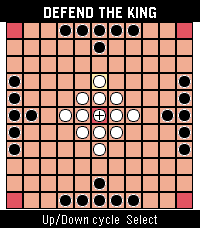
GamesHnefatafl app
 125
125TravelCrumbs
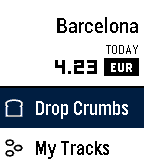
Daily"Fantastic Travel Currency App!" - Eric Migicovsky (Pebble CEO) If you like my app could you please give ❤️ ==New Features== 1. App Glance Mode : Total Spent Money / Today Currency Rates 2. Offline Mode : You don't need to internet! 3. Support for Spanish, French, English, Italian and German is coming soon TravelCrumbs helps people spend their money while traveling. It shows the exchange rates of the current location while it keeps tracking the locations using GPS. As you travel from country to country, all you need to do is to set your currency in your own country. And wherever you are in, TravelCrumbs will detect your location and automatically change the currency. In case you travel domestically TravelCrumbs will be still helpful for tracking where you have visited and checking the amount of money you spend each time. Users can easily input via voice or button control and check the price directly. They can also see an overview of their total expenditure for the day and the places that they have visited. TravelCrumbs is able to detect any value that you have said. We have the accurate exchange rates and location datas for over 39 countries worldwide. **Voice Input Guide** e.g 102.77 USD -> Say "one hundred two dollars and seventy seven cents" or "one hundred two point seventy seven" ==KIEZEL PAY== Travel Crumbs is no longer free, a one time purchase using KiezelPay at $2.99 is required to continue using Travel Crumbs. Thank you. email : travelcrumbs@yahoo.com twitter : @travelcrumbs
 4
4tvtime
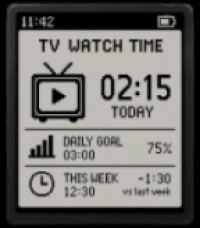
DailyI want to make my private app that can track my plug's time on and off.
 155
155GymTracker
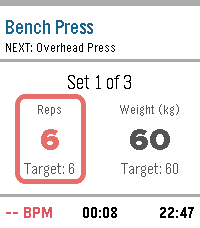
Health & FitnessLeave your phone in your locker. A fully-featured, standalone workout tracker with smart rest timers, haptic coaching, and automatic data export. Transform your Pebble into the ultimate gym companion. GymTracker is built specifically for the tactile, screen-on experience of Pebble, letting you track your entire workout without ever pulling out your phone. Build your routines, hit the gym, and let your wrist do the coaching. KEY FEATURES: -Phone-Free Tracking: Log your actual reps and weight against your target goals directly from your wrist using Pebble’s physical buttons. Sweaty hands? No problem. -Smart Rest Coach: The moment you finish a set, a rest timer takes over the screen. Custom haptic vibrations tell you exactly when it’s time for your next set. -Live Health Stats: Keep an eye on your real-time Heart Rate and the real-world clock, seamlessly integrated into your workout dashboard. -Routine Builder: Use the clean, drag-and-drop companion website on your phone to build and sync up to 7 custom routines directly to your watch. -Total Customization: Match your style! Choose from 4 vibrant UI themes (Orange, Blue, Red, Green), set custom vibration patterns, and toggle between kg and lbs. -Own Your Data: Your completed workouts are automatically saved locally to your phone for a quick .csv download. Power users can even plug in a secure Google Apps Script URL to auto-sync every workout directly to a personal Google Sheet! How to Setup: Simply install the app, click "Settings" in your Pebble App to launch the Routine Builder, build your workout, and click "Save & Send to Pebble". Disclaimer: This app was coded 100% using AI (Gemini). I've worked hard to make it secure and efficient, but I'm always looking to improve. If you know how to make it better, please reach out and teach me!
 4
4My Sleep
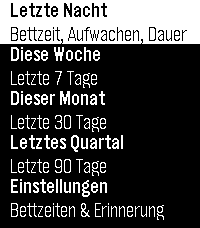
Health & FitnessMy Sleep displays your sleep statistics—tracked by your Pebble watch—right on your wrist: bedtime, wake-up time, and the duration of your last night’s sleep, as well as rolling averages for the last 7, 30, and 90 days. You can also set a scheduled bedtime for each day of the week—the watch will remind you in time with a vibration, even if the app isn’t currently open. BUT: you need to open the app on the watch at least once, to initialize reminder setting! The watch’s firmware handles the sleep tracking itself; My Sleep is a fast, easy-to-read viewer for this data and sets the reminder. Watch face is done with the skill (see https://repebble.com/blog/spring-2026-pebble-app-contest) using Claude. My Sleep zeigt Deine mit der Pebble-Uhr erfasste Schlafstatistik direkt am Handgelenk: Bettzeit, Aufwachzeit und Dauer der letzten Nacht sowie rollierende Auswertungen für die letzten 7, 30 und 90 Tage. Für jeden Wochentag lässt sich außerdem eine geplante Bettzeit einstellen – die Uhr erinnert dich rechtzeitig per Vibration daran, auch wenn die App gerade nicht geöffnet ist. AUFPASSEN: die App muss auf der Uhr mindestens einmal gestartet werden, damit die Initialisierung für den ersten Reminder stattfinden kann. Die Schlaferkennung selbst übernimmt die Firmware der Uhr; My Sleep ist ein schneller, übersichtlicher Viewer für diese Daten und setzt die Erinnerung.
 6
6Pulsar Chronograph
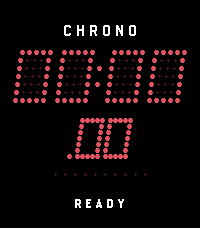
Tools & UtilitiesPulsar Chrono is a high-performance digital chronograph and split-lap stopwatch for Pebble OS styled after vintage 1970s solid-state LED timing instruments. TIMING FEATURES: • Centisecond Precision: High-rate 50ms (20fps) refresh loop displaying split-second timing in MM:SS.cc. • Automatic Hours Scaling: Seamlessly switches to HH:MM :SS format when timing passes 60 minutes with CHRONO [HR] indicator. • Live Lap Split Freeze: Pressing UP during active timing records a lap split (up to 20 laps) and freezes the split time on-screen for 3 seconds while background timing continues unaffected. • Interactive Lap Review Browser: When stopped, press UP or DOWN to cycle through recorded splits (LAP 01, LAP 02, etc.) with the fastest split highlighted as [BEST]. • 10-Dot Micro-LED Tachymeter: Smooth optical bead chaser animating split-second progression. • Zero-Drift Background Persistence: Exiting to your watchface or switching apps preserves elapsed time and running state via epoch timestamps with zero background battery drain. • Always-On Backlight Mode: Toggleable backlight hold to keep the screen readable during workouts. • Retro Synth Audio & Tactile Haptics: Distinct actuation buzzer tones and haptic pulses (Pebble Time 2). HARDWARE CONTROLS: • SELECT: Start / Stop timing loop. • UP (Running): Record Lap Split (holds split time on-screen for 3s). • UP / DOWN (Stopped): Browse recorded lap splits with centisecond accuracy. • DOWN (Stopped at Reset): Reset to 00:00.00. • DOWN (Hold): Clear all stored laps from memory. • BACK: Return to watchface (timing continues safely in background).
 1
1UTC Companion
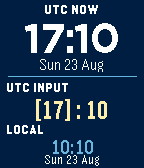
Tools & UtilitiesUTC Companion puts the current UTC time and a fast UTC-to-local converter on one screen. The upper section shows the current UTC time and date. In the lower section, enter any UTC hour and minute to see the corresponding local time and date. Conversions update immediately and use the watch's current time-zone rules and 12- or 24-hour preference. Up and Down adjust the selected value, Select switches between hours and minutes, and holding Select resets the input to the current UTC time. Hours change by one and minutes by five. UTC Companion works entirely offline and needs no account, configuration, location permission, internet access, or phone connection after installation. Native builds support rectangular classic Pebble platforms, and the app also runs on Pebble Time 2 using legacy compatibility mode.
 19
19HA Launcher
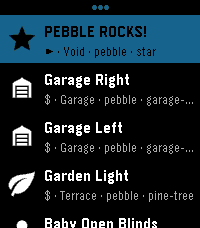
RemotesStored shortcuts launch instantly — no browsing, no waiting. Setup is easy: the app fetches every available SCRIPT and SCENE from your HA automatically. Per-shortcut a confirmation checkpoint can be activated preventing accidental triggers for important ones. Touch navigation is ready, and auto-close keeps it a true quick-launch app. This brings whatever action you can imagine to your wrist! Inspired by home-assistant-shortcuts (https://github.com/Carles-Figuerola/home-assistant-shortcuts), modernized for the newest SDKs. Built with AI, maintained with love.
 1
1UNIT CONV JP
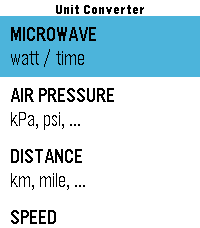
Tools & UtilitiesA quick unit conversion app for when pulling out your smartphone feels like too much hassle. Inspired by small personal frustrations—such as "I want to heat up my frozen food faster" or "my electric tire pump only shows PSI"—I had Gemini build this app, with GPT and Claude helping polish the final code. Optimized primarily for daily use in Japan, it supports 8 conversion types: - Microwave Heating Time - Tire Pressure - Distance - Speed - Weight - Volume - Fuel Economy - Temperature
 9
9TickTick Timeline
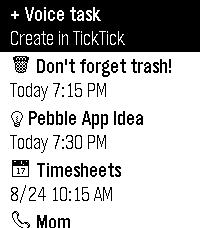
DailyUnofficial TickTick integration for the Pebble Watch. This app is not affiliated with the official TickTick team. This is a community project because I love Pebble and I love TickTick! Key features: - Sync tasks from TickTick to the Pebble Timeline - Create tasks with Pebble Voice Dictation - Take basic actions on tasks Known limitation: At the moment, the app doesn’t have a companion app, so you need to open the TickTickTimeline watch app to sync tasks from TickTick. Setup (MUST-DO): 1. Install this app. 2. Go to the app settings in the Pebble mobile app. 3. Enter your TickTick API key. How to get your TickTick API key: 1. Open TickTick in a web browser (this only works on the web version). 2. Click your profile picture and go to Settings. 3. In the Account tab, next to API Keys, click Manage. 4. Click Add New Key. 5. Name it whatever you like, such as "Pebble" and click Add. 6. You should see the API key, partially hidden. Click the Copy button. 7. Paste the key into the TickTickTimeline settings page. Disclaimer: This app is 99% vibe-coded, so there might be a few bugs here and there. But this project is free and open source, so there's that.
 40
40Moon Phase
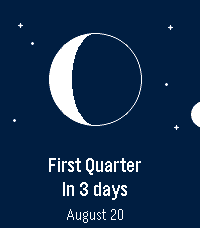
DailySee the Moon exactly as it looks in the sky tonight — right on your wrist. Moon Phase draws the Moon the way you'd actually see it — the real illuminated shape, oriented for your hemisphere — then tells you what's next and when. No phone required: everything is computed on the watch. 🌒 The real Moon — the current phase drawn as a crisp disc, lit exactly like the sky above you. ⏳ Next phase, at a glance — “In 4 days” and the date, front and center. 📜 What's coming — press SELECT for the upcoming new, first‑quarter, full and last‑quarter dates. 🧭 Hemisphere aware — the crescent flips for the Southern hemisphere, set automatically from your location. 🌍 Speaks your language — English, French, German, Spanish, Italian, Portuguese and Chinese, with local date formats. 🗓️ In your Timeline — upcoming phases show up as pins. 🎯 Accurate & offline — a proper astronomical model, good to the minute.