 15
15Tick Every
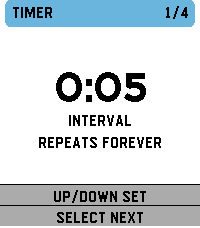
Tools & UtilitiesSupports: Aplite, Basalt, Chalk, Diorite, Emery, Flint and Gabbro. English by default; French and optional local session history are available from Configure in the Pebble mobile app. Tick Every is a simple haptic timer that keeps running until you stop it. Choose an interval, optionally add a start delay, then launch the timer. The watch gives two short pulses when timing begins. It then vibrates at every cycle. A long pulse represents five cycles and short pulses represent the remainder, with clear pauses between pulses. Includes pause/resume, optional haptic counting and opt-in local history: 32 recent sessions on the watch, plus every successfully synchronized session in the phone archive with no app-imposed count limit. The timer and watch history work offline. Français Tick Every est un timer haptique simple qui tourne jusqu’à ce que vous l’arrêtiez. Choisissez un intervalle et, si besoin, un délai de démarrage. La montre émet deux petites vibrations au démarrage, puis vibre à chaque cycle. Une vibration longue représente cinq cycles et les courtes le reste, avec des pauses nettes entre impulsions. Pause/reprise, comptage haptique désactivable et historique local optionnel : 32 sessions récentes sur la montre, plus toutes les sessions synchronisées dans l’archive du téléphone sans plafond imposé par l’app. Le timer et l'historique montre fonctionnent hors ligne.
 22
22PebbleKuma
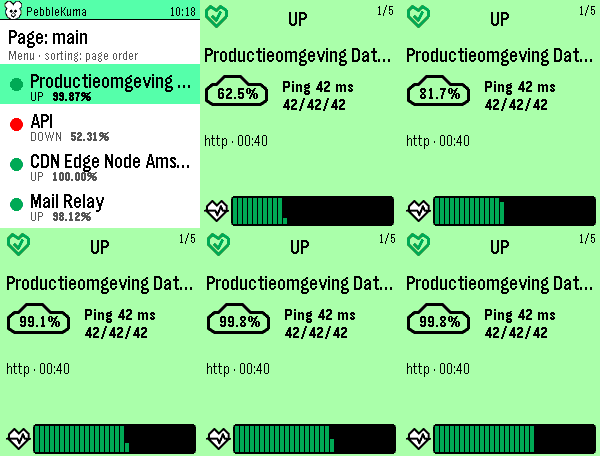
Tools & UtilitiesPebbleKuma brings your Uptime Kuma status pages to your Pebble Time 2. Browse a clean list of your monitors at a glance, a colored dot tells you what's up, down, in maintenance, or pending, with the 24-hour uptime right beside it. Tap a monitor for a full card, color-coded by its status, showing the uptime percentage, current ping (with min/avg/max), monitor type, last check time, the latest status message when something's wrong, and a heartbeat history graph. Page up and down to flip through monitors; the numbers count up and the heartbeats sweep in as you go. Sort by page order, name, or "problems first" (down → pending → maintenance → up, worst uptime leading). Pick a default in settings and switch instantly from the watch. Setup is quick: enter your Uptime Kuma base URL and the status-page slugs you want in the phone settings. Everything is fetched on the phone and streamed to the watch, so it stays light and responsive. Note: your Uptime Kuma server must be reachable from your phone (use your VPN if it's internal).
 32
32Cairn
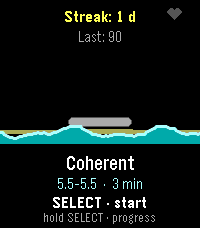
Health & FitnessBreathe with the tide. A guided breathing coach with live heart rate. Inhale and the water rises, exhale and it falls. Finish a session, lay a stone. Cairn turns a breathing exercise into a tide. Start a session and the waterline rises while you inhale and falls while you exhale, uncovering a cairn of stones on the shore — no counting, no timer to stare at, just a rhythm to follow. A pulse on your wrist marks every phase change — a nudge to breathe in, a double tick to hold, a longer pull to breathe out — so you can follow the rhythm with your eyes closed. While you breathe, the watch reads your heart rate every second. Afterwards you get a calm score out of 100 built from completion, how far your heart rate came down, how strongly it rose and fell with your breathing — real physiology, respiratory sinus arrhythmia — and, on watches that deliver it, your actual heart rate variability (RMSSD, the beat-to-beat detail behind true HRV). It is the difference between a session you were present for and one you merely sat through. Finish a session and a stone is added to your cairn. Keep it up day after day and the stack grows, badges unlock, and the progress screen shows where your calm score and resting heart rate are heading over the last week and month — with one line of coaching drawn from that history. FEATURES • Four patterns: Coherent (5.5 s in / 5.5 s out), Box, 4-7-8, and a Custom rhythm you set in half-second steps. • Sessions of 1, 2, 3, 5, 10 or 15 minutes. • Live heart rate, sampled every second, with a priming screen so the starting reading is a real baseline. • A calm score from completion, heart-rate drop, breath-linked heart-rate swing and — where the watch supports it — real heart rate variability (RMSSD), with an honest fallback when there is no reading at all. • A growing cairn, six badges, a personal best and your last 20 sessions. • 7- and 30-day trends for calm score and resting heart rate, plus a coaching line. • A distinct haptic pulse per breathing phase, and soft chimes at four volume levels; backlight, vibration and heart-rate display all switchable. • Settings on the watch or from the phone (Clay). • Made for the Pebble Time 2 (Emery) colour screen; works without the phone. • Available in English, Nederlands, Français, Deutsch and Español, following your watch's system language.
 19
19Polly
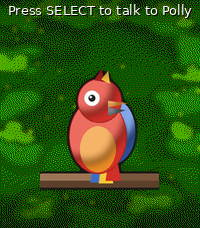
Tools & UtilitiesPolly — your talking parrot Polly is a colourful parrot for your Pebble Time 2 that actually talks out loud through the watch speaker. - **SELECT** — dictate a sentence and Polly speaks it back. - **UP** — ask a question and Polly answers in a sentence or two, powered by Google Gemini's free tier. - **DOWN** — pick one of your own preset "quick phrases" and say it instantly. Speech is generated by Google Cloud Text-to-Speech, with dozens of languages and voices to choose from. Between chats the parrot blinks, tilts its head, steps, hops and flaps on its branch. Requires a Pebble Time 2 (speaker + microphone). Bring your own free Google API keys — Cloud Text-to-Speech for the voice, and an AI Studio (Gemini) key for the optional ask-AI button. Both are entered in the app settings and stay on your phone. Voice, language, volume, animation frequency and quick phrases are all configurable.
 6
6PBL-7
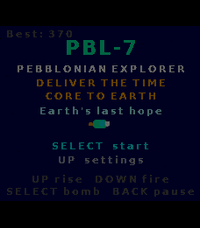
GamesA landscape shmup through the solar system. Hold your Pebble Time 2 sideways and fly PBL-7 to Earth. Rise, fire, dodge, and beat a boss on every planet. 11 planets, secrets, 5 languages. PBL-7 is a sideways-held arcade shoot-'em-up for the Pebble Time 2. Turn your watch a quarter turn — the three buttons line up along the bottom and the screen becomes a 228×200 landscape playfield. You are PBL-7, a Pebblonian explorer carrying the Time Core to Earth to save it. Every planet mistakes you for an invader and sends its champion to stop you. Hold UP to rise, release to fall, DOWN to fire (don't hold it too long or the gun overheats and jams), and SELECT for a screen-clearing smart bomb. Fight your way past a themed boss on each of Mercury, Venus, Mars, Jupiter, Saturn, Uranus and Neptune — each with its own gimmick, from acid clouds and gravity wells to splitting rings and lightning storms. After every boss you choose one of three Pebble-themed upgrades that carry through the run. Hidden on each planet is a lost Pebble device to collect — find all eight to unlock the true ending, and beat Neptune without taking a hit to open a secret portal. FEATURES • Landscape gameplay — held sideways, a real quarter-turn shmup. • 11 planets: Mercury → Neptune, a secret boss-rush, a hidden ally world, a Moon base and a three-phase Earth finale. • A themed boss with a unique gimmick on every planet. • Upgrade cards after each boss, 8 hidden collectible Pebbles, and two secret endings. • Weapon-heat system: burst-fire beats mashing — or switch the jam off in Settings for easy mode. • Settings: backlight, weapon jam (easy mode), rumble, sound, reset save. • Made for the Pebble Time 2 (Emery) colour screen; plays entirely offline. • Available in English, Nederlands, Français, Deutsch and Español, following your watch's system language automatically. • Progress, records and collectibles saved on the watch.
 9
9PebbleDiver
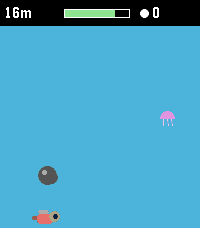
GamesA one-button deep-sea dive. Hold to swim up, let go to sink. Dodge rocks and jellyfish, grab pearls and air, upgrade your gear, and dive as deep as you dare. PebbleDiver is a one-button arcade dive for the Pebble Time 2. Hold SELECT to swim up, hold DOWN to dive faster, let go to sink — that's the whole control scheme. Dodge rocks and jellyfish on the way down, scoop up pearls and air bubbles, and see how deep you can go before your oxygen runs out. Pearls carry over between runs. Spend them in the shop on a bigger oxygen tank, faster fins, a lamp that pulls nearby pearls and bubbles toward you, or a sword. The deeper you go, the darker the water and the faster the current — and from 30 m down, sharks start hunting you instead of just drifting past. Dodge them, or equip a sword and tap UP (or the touchscreen) to fend one off for extra pearls. Legend says a magic Pebble waits deep below for divers who have fully equipped themselves. Whether that legend is true is for you to find out. FEATURES • Genuine one-button gameplay: hold to rise, release to sink, DOWN for a burst of extra descent speed. • Oxygen meter with a fair "pity" system — bubbles never stay scarce for long, so a dry spell never turns into an unfair death. • Pearls persist between runs — build up your stash and gear up over time. • Shop with four upgrades, five levels each: Oxygen tank, Fins, Lamp, Sword. • Sharks actively hunt you from 30 m down — dodge them, or fend one off with a sword (UP or a screen tap) for a pearl payout. • Water darkens and the current quickens the deeper you dive, for a real sense of descent. • Made for the Pebble Time 2 (Emery) color screen. • Plays entirely offline — no phone app, no internet connection needed. • Available in English, Nederlands, Français, Deutsch and Español, following your watch's system language automatically. • Your pearls and upgrades are saved on the watch itself.
 1
1Golf Stroke Counter
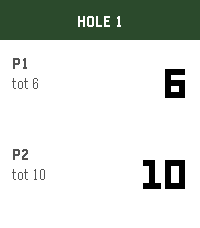
Tools & UtilitiesKeep score for two players on the course. Up adds a stroke for P1, Down for P2. Select goes to the next hole. Hold a button to undo. Scores save through all 18 holes.
 6
6Color Labratory
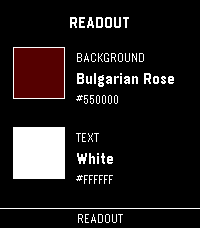
Tools & UtilitiesA quick way to test out colors on your physical watch. Quickly scroll through every color the e-paper screen has to offer. Then check it against secondary text colors to complete the palette. Hold up and down to jump color families. If you like the app, consider funding my coffee addiction (thank you!) BTC bc1q7esequqkl8sg96je7zu045zyat2sg2x3ey8plu XMR 844dKmmRGpR2KPJd9pSin3NqYu7vH7AtdLFBRRPip8mkcS4NH61JvnKRi3zTHV91TvRerJHMHy8ihPSaso8wpgrhJKqsHN5
 2
2Hubitat Control
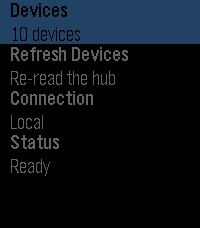
RemotesControl your Hubitat home from your wrist. A Pebble watch app for lights, dimmers, speakers, locks, garage doors, shades, and sensors, talking to your hub through its built-in Maker API app — over your home network or through Hubitat's cloud relay when you are out. No account, no third-party service, no bridge to install. Your hub and your phone are the only things involved.
 4
4Quran
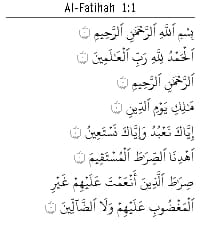
DailyThe Holy Quran fully offline independent from phone connectivity.
 17
17WindSock
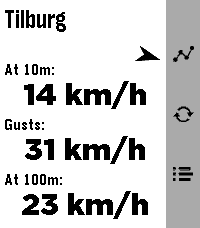
DailyWindSock is a basic location based wind Forecast app that I made mainly for my drone flying. But I'd imagine it being useful for many outdoor activities 🚁⛵😎 Watch: 🔶 Main screen shows current wind speeds at your current location (shown on top) at 10m , gusts and at 100/120m, and a small arrow for bearing 🔶 Forecast screen (down button) gives you a (touch-)scrollable 24hr hourly forecast of all these values (also bearing!). Where a line turns red when either Gusts or 100/120m Winds exceed your set warning threshold 🔶 12hr forecast Graph screen (up button) for all three values (Gusts in red in colour screens). Adapts to km/h, mph, m/s or kts choice. Phone side settings: 🔷 Choose wind speed unit between kilometers per hour (the default), miles per hour, meters per second or knots. 🔷 Choose between wind models 'Global' (the default) and 'Benelux'. 🔷 Choose your own 'Strong wind warnings' speed limts The Benelux KNMI model is slightly more accurate for NL, BE and LX (the model I used as main up to v1.2) but reports the high winds at 100m instead of 120m. The 100m/120m label on main will switch accordingly with your model choice. 👉 Just select Refresh on the watch main screen to apply any changes (or just refetch the data). ☑️ Chosen wind model or wind speed unit are persistent over launches. Data comes from Open-Meteo so should give you a worldwide coverage. Resolving phone's location into location-name done by a call to BigDataCloud. App uses phone location and loads all data fresh every time you start the app. Like what me and Claude made? Then give it some love in the store 😘🩷 And do check out my other stuff here:
 38
38Thataway!
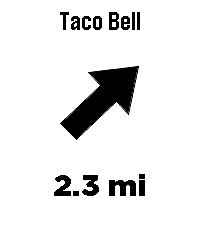
Tools & UtilitiesThataway! points an arrow at the closest anything. Type any business or place name - Taco Bell, Starbucks, a grocery store - and the arrow on your wrist always points at the nearest one, with live distance. Turn, and the arrow turns with you. Always points to the closest match. No routes, no maps, just a direction and a distance, as the crow flies. To enter a location or change settings go to Thataway! in the pebble app on your phone and click on the Settings button. Mark where you're standing: hold the middle button to save your current spot - your campsite, the trailhead, where you parked. The app grabs a precise GPS fix, tells you how accurate it is, and the arrow leads you back. No cell coverage needed. Save up to three favorite places with GPS coordinates in settings - these work without cell coverage too. UP and DOWN cycle between your search, your marked spot, and your saved places right from the watch. Fuzzy search - sloppy spelling still works Vibrates on arrival (optional) Imperial or metric units Optional live GPS accuracy readout The watch needs its Bluetooth connection to the Pebble app at all times - the phone provides the GPS. Internet is only needed for searching; marked and saved destinations work with no data signal at all, perfect for the backcountry. Distances are straight-line, not driving directions. If the watch asks, wave it in a figure-8 to calibrate the compass. Note: Support for the OG pebble time is not confirmed yet, if you try it and it works please let me know, I have only done emulator testing of it. Search data (c) OpenStreetMap contributors, via Photon and Overpass.
 14
14Solfarer Atlas
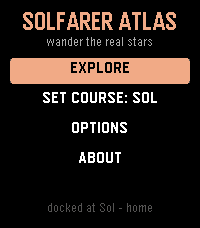
Tools & UtilitiesTravel where you like. Solfarer Atlas is the Local Bubble as a place you can walk around: 2,236 real star systems within 100 light-years of Sol - Proxima Centauri, Barnard's Star, Wolf 359, Tureis, Guniibuu, and the rest - from the Hipparcos catalog, in their true spectral colors. No hourly schedule, no daily seed, nothing waiting for you. Where the Solfarer watchface walks one path chosen for you, the Atlas hands you the whole neighborhood: the map centers on wherever you're docked, and the 24 nearest stars are yours to cycle through, one button at a time. Each one has a page - spectral class, absolute magnitude, distance from Sol, the constellation it belongs to - and, more to the point, what the trip would cost you. Set course and go. Every journey is honest special relativity: a 1g burn to the midpoint, flip, and brake. The flight plays out as a twin-paradox cutscene with both clocks running at their true relative rates - 7.8 light-years to Wolf 359 ages the universe 9.5 years and you 4.5. Your career keeps the tally: how many hops, how far you've roamed, the farthest you've ever been from home, and how much younger you are than everything you left behind. * 2,236 real star systems, names, classes, and constellations included * The 24 nearest neighbors from wherever you stand - the neighborhood re-sorts every time you arrive * A lifetime ledger: hops, light-years, and the gap between your clock and the universe's * Set course for Sol from the title menu, from anywhere in the Bubble * Options on the watch, no phone needed: full, quick, or no flight replay; confirm before travel; a buzz on arrival; and a reset back to Sol * Sibling of the Solfarer watchface and the Lighthaul courier game - same bones, real galaxy The physics is real: exact time dilation, honest 1g rocketry in rapidity. The stars are real too. Go and see them.
 77
77Workout HR
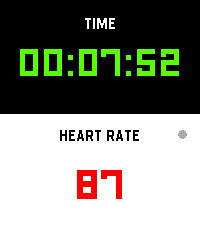
Health & FitnessI’m finally launching my dream workout app, built exclusively to make that glorious Pebble Time 2 screen pop! Get all your vital stats—elapsed time and real-time heart rate—that’s actually easy to read while you're breaking a sweat. It’s time to manage your gains more effectively while keeping that classic Pebble quirkiness alive on your wrist!
 2
2Bit Spender Fork
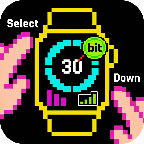
DailyFork of Tonda's Bit Spender App. Recreated using Gemini to add some new QoL features. Now used for MY thesis! Select a focus which starts a 30 minute timer. After 30 minutes, you earn a bit. You can hold Select to add a bit without the timer. Hold Down to see stats. New QoL features include: - Combined the Bit Display with the Bit Selection Display so that you can select a timer as soon as the app opens - Persistent Timer which runs even when you exit out of the app. Also vibrates and brings you back to the app when the timer goes off - Made Daily Bits have colors corresponding to your focus so you can visually see what you've been focusing on during the day - made a smoother way to add specific bits without a timer (holding select now works consistently) - Made the histograms stacked with color so you can visually see what you've been focusing on the last few days - When using app with Quick Start, exits you out of app 3 seconds after starting timer - Can cancel timer