 8
8SG Bus Lai Liao
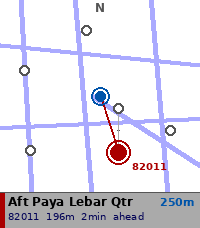
DailySG Bus Lai Liao — Real-time Singapore bus arrivals on your wrist. Now with a map. Powered by LTA DataMall, get live arrival times for any bus stop in Singapore directly on your Pebble watch. NEW IN 3.0 — MAP VIEW - Nearby Stops can now show a map instead of a list: the stops around you, plotted over Singapore's road network - The map turns with you — compass heading keeps the way you're facing at the top of the screen - Zoom 100m / 250m / 500m / 1km with UP and DOWN - Stops across the road from each other fan apart when you select them, so you can tell which side you actually want - Tap a stop to select, hold SELECT to open its arrivals - Walking time shown alongside distance - Nearby Stops now finds 12 stops instead of 5 - Choose list or map in the app settings on your phone ALSO NEW — KEYPAD - Enter a stop code in five taps on a full 12-key touch keypad - Auto-submits on the fifth digit FIXES - Arrivals list no longer jumps to the top when it refreshes, and keeps your selected bus even when others drop off the list - Auto-refresh no longer stalls if the phone stops responding - Errors such as "Timeout" now display correctly - Long stop names no longer cause Nearby Stops to come up empty - Fixed memory leaks when leaving Nearby, Bookmarks and Search FEATURES - Nearby Stops — GPS-based detection of the 12 closest bus stops, as a list or a map - Search by Code — 12-key touch keypad, or the button-driven digit picker - Bookmarks — save your favourite stops for quick access - Grouped arrivals — buses grouped by service number, up to 3 incoming shown - Load indicator — Low / Med / Full crowd level per bus - Auto-refresh — arrivals update every 60 seconds, or swipe left for now - Offline stop names — descriptions cached locally, refreshed monthly - Offline road map — Singapore's road network ships with the app, no data needed to draw it REQUIREMENTS - Free LTA DataMall API key (datamall.lta.gov.sg/content/datamall/en/request-for-api.html) - Configure your key via the app settings in the Pebble phone app SUPPORTED WATCHES - Pebble Time 2 (Emery) — optimised - Map and keypad need the touchscreen; other models use the list and the digit picker, and everything else works the same HOW TO USE 1. Open app settings in the Pebble phone app 2. Enter your LTA DataMall API key 3. Choose whether Nearby Stops opens as a list or a map 4. Select Nearby Stops, search by code, or pick a bookmark 5. Swipe left to refresh, long press SELECT to bookmark a stop Tested with Pebble Time 2 only. Bus and road data © Land Transport Authority of Singapore, used under the Singapore Open Data Licence (data.gov.sg/open-data-licence). Built with ❤️ in Singapore.
 8
8OctoPebble
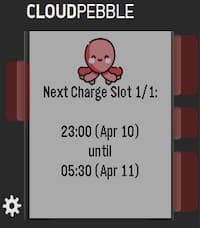
Tools & UtilitiesA quick, way to view your FlexPlannedDispatches from the Octopus Energy API. Perfect for Intelligent Octopus Go users who want to know exactly when their EV is scheduled to charge—especially when checking for dynamic smart slots outside the standard 23:30–05:30 window. Setup Notes: To use this app, you will need to enter your API Key, Account Number, and Device ID in the Pebble app settings. API Key: Can be obtained directly from your account via the https://octopus.energy/help-and-faqs/articles/how-do-i-access-the-octopus-api/. Account Number: Found by logging into your Octopus Energy dashboard. It is listed under your username or in the URL of your main account page (e.g., .../accounts/A-A1B1C1D1/...). It is typically formatted as A-########. Device ID: This is the unique identifier for your specific EV charger (e.g., a Zappi). Because an account might have multiple smart devices (like a heat pump or solar inverter), you currently need to select this manually. The format looks like this: 00000000-0000-0000-0000-000000000000. How to get your Device ID: I have provided a simple Python helper script (get_device_id.py) that will fetch this for you. You can find the script here: https://github.com/sunrisesteel/octopebble_script . You will need to enter your API key and Account Number to fetch the device IDs on your account.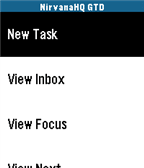 8
8NirvanaHQ
Tools & UtilitiesNirvanaHQ The ultimate Getting Things Done® (GTD) companion for your wrist. Manage your NirvanaHQ tasks right from your Pebble! Designed specifically for the Getting Things Done methodology, this unofficial companion app connects directly to your Nirvana account to keep you focused on what matters most. Features: Quick Task Capture: Got an idea? Instantly create new tasks right to your Inbox using Pebble's native Voice Dictation. Your Lists, On the Go: Quickly view and browse your most important lists: Inbox, Focus, Next, and Waiting. Task Details: Dive into specific tasks to view their associated contexts, areas, due dates, and detailed notes. Wrist Management: Edit task titles and descriptions using your voice, or quickly mark a task as complete without ever taking out your phone. Beautiful Native UI: Built with love for the Pebble interface, featuring clean Action Bars, smooth navigation, and a battery-friendly design. Setup: This app requires a free or Pro NirvanaHQ account. Simply enter your login credentials in the app settings on your phone to get started. (Note: This is a third-party app and is not officially affiliated with or endorsed by NirvanaHQ.)
 8
8bash
GamesBorn Again Simon with Hands or 'bash' for short is a watchapp game for the Pebble inspired by Simon the game. By utilizing the 3 available buttons along with the accelerometer on the Pebble, the player will attempt to memorize a random sequence of commands provided by the app and enter the exact same sequence into the Pebble.
 8
8Spaceship
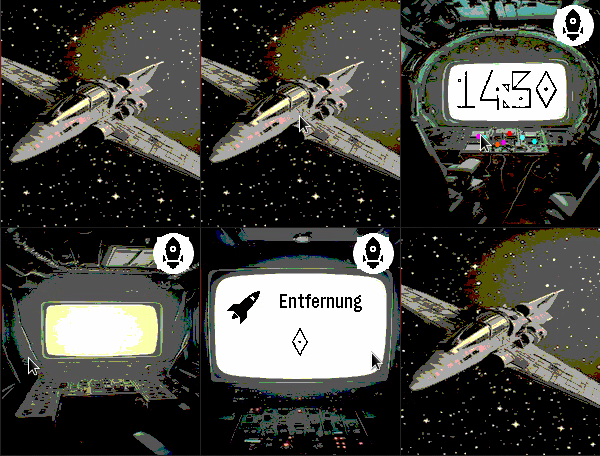
DailySpaceship is a watchapp for Pebble Time 2 (Emery) that turns your wrist into the cockpit of a spaceship. Built as an app rather than a watchface because only apps can access the Emery's touch screen — but it behaves just like one. SCREENS & NAVIGATION --------------------- Tap the space screen to open the cockpit. Swipe left or right to move between screens: • Space — your ship drifting through the stars (tap to enter) • Cockpit — large digit clock with animated indicator lights • Engine Room — battery level displayed as a ten-bar fuel gauge; ALERT blinks below 20% • Distance — today's step count with a distance icon • Weather — current temperature, condition icon and description (GPS or IP location) • Heart Rate — current BPM, blinking at your actual pulse with electric sparks Navigation is circular: swipe right from Heart Rate to return directly to the Cockpit. A back button on every secondary screen takes you straight back to Space. SPACE SCREEN ------------ Choose from twelve different spaceship designs — or enable shuffle mode to automatically cycle through them at a configurable interval. An optional animated comet streaks across the background for extra atmosphere. WEATHER ------- Weather data is fetched automatically using GPS location (with IP fallback) via Open-Meteo. The weather screen shows the data source (GPS / IP), a programmatic weather icon, and a reload button for manual refresh. Temperature in °C or °F, description in English or German. AUTO-RETURN ----------- After a configurable delay (3–30 seconds of inactivity), the app automatically returns to the Space screen. SETTINGS (configurable via the Pebble app) ------------------------------------------ • Spaceship design: 12 models or shuffle mode • Shuffle interval: how often the ship changes automatically • Animated comet: on / off • Language: German or English • Temperature unit: °C or °F • Time format: 12h or 24h • Auto-return delay: 3–30 seconds • Backlight timeout: 3–9 seconds NOTE ---- Spaceship must run as an "App" rather than a "Watchface" because Pebble only exposes the touch screen to apps. Once launched, it stays active and responds to touch and swipe gestures exactly like a watchface would. Vibecoded with Claude · Pebble Time 2 (Emery) only
 8
8Catcher
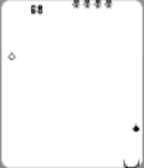
GamesThis is the last version released after his author, David (my brother), passed away on 2023. It's a simple catcher game. You have 2 modes of play : time mode and lives mode. In time mode you will play until time goes to 0. In lives mode you will play until no lives left. You have to catch tears (black and white). In time mode you can catch a clock for adding time. Black tear add two points to score, white add four points. Added animation of objects crashed. In lives mode there are five lives and for the moment there weren't added none while playing. It saves the 5 hightest score to pebble for every mode : 5 for lives mode and another 5 for time mode. Menu and messages are shown in 4 configurable languages : spanish , english , tagalog and waray. Waray language already not yet, waray for the moment is the same as english. Tagalog language with the help of google translate, not revised. Default language is spanish.
 8
8Dug Digger
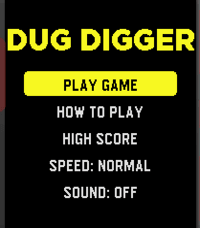
GamesThis is a re-imagining of the game Dig Dug. The metal grinding plate at the top keeps approaching........can you keep digging, collecting coins, killing enemies and escape the ever approaching doom? Good luck! It's a first release, so feel free to give it a try! It will be improved going forward.
 8
8Delta Notes
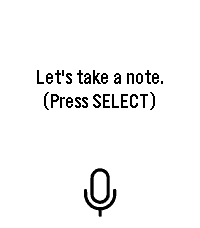
Tools & UtilitiesDictate a note on your wrist and have it saved straight into your own self-hosted Obsidian vault. Requires your own n8n instance — not a standalone note-taking app. Delta Notes turns your Pebble into a voice inbox for Obsidian. Press SELECT (or tap the mic icon on a touchscreen model), say your note, and it lands as a plain Markdown file in your vault's Watch Inbox/ folder within seconds — no phone typing, no manual copy-paste. This requires infrastructure you run yourself: a self-hosted n8n instance and an Obsidian vault reachable from wherever you run the companion mcp-obsidian tool (Docker Compose included). If you don't already run n8n, budget 15–20 minutes for the one-time setup — full guide in the GitHub repo's docs/SETUP.md. If you're not planning to self-host a backend, this app won't do anything useful for you. What it does do, once set up: dictation via your watch's built-in cloud speech recognizer, a direct authenticated webhook to your n8n (no third-party service in between), and a note that syncs to your other devices the same way any other vault change does. Open source, AGPLv3 licensed. github.com/Delta-43/pebble-watch-obsidian-notes
 8
8Tippy
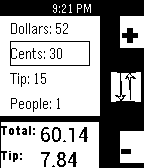
Tools & UtilitiesEnter restaurant tip bill info into the watch, using the select button to toggle between "dollars", "cents", "tip %", and "people". The incrementer (up button) goes up by 5 every time you press it, and down by 1, so you can get to your bill price quickly
 8
8Quad-Type-Notes
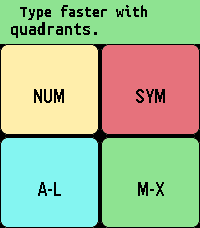
Tools & UtilitiesTake notes locally with a quadrant-based keyboard. Common actions like space, shift, backspace, and backspace word are activated quickly by double tapping the various quadrants. Tapping the top/middle/bottom third of the screen is the same as pressing the up/select/down physical button when navigating, and swiping horizontally through the middle third of the screen is the same as a long press of the select button where it makes sense. Sometimes there's a second function by swiping the reverse direction. For example, reorder a note by swiping right, but close the app by swiping left when in the main note-reading interface. While editing, swipe left/right through the top 2 quadrants to confirm your edit/select a different line. Do the same through the bottom 2 quadrants to turn "sticky" off/on (so the same quadrant stays active). Tap the editing area to cancel. You can tap and drag the active quadrant to a different quadrant to switch quadrants without having to cancel. Long press select to "grab" a note (or line when selecting lines) to move it around and change the order. Long press again to delete the note (or line). Long press select on "Note 0" (new note) to start dictation. Advanced: Create a custom layout by swiping down from the middle of the screen on "Note 0", then editing the configuration note by following the instructions. Error messages will catch common mistakes when you try to save this note. This app is appropriate for all ages and no personal data is shared with the developer. For Texas users: Rated for children under 13, due to having common english words for the interface and instructions. The font is Ubuntu Sans Mono Bold: https://assets.ubuntu.com/v1/81e5605d-ubuntu-font-licence-1.0.txt
 8
8Sudoku Solver
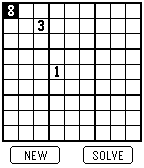
GamesEnter a Sudoku and your Pebble solves it.
 8
8TURTLE BRIDGE
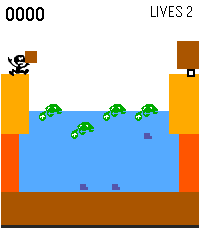
GamesA little tribute to the classic Game & Watch days. Hop across the backs of turtles to deliver your cargo! Jump from turtle to turtle to cross the river. When fish get close, the turtles dive underwater — so time your jumps carefully. Drop off your cargo at the truck waiting on the other side, then head back for more. Features: Turtles dive when fish approach — read the pattern and nail your timing Bonus points for every delivery The more you deliver, the higher your score climbs High score saved right on your watch How many deliveries can you make before you're out of lives?
 8
8Rosetta
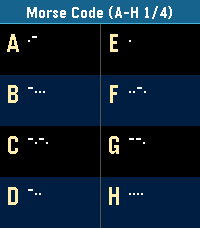
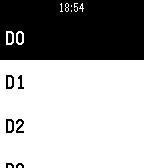
Tools & UtilitiesPocket Rosetta: The Wrist Decryptor for Pebble Turn your Pebble into the ultimate field manual for cryptographers, geocachers, escape-room addicts, and vintage sci-fi fans. Pocket Rosetta puts over 20 essential scripts, historic alphabets, and substitution ciphers directly on your e-paper display—no internet connection required. Whether you're tapping out an SOS, decoding ancient stone tablets, or cracking an encrypted transmission mid-run, cycle through complete reference tables and quick translation lookups with just the side buttons. Classic Signals & Radio: Morse Code, NATO Phonetic Alphabet, Flag Semaphore, Naval Flags Historic Scripts & Glyphs: Egyptian Hieroglyphs (Names & Glyphs), Cuneiform, Elder Runes (Names & Letters) Alphabets & Transliterations: Greek (Names, Letters, Written), Cyrillic/Azbuka (Names, Letters, Written) Ciphers & Cryptography: ROT13 / Caesar Shift, Atbash, Baconian Cipher, Polybius / Tap Code, Pigpen Cipher, A1Z26 Numeric Binary, Tactile & Geek Culture: 5-Bit Binary, Braille, and Alienese (Futurama) Fast, battery-friendly, and lightweight. Keep centuries of secret communication strapped right to your wrist.
 8
8Tinker
RemotesControl your Particle Photon from your Pebble smartwatch. You can read and write all the digital and analog pins, directly on your wrist.
 8
8Heel Hook
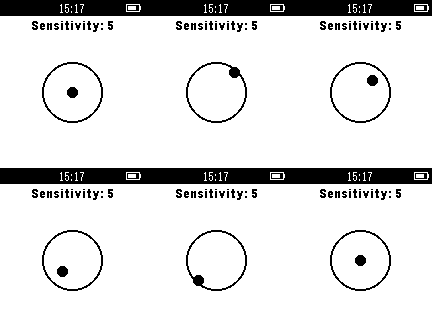
Health & FitnessHeel Hook is an app that helps promote static, fluid climbing through your pebble smart-watch. This app allows for adjustment of sensitivity threshold to make it easier or harder to climb statically. Just start the app before you boulder your route and test your static climbing ability to see if the Heel Hook app buzzes.