Plugins are a dev preview. Enable them first in the Pebble mobile app: Settings → Plugins → Plugins/permissions preview. Learn more
 17
Grok Bot
AI AgentsSend messages to your Grok Bots from your Pebble watch or Index ring, and read their replies. On an Index 01 ring, either choose Grok Bot as your hold-and-talk destination in Index settings, or start with "Send to Grok Bot", for example "Send to Grok Bot, how did the deploy go?". Say "Grok Bot" followed by your message, for example "Ask Grok Bot how the deploy went". The message goes to your default bot, or to the bot or group you name. You can give bots short nicknames in the plugin settings so they're easy to say, like "Send to work". To see what a bot wrote back, ask for its latest replies. If the plugin can't tell whether a message arrived, it won't send it again. Security and privacy: - You sign in to Cursor in your phone's browser, the same way the Grok Bot app does. The sign-in is stored in your phone's secure storage and is only used to talk to Grok Bot. - Messages go from your phone to Cursor and your Grok Bot computer over HTTPS. They don't pass through Pebble or Core Devices servers. - The source code is on GitHub. To set it up, install the plugin, open its settings, sign in to Cursor and pick a default bot. Cursor's sign-in lasts about 60 days, after which you sign in again. Grok Bot doesn't have a public API, so this plugin uses the same connection as the Grok Bot apps. You need a Grok Bot account.
 15
Dashboard (Plugin Demo)
Tools & UtilitiesDashboard demo app: show data from any plugin in 2 pages of 4 slots each. Configure which sources to use in the app's settings page. Tapping also allows taking actions (e.g. turning on lights, play/pause/skip music). Fun as a quicklaunch app.
 14
Universal TTS
AI AgentsGive your Pebble a voice! Universal TTS is a powerful, flexible text-to-speech plugin that lets compatible Pebble apps and watchfaces speak using your preferred voice service. Instead of requiring each app to manage its own speech engine, Universal TTS provides one standardized interface. Configure your preferred provider once, and compatible apps can generate spoken responses without managing API keys or audio processing themselves. Features - 12 speech providers: Google Cloud TTS, Gemini, ElevenLabs, Microsoft Azure, Home Assistant, Deepgram, Cartesia, Speechify, Smallest AI, Inworld AI, Rime, and Fish Audio. - Live voice and model discovery: Browse available voices and models directly from supported providers. - Centralized configuration: Manage API keys, voices, models, and your preferred provider in one place. - High-quality speech conversion: Automatically converts generated audio into a Pebble-compatible format. - Reliable audio delivery: Uses verified audio chunks and optimized compression for Bluetooth transfer. - Local TTS support: Connect to compatible Home Assistant speech engines, including Piper. - Developer-friendly: A reusable SDK lets app developers add speech capabilities without implementing their own TTS pipeline. Requirements - A Pebble watch with speaker hardware and compatible firmware. - A compatible Pebble app or watchface that supports Universal TTS. - An API key or access token for your chosen provider, where required. - An internet connection for cloud-based services. ### For Developers Adding speech to your Pebble application is as simple as: `tts.speak("Hello from Pebble!");` The included JavaScript and C libraries handle provider communication, audio conversion, transfer, and playback. Open-source project: https://github.com/ericlmccormick/Pebble-Universal-TTS Support development: If you find Universal TTS useful, consider supporting future Pebble development at: https://ko-fi.com/ericmccormick 13
Weather+
WeatherWeather+ — Global Weather Data for Pebble Weather+ passes the forecast location’s time zone to compatible apps such as Timeline WX so they can display local forecast hours across daylight-saving changes. Weather+ is a powerful, configurable weather data plugin for Pebble watches. It provides a shared source of detailed weather information for compatible Pebble apps and watchfaces, reducing the need for each app to manage its own weather services. **Features** - Worldwide weather forecasts with automatic provider fallback. - Four forecast providers: Open-Meteo, MET Norway, NOAA National Weather Service (US), and OpenWeather. - Hourly and daily forecasts, including temperature, feels-like temperature, precipitation, humidity, wind, gusts, cloud cover, UV index, and more. - Weather alerts from NWS, MeteoAlarm, and OpenWeather, with automatic regional selection. - Optional air quality information, including AQI and pollutant concentrations. - Optional marine forecasts, including waves, swell, and sea temperature. - Independent unit settings for temperature, wind, precipitation, pressure, and visibility. - Configurable forecast provider priority and Open-Meteo forecast models. - GPS or manually specified locations. - Weather caching to reduce unnecessary requests. **Reliable and configurable** Weather+ includes data validation, source diagnostics, manual refresh, and worldwide provider testing. Advanced diagnostics are hidden by default and can be enabled when troubleshooting. Diagnostic reports can be saved to your phone. **Requirements** Weather+ supplies weather data to compatible Pebble apps and watchfaces; it is not a standalone weather display. Some features require internet permissions, and OpenWeather requires your own One Call 3.0 API key and subscription. **Support development** Weather+ is independently developed and maintained. If you find it useful, you can support continued development at: https://ko-fi.com/ericmccormick **Pebble Weather Plugin Compatibility** Weather+ can also use the official Pebble Weather plugin as a weather data source, providing a convenient option for users who already have it configured. However, selecting the Pebble Weather plugin instead of Weather+'s direct weather providers may limit the weather information available, including the number of supported data fields and how far into the future forecasts extend. For the most comprehensive weather data and longest available forecast range, we recommend using Weather+'s built-in providers, such as Open-Meteo, MET Norway, NWS, or OpenWeather.
 10
Open Gymnasium
Health & FitnessOPEN GYMNASIUM Set and rest timer, heart-rate tracking and automatic workout logging for the Pebble Time 2. Every workout is saved as a spreadsheet-ready CSV in your own Google Drive, in a phone folder you choose, or both. WHAT IT DOES - One-button set and rest timer, with a live heart rate coloured by training zone and a graph of the whole workout. - Your workout days on your wrist: exercises in order, each with reps per set and a starting weight. Alternating exercises (for example curls and pull-ups) supported. - Record the weight of every set on the watch, in kg or lbs. - Optional warm-up, timed rest alarm, and Generic workouts (Exercise 1, 2, 3) when you have no plan. - Pause stops recording. A forgotten workout asks "Still exercising?" and ends itself. - A summary at the end: total time, average heart rate, work and rest time, and a heart-rate graph. - One CSV per workout in your Google Drive: every set and rest, reps, weights, heart rate and two calorie estimates. Optional Android helper to copy workouts into Health Connect. - No account, no subscription: your data goes from your watch to your phone to your Drive. CONTROLS - SELECT: start a set / start the rest. - UP: next exercise. Hold UP: back an exercise. - DOWN: weight up 1 kg or 5 lbs (with no weight yet it opens Record weight). - Hold DOWN: menu (Pause, Record weight, Swap movement, Jump to exercise, Settings, End workout). - Hold SELECT: end the workout. - On the start screen, hold SELECT for a Generic workout. WHAT YOU NEED - A Pebble Time 2 and the Pebble / Rebble app on your phone. - A free Google account. SET UP (about 10 minutes, once) Downloads: https://drive.google.com/drive/folders/1TcKN7BK410Mwz1CnRDCwd1dCp9fWFO38?usp=drive_link 1. Download Code.gs. At script.google.com create a New project, replace the code with Code.gs and save. 2. In Project Settings > Script Properties add UPLOAD_TOKEN with a long random password of your own (optional: FOLDER_NAME, default Open Gymnasium). 3. Deploy > New deployment > Web app, Execute as: Me, Who has access: Anyone. Approve the Drive permission and copy the Web app URL (ends in /exec). Nobody can save to your Drive without your token. 4. On your phone, open Open Gymnasium's settings: paste the URL and the token, choose Metric or Imperial, add your workout days and exercises, and Save. Finish a workout of 2 minutes or more and its CSV appears in your Drive a few seconds later. If the phone is offline it keeps the workout and uploads it later. Phone folder (Pebble mobile app 2.0 or later): in the phone settings pick Phone folder, or Google Drive and phone folder, tap Choose folder, pick a folder in Android's folder picker and Save. Phone folder alone needs no Apps Script URL or token. If a copy cannot be saved (folder access removed, no internet) the workout stays on the phone and is retried; choose the folder again if its access was removed. Optional (Android): install OpenGymnasiumHealthSync.apk from the same folder, enter the same URL and token, allow Health Connect access and tap Sync now. Typeface: Barlow Condensed (SIL Open Font License). Statue artwork is AI-generated.
 10
Dashboard
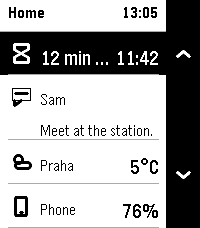
Tools & UtilitiesYour activity, notifications and pinned readings in one Pebble overview. Open Dashboard for a quick look at one activity, a notification panel and two pinned items. Browse the full collections when you need more detail. - Hold Up to browse Activities: ongoing updates such as a running Timer. - Open Pinned to browse your chosen readings and shortcuts. - Choose what each pin displays, its Select action and its Hold Select app shortcut, where supported by the source. - Confirm actions when required by the source or your pin settings. - Choose text size and a Light or Dark watch appearance. Available in 17 interface languages. Start a countdown in Timer, then see its remaining time in Dashboard. Timer keeps control of the countdown and alarm; open Timer to pause or resume it. Available actions depend on the selected source. For Pebble Time 2 and Round 2. Shared readings and Activities require a connected phone, plugin support enabled in the official Pebble phone app, and permissions for the chosen sources. Built-in music and notifications require Android. Pinned items here are Dashboard readings and shortcuts, separate from Pebble timeline pins. Free. Part of XOCE. No XOCE account, ads or analytics. Selected providers have their own requirements and privacy practices.
 10
Apple Notes
NotesSave notes to Apple Notes from your Pebble watch or Index ring. Say what you want to save, for example "Note: the wifi code is on the router". It's saved as a new note, or added to the end of a note you pick, and syncs to your Apple devices through iCloud. This plugin uses an unofficial connection to iCloud. Apple has no public API for Notes, so the plugin talks to iCloud the same way the iCloud website does. Apple could change this at any time, and the plugin would stop working until it's updated. Security and privacy: - You sign in on Apple's own iCloud sign-in page. The sign-in is stored in your phone's secure storage and is only used to save notes. - Notes go from your phone straight to iCloud over HTTPS. They don't pass through Pebble or Core Devices servers. - The source code is on GitHub. To set it up, install the plugin, open its settings and sign in with your Apple ID.
 9
Counters (Plugin + App)
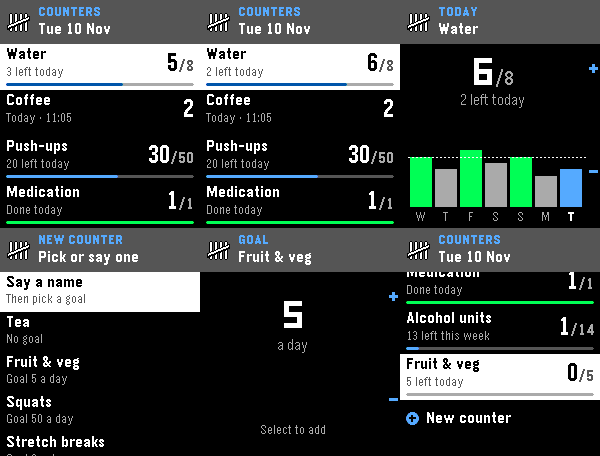
Tools & Utilities, Reminders & TasksTally counters on your watch and for any watchface: glasses of water, coffees, push-ups. Press to add one.
 9
Calendar Enhanced + iCal
CalendarYour phone's calendars and your iCal links, together in one agenda on any watchface that reads calendars. Calendar Enhanced + iCal builds on the Pebble app's own Calendar plugin and adds up to two iCal links beside it. Add a work calendar you can't sync to your phone, a shared family or team calendar, a sports schedule, or a school timetable. Every event comes through once, in order, with the calendar it came from. - Shows today and the next six days, up to 20 events, with up to 10 from the phone's own calendars. - Works with any watchface that reads calendar plugins, with nothing to change on the face. - Keeps your iCal links in the phone's encrypted secure storage, since a private link works like a password. - Needs no account and no API key, and your calendars never leave your phone. - Refreshes each link every 5 minutes to an hour, your choice. To use it, turn on plugins in the Pebble app under Settings, Plugins, Plugins / permissions preview. Then pick Calendar Enhanced + iCal as your calendar source. ----- I mostly build things in my spare time, and your support helps keep that going. It usually finds its way into more green coffee beans, a few roasting experiments, and plenty of late-night coding sessions working on Pebble projects like this one. If you've found something useful here, or simply enjoy following along with what I'm building, you can support my projects here: https://ko-fi.com/nullsyntax
 9
TickTick
Reminders & TasksAdd reminders to TickTick from your Pebble watch or Index ring. Say what you need to remember, for example "Add dry cleaning for tomorrow". The reminder goes to your Inbox, or to the list you name, with the due time you said. Your watch confirms when it has been added. Security and privacy: - You connect TickTick on TickTick's own sign-in page. After that, reminders go from your phone straight to TickTick over HTTPS. - Your connection is stored in your phone's secure storage and is only used to add reminders to TickTick. Disconnecting in settings removes it. - The source code is on GitHub. To set it up, install the plugin, open its settings and connect TickTick.
 9
Hue
Smart HomeControl your Philips Hue lights from your Pebble watch or Index ring. Turn single lights, rooms or your whole home on and off, and dim them, for example "Dim the bedroom to 30 percent". Watchfaces and apps can also show whether lights are on. Security and privacy: - The plugin talks to your Hue bridge directly over your home Wi-Fi. It doesn't need a Hue account or Philips' cloud. - It only goes online once, while pairing, to find your bridge. - You pair by pressing the button on your bridge, and the pairing is stored on your phone. - The source code is on GitHub. To set it up, install the plugin, open its settings, press the button on your Hue bridge and tap Pair.
 8
Open Activity
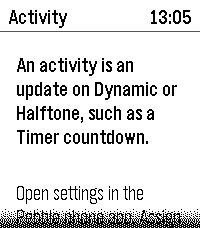
Tools & UtilitiesA button shortcut from your watchface to the app behind its activity. See a Timer countdown on Dynamic or Halftone, then use a Quick Launch shortcut to open Timer. Open Activity uses recent activity information from your chosen watchface. - Choose Dynamic or Halftone as the source watchface. - Bind supported Quick Launch shortcuts to its large Primary activity or smaller Secondary row. - Open the helper from the watch app list to read its setup guidance. - Choose text size and a Light or Dark watch appearance in phone settings. Assign Open Activity to the same shortcuts in Pebble's Quick Launch settings. If you switch between Dynamic and Halftone, update the source watchface in Open Activity too. The shortcut opens the associated app, not a particular timer, song or notification. Timer's controls stay in Timer. When no valid activity destination is available, the helper returns to the watchface. For Pebble Time 2 and Round 2, with one connected watch. Requires Dynamic or Halftone, a connected phone, plugin support enabled in the official Pebble phone app, and Launch Apps permission. The activity must provide an installed app to open. Free. Part of XOCE. No XOCE account, ads or analytics.
 8
Universal AI
AI AgentsOne plugin. Multiple AI providers. Unlimited possibilities. You can also add a custom provider by entering an OpenAI-compatible HTTPS endpoint and its model name. The plugin scopes API keys and conversation history to each endpoint. Universal AI connects Pebble applications to your choice of AI service through a single, standardized interface. Instead of requiring separate integrations for each AI provider, applications can communicate with your preferred AI using one plugin. Supported AI providers: - Google Gemini - OpenAI (ChatGPT models) - Anthropic Claude - xAI Grok - OpenRouter - DeepSeek - Muse Features - Choose your AI: Configure your preferred provider and model. - Bring your own API key: Each provider has independent, securely stored credentials. - Full responses: Returns the complete AI-generated response to the requesting application, rather than just a notification or delivery confirmation. - Conversation memory: Maintains conversation context across multiple messages. - Universal compatibility: Provides a standardized API for Pebble developers. - Privacy controls: Manage and clear locally stored conversation history. How it works Install Universal AI on your Pebble phone app, select an AI provider, enter your API key, and choose a model. Compatible Pebble applications can then send requests through Universal AI and receive responses directly. Each application decides whether to display, summarize, speak, or otherwise use the response. Universal AI handles communication with the AI provider. The application handles the user experience. Important: An API key from your chosen provider is required. API usage may incur charges. Subscriptions such as ChatGPT Plus, Claude Pro, or Google AI Pro do not necessarily include API access. For developers Universal AI supports Pebble's standard "send_to_agent" action, "agent/chats" and "agent/configured" sources, plus an extended request/response API with conversation IDs, request tracking, and response retrieval. Source code and integration documentation: https://github.com/ericlmccormick/Pebble-Universal-AI Support development If you enjoy this plugin and want to support continued development: https://ko-fi.com/ericmccormick
 8
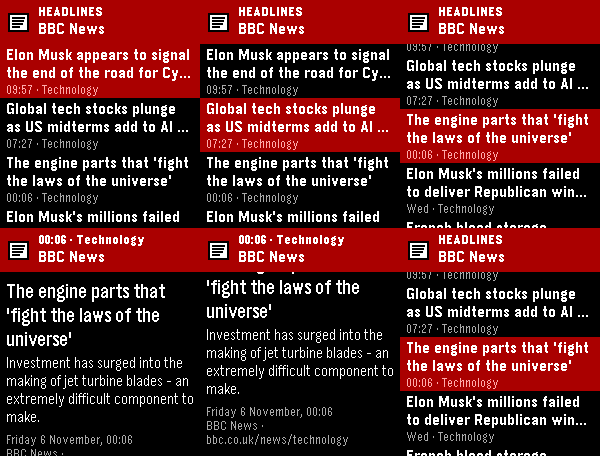
BBC Headlines
Tools & UtilitiesHeadlines from BBC News or any RSS feed: a reader on your wrist, and a plugin for any watchface.
 8
Air & Pollen
WeatherAir quality for any watchface, anywhere: the US and European AQI, PM2.5 and ozone, plus today's pollen in Europe.