 11
11Roon Remote for Pebble
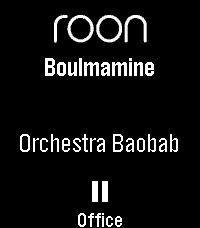
Roon Remote is a Pebble app that connects seamlessly to your Roon Core, letting you manage your audiophile endpoints without ever reaching for your phone.

KEY FEATURES

- Complete Playback Control: Play, pause, and skip tracks with ease.

- Instant Volume Adjustments: Use your physical buttons to quickly dial in the perfect volume, complete with a sleek visual overlay and fixed-volume endpoint detection.

- Zone Management: Seamlessly cycle through and control all of your active Roon audio zones on the fly.

- Live Metadata: See the current track, artist, and zone name updating in real-time on your watchface.

- Touch Enabled: Fully supports tap-to-play/pause, skip tracks, and adjust volume on modern capacitive touch screens (Pebble Time 2 / Pebble Round 2):

Tap: play/pause
Swipe Left/Right: change tracks
Swipe Up/Down: change zone
Hold-and-swipe Up/Down: adjust volume
Tap-and-hold: pause all zones

- Highly Customizable: Tweak font sizes, enable marquee or multi-line wrapping scrolling for long track names, and set smart battery-saving inactivity timeouts via the companion settings page.

REQUIREMENTS (Companion App)
To connect your watch to your Roon Core, this app requires a lightweight Node.js bridge extension running on your local network (easily deployed via Docker, a NAS, or a local PC).

Detailed setup instructions and the open-source bridge code are available at the project's GitHub repository.

Watchface version available as well, see the Roon Community posting for more details.
 2
2Peep My Phone
"Press a button, find your phone."
To work in ALL occasions, requires the Android companion app.

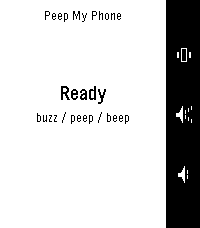
Lost your phone in the sofa again? Press a button on your Pebble and it peeps — loudly.

Peep is built to be heard when nothing else can be. It rings through silent mode, through vibrate, through Do Not Disturb [except DNDs which block alarms], and even with the alarm slider turned all the way down — then restores every setting back exactly as it found it.

Three ways to find it, one per button:

Peep — the full alarm
Beep — a single short chirp, for less intrusive
Buzz — vibrate only, for more discrete

Press again to stop, or tap Stop on the phone. If your watch wanders out of range mid-alarm it keeps ringing, because the phone is usually the thing that's lost.

When something would stop the alarm being heard — a missing permission, or a battery saver that has paused the app — the watch tells you instead of pretending it worked.

No iOS version yet.
 63
63Hooky
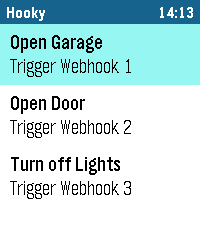
Hooky lets you execute webhooks from your Pebble smartwatch with just a tap. Whether you want to control smart home devices, send notifications, or integrate with your favorite services, Hooky makes it simple and fast.

Key Features:
- Trigger up to 5 custom webhooks directly from your watch.
- Customizable names for each webhook for easy identification.
- Cloudflare Service Tokens support for secure webhook calls.
- Receive status feedback on your watch (success, error, timeout, or disabled).

How it works:
- Configure your webhook URLs and credentials in the Pebble app settings.
- Enable the webhooks you want to use.
- Open the Hooky app on your Pebble, select a webhook and trigger it.
- Receive status updates instantly on your watch.

Note:
- Requires an active internet connection via your smartphone.
- Webhooks must be reachable over HTTPS.

Disclaimer:
- This App is 100% built with Gemini AI. I've focused on keeping it secure and efficient, but there's always room to grow. Got ideas or feedback? Let me know.
 451
451Home Assistant WS
Home Assistant control with real-time updates, voice commands, entity history, calendars, and support for a wide range of devices and helpers.

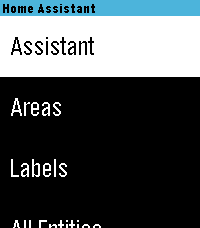
Control your Home Assistant smart home directly from your watch. Browse and control entities, check live states, view history graphs, view and edit calendars, manage To-Do lists, control media, and use voice commands with Home Assistant Assist, ChatGPT, and other conversation agents.

* Real-time Home Assistant status updates and control via WebSocket
* Browse entities by area, type, or favorites
* Control lights, switches, fans, covers, climate devices, alarms, timers, media players, and much more
* Voice commands with multiple Home Assistant conversation agents
* View entity history with graphs and recent state changes
* View and edit Home Assistant calendars and events
* Full media controls including volume, seek, source, shuffle, repeat, and speaker grouping
* Manage Home Assistant To-Do lists
* Edit helpers including numbers, selects, text, dates, and times
* Touchscreen support on compatible watches
* Support for all Pebble screen sizes, including round watches and Pebble Time 2

Home Assistant WS connects directly to your Home Assistant instance and does not require a separate cloud service.

iOS Compatibility Note: This app requires the new Core Devices Pebble app for iOS. The older legacy Pebble app uses an outdated JavaScript engine and is not compatible.
 107
107Music Boss Time
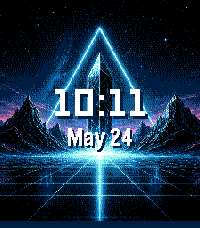
🎧 Music Boss Time is a premium media controller and media browser disguised as a watch face. Keep it on all day as you go about your daily hustle. Works with all your media/music apps*!

Not a Music Boss Deluxe user yet? 🎁 Activate a fully unlocked 3-day free trial - all features included, nothing held back!

•  Features an album art-focused main screen with the time and date prominently displayed
•  Track progress ticks away to keep you informed on the current song
•  Customize visual elements to suit your style, and enjoy built-in media controls, volume support, and customizations for a truly personalized Pebble Music experience
•  Compatible with all your media apps (Spotify, Youtube, YouTube Music, Netflix, Plex, etc)

🎵 Play, pause, skip, and seek tracks from your Pebble
📺 Control apps casting audio/video to external displays or audio devices (e.g. Netflix, most music apps)
⏩ Manual Seek Mode* - jump within songs, podcasts, audiobooks, long tracks (*except OG Pebble)
🔊 Adjust volume on phone, Bluetooth devices, or while casting
⚡ Assign app-specific custom controls (e.g. Spotify DJ X)
👍 Rate songs (YouTube Music, YouTube, Spotify, more being tested)
🎨 Dynamic album art & themed UI
ℹ️ View album art, title, artist, album, volume, and progress
🌈 On color Pebbles and Pebble 2/2 DUO, themes adapt to album art

📱 Watch Compatibility - Every Pebble Supported
• Pebble Time,  Pebble Time Steel, Pebble Time 2
• Pebble Time Round,  Pebble Round 2
• Pebble 2/2HR/2 DUO
Full support for album art, themes, customizations, and all features.

Original Models:
• Original Pebble
• Pebble Steel
Support album art! Manual Track Seek Mode does not function on the original models.

Pebble Companion App Compatibility:
• Classic Pebble App / Rebble
• New Core Pebble App
• microPebble

Thank you for your support - whether you’ve been with Music Boss since the early days or you’re just discovering it now!

*Media Browsing/Playback has been tested with: PowerAmp, Podcast Addict, Spotify, Musicolet, GoneMAD and VLC. Works with any app that supports Android Media Browsing.

All assets in this listing are original and © Reboot's Ramblings 2013–2026.
 9.3K
9.3KMusic Boss
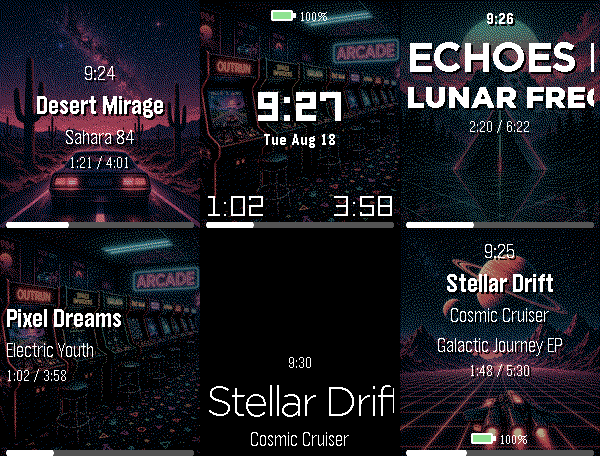
🎧 Music Boss is a powerful, customizable media controller and music library browser for your Pebble. Works with all your media/music apps*!

New here? 🎁 Music Boss includes a fully-featured 3-day free trial through the Music Boss Deluxe phone app - every feature included, nothing held back!

🆕 NEW: Layout Presets - give your watch a whole new look in one tap. Choose from 20+ built-in styles - applied instantly from your phone, then fine-tune anything. Save your own looks too. (Layout Presets & the new UI are for Pebble Time 2 and Pebble Round 2. All other features are for all Pebbles!)

🎵 Play, pause, skip & seek - full media control from your wrist
🔍 Browse & play your whole library - PowerAmp, Podcast Addict, Spotify, Musicolet, GoneMAD, VLC & more
🔄 Switch and launch media apps right from the watch
🔊 Volume on phone, Bluetooth, or while casting
👍 Rate songs - Spotify, YouTube Music, YouTube (more in testing)
📺 Cast control - drive apps sending audio/video to TVs & speakers (Netflix, most music apps)
⚡ Custom per-app controls (e.g. Spotify DJ X) + full Tasker automation
ℹ️ Album art, track info & live progress at a glance
🎨 Dynamic art themes that adapt to your cover (colour Pebbles & Pebble 2/2 DUO)
🖼️ Instant album art preview the moment the app opens (no more blank screen!)
🎚️ Image Quality control - Auto / 1 / 4 / 8-bit, plus a custom 1-bit colour theme
⬛ Album-art darkening for crisp text over busy covers
⚙️ Redesigned tabbed phone settings, tailored to your watch
👀 New perk - the new Music Boss watch face preset in Face Boss

✨ Pebble Time 2 & Round 2:
🆕 Brand-new Modern UI - Retro+, Classic & Time layouts in one app, full touch with seek & volume overlays, mix and match to taste
🎨 One-tap Layout Presets - 20+ styles, swap looks instantly, save your own
🎛️ Fully customizable layouts - fonts, colours, sizes, art modes, drop shadow, progress ring & optional solid text backdrops
👋 Wrist-flick gestures - flick forward/back for play, volume, rating & more (adjustable sensitivity; single, double or triple)
🕒 Big-clock display with 9 large fonts
🔒 Quick & Persistent screen lock - double-press BACK

📱 Watch Compatibility - Every Pebble Supported

• Pebble Time 2 & Pebble Round 2
• Pebble Time, Pebble Time Steel
• Pebble Time Round
• Pebble 2 / 2HR / 2 DUO

Original Models:
• Original Pebble
• Pebble Steel
Support the Classic UI layout only (no album art). Manual Seek Mode not supported on the original models. For album art on the OG models, please check out "Music Boss Time" on the appstore.

Pebble Companion App Compatibility:
• Classic Pebble App / Rebble
• Core Pebble App
• microPebble
• Any companion app that supports PebbleKit Classic

Thank you for your support - whether you've been with Music Boss since the early days or you're just discovering it now!

*Media Browsing/Playback has been tested with: PowerAmp, Podcast Addict, Spotify, Musicolet, GoneMAD and VLC. Works with any app that supports Android Media Browsing.

All assets in this listing are original and © Reboot's Ramblings 2013–2026.
 1
1Audio Cues 4 Pebble
Watch app for Pebble time 2 to control Audio Cues Andriod App. Used for controlling music for stage shows. You will need to install the android audio cues bridge apk in order for this app to work.
 5
5HTTP Call-ur
Launch the app to make a http call (get/post/etc) to a user definable url. Add headers or a body and set up authentication.
 48
48Hue Off v1.1
Control your Philips Hue light bulbs.

Initial Setup
 - Press select to discover bridge and begin pairing process.

Controlling Light Bulbs
- Press select to switch on/off
- Long press select to adjust brightness levels
 12
12Wake on Lan
Wake on LAN (internet only for now), this uses a web service to send a wake on lan magic packet. press middle (select) button to send the magic packet, make sure to set the settings on your phone beforehand! Soon: Better UI Multiple Address/ Mac selection
 21
21MPD Client
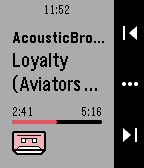
Be able to control your MPD servers right from your smartwatch!

Be sure to check out the installation guide over here, you might need to install a proxy server: https://github.com/Sorunome/pebble-mpd-client#installation
 95
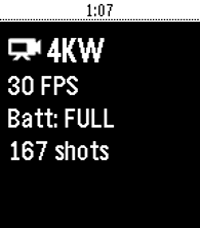
95GoPro Remote
A GoPro Remote for Pebble.

Works with:

- (Partially) GoPro HERO3 and HERO3+
- GoPro HERO4 Black/Silver
- GoPro HERO4 Session
- GoPro HERO5 Black/Session
- GoPro HERO+ and HERO+ LCD
- GoPro HERO6
- GoPro HERO7
- GoPro MAX
- GoPro FUSION
- GoPro HERO8

Press UP to change modes, press Center to start/stop video/timelapse or take a photo, press Down for quick presets, long-press Up for HiLight Tag.
Needs a GoPro Wifi connection to the phone!

For GoPro HERO4 / HERO5 Session / GoPro HERO8 / MAX:
Make sure you first open the GoPro App and get a live preview, this step is necessary for H4 Session and H5 Session. Then close the GoPro app and open GoProRemote app on Pebble. (HERO8/MAX: Leave the app open to ensure WiFi connection)

Tutorial/write-up: https://medium.com/@konrad_it/gopro-remote-for-pebble-8661dabf0897

App icon by PotatoFi
 100
100Kodi Launch
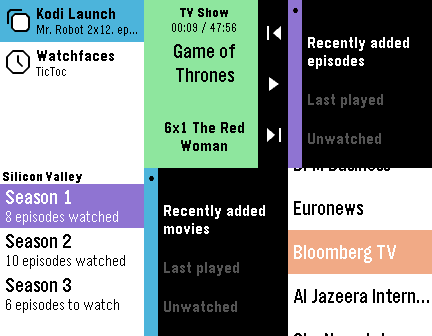
The most complete controller and library browser for Kodi!

(This watchapp is unofficial and not endorsed or supported by Team Kodi or the XBMC Foundation.
Kodi and the Kodi logo are trademarks of the XBMC Foundation.)

Quickly control your Kodi instance, browse your video library and PVR channels, and launch your media from your wrist!

Features:
- Now playing screen
- Volume control
- Automatic refresh
- Navigation mode (see below)
- TV shows browser: recently added episodes, last played, unwatched. Reports the number of episodes watched/to watch for each show & season, displays the air date and a mark for watched episodes.
- Movies browser: recently added movies, last played, unwatched. Displays the rating and year of each movie.
- Exits to the watchface after launching a movie or TV show episode (this is by design)
- Live TV browser: display channel groups and channels
- System actions: toggle fullscreen, info & codec display, update video library, party mode, suspend/reboot/shutdown the system.
- Sets the app glance to the last launched media using the app.

A note about navigation:
The navigation mode uses the 4 buttons of your watch. Hold Back to return to your watchface.
Double-click the Select button to perform a selection in Kodi, double-click the Back button to go back in Kodi.


Music browsing & launching is not implemented (yet).
 4
4OpenHab control
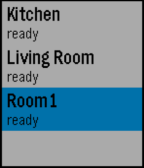
Connect to your OpenHab server and quickly send commands to switch any light on/off.

This app is intended to be quick and simple. It doesn't use your full OpenHab site map. You just configure what you need.
 3
3One Click Vera Unlock
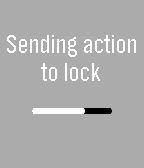
Unlock or lock your house door with a single click on your watch!
The app toggles the current state of the doorlock.
It works whether your home in your local network or outside connected to any wireless network.
This app is for Vera U17+ Only.
If you experience any bugs, send me an email!