 2
2OKC Thunder fan watchface
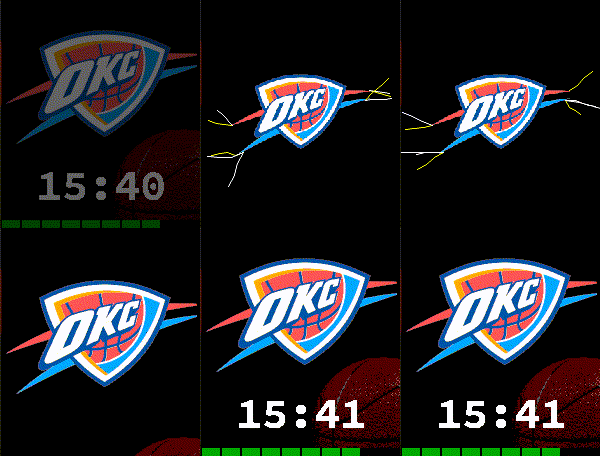
Facesokc is a watchface for Pebble Time 2 (Emery) with an Oklahoma City Thunder theme. DISPLAY ------- • Large white time display — always visible • OKC Thunder logo as background art • Basketball graphic in the background (toggleable) • Battery bar along the bottom edge: 10 segments, 10 % each Half segments for 5 % accuracy Green > 40 % · Orange > 20 % · Red ≤ 20 % SHAKE TO REVEAL --------------- Shake the watch to cycle through additional information: 1. Shake → Date (visible for 3 seconds) 2. Shake again → Today's step count (3 seconds) 3. Third shake → Lightning animation (even if animation is disabled) ANIMATION --------- When animation is enabled, a sequence fires at second :57 of every minute: • Phase 1 (1.5 s): Logo slides to the center, time and ball slide out • Phase 2 (3 s): Lightning bolts flash outward from the logo • Phase 3 (1.5 s): Everything smoothly returns to position HOURLY CHIME ------------ Audible time signals at the full and half hour — three sounds to choose from: • Short beep — a clean single tone • F-G-C — two rising notes and a deep C • Thunder — a low rumble fitting the OKC theme Each interval (full / half hour) has its own independent sound selection. A quiet-hours window suppresses all chimes (default: 22:00 – 7:00, toggleable). Use the preview toggle in settings to audition any sound before enabling it. SETTINGS -------- • Animation: on / off • Show basketball: yes / no • Time format: 24h / 12h • Date format: DD.MM.YY · MM/DD/YY · DD/MM/YY • Full hour chime: on / off + sound • Half hour chime: on / off + sound • Quiet hours: on / off, from / until Vibecoded with Claude · Pebble Time 2 (Emery) only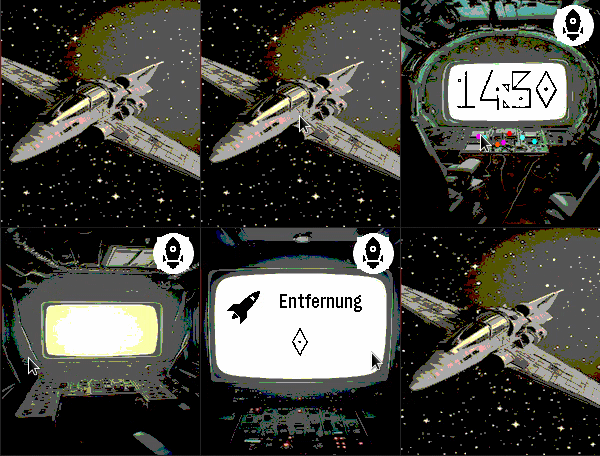 8
8Spaceship
DailySpaceship is a watchapp for Pebble Time 2 (Emery) that turns your wrist into the cockpit of a spaceship. Built as an app rather than a watchface because only apps can access the Emery's touch screen — but it behaves just like one. SCREENS & NAVIGATION --------------------- Tap the space screen to open the cockpit. Swipe left or right to move between screens: • Space — your ship drifting through the stars (tap to enter) • Cockpit — large digit clock with animated indicator lights • Engine Room — battery level displayed as a ten-bar fuel gauge; ALERT blinks below 20% • Distance — today's step count with a distance icon • Weather — current temperature, condition icon and description (GPS or IP location) • Heart Rate — current BPM, blinking at your actual pulse with electric sparks Navigation is circular: swipe right from Heart Rate to return directly to the Cockpit. A back button on every secondary screen takes you straight back to Space. SPACE SCREEN ------------ Choose from twelve different spaceship designs — or enable shuffle mode to automatically cycle through them at a configurable interval. An optional animated comet streaks across the background for extra atmosphere. WEATHER ------- Weather data is fetched automatically using GPS location (with IP fallback) via Open-Meteo. The weather screen shows the data source (GPS / IP), a programmatic weather icon, and a reload button for manual refresh. Temperature in °C or °F, description in English or German. AUTO-RETURN ----------- After a configurable delay (3–30 seconds of inactivity), the app automatically returns to the Space screen. SETTINGS (configurable via the Pebble app) ------------------------------------------ • Spaceship design: 12 models or shuffle mode • Shuffle interval: how often the ship changes automatically • Animated comet: on / off • Language: German or English • Temperature unit: °C or °F • Time format: 12h or 24h • Auto-return delay: 3–30 seconds • Backlight timeout: 3–9 seconds NOTE ---- Spaceship must run as an "App" rather than a "Watchface" because Pebble only exposes the touch screen to apps. Once launched, it stays active and responds to touch and swipe gestures exactly like a watchface would. Vibecoded with Claude · Pebble Time 2 (Emery) only
 5
5FastAndSwipurious
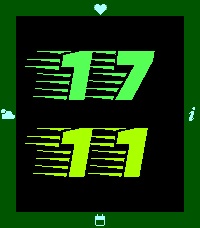
DailyFastAndSwipurious is a watchapp for Pebble Time 2 (Emery) that behaves just like a watchface — built as an app because only apps can access the Emery's touch screen. SCREENS & NAVIGATION --------------------- Swipe in any direction to move between five screens: • Time — large digit display, optimized for at-a-glance readability • Date — weekday and date in your chosen language • Weather — current conditions with icon, temperature and description • Steps — step count and Bluetooth status • Health — heart rate and sleep duration from last night SETTINGS (extensively configurable via the Pebble app) ------------------------------------------------------- • Background color • Navigation bar color • Symbol / icon color • Hours color (large digit) • Minutes color (large digit) • Text color (date, weather, steps and health screens) • Language: German or English • Temperature unit: °C or °F • Backlight timeout: 3–9 seconds (must match the value in your Pebble system settings — see below) • Auto-return to time screen: on/off and delay (2–5 seconds) WEATHER ------- Weather data is fetched automatically using your GPS location (with IP fallback) via Open-Meteo. Language and unit (°C / °F) follow your chosen settings. The weather screen shows whether data was retrieved via GPS or IP, its age, and a reload button for manual refresh. BACKLIGHT --------- In normal Pebble apps, the display lights up on every touch and swipe — which drains the battery noticeably faster. FastAndSwipurious suppresses this completely: the backlight stays off by default. Instead, a double-tap (two quick taps) deliberately activates the backlight when you actually need it. The app uses the system timeout to determine how long the light stays on — which is why the backlight timeout in the app settings must be set to the same value as in your Pebble system settings, so the app knows when the light has turned off again. NOTE ---- The app must run as an "App" rather than a "Watchface" because Pebble only exposes the touch screen to apps. The behavior is identical to a watchface — the app stays permanently active and responds to swipe gestures. Vibecoded with Claude · Pebble Time 2 (Emery) only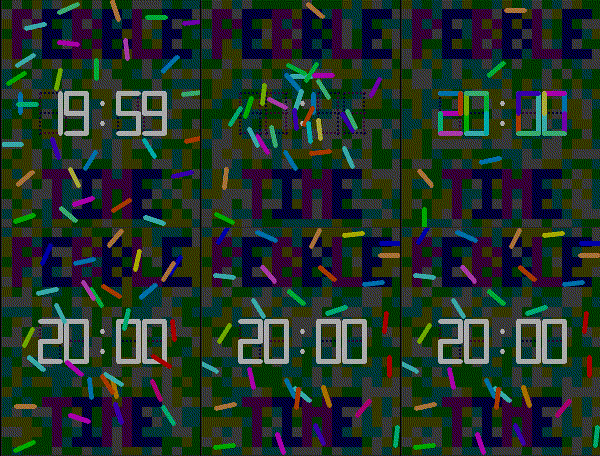 18
18Lines Time
FacesLines Time 28 colored lines float across a dark mosaic background — and every minute, they come alive. At :57 past each minute, the lines glide into position, assembling into 7-segment digits before your eyes. Once every line is in place, the new time snaps into sharp white. Then they scatter back, drifting to new positions until the next minute calls them home. Features: - Smooth 20 fps line animation with individual rotation - 28 uniquely colored lines in bright, vibrant hues - Dark color-shifting background grid during animation - Dotted segment guides that pulse between purple and blue - Always-on time display between animations - Designed for Pebble Time 2 (Emery, 200×228)
 6
6Analogue beams
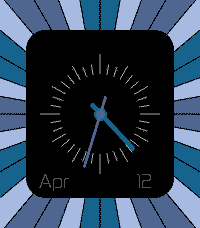
FacesAnalogue beams is a clean, elegant analog watchface for Pebble Time 2, built around a striking radial beam background design that gives the dial depth and character. Three hands are drawn in a harmonious blue palette: • Hour hand in Cobalt Blue • Minute hand in Liberty Blue • Second hand in Baby Blue Eyes (optional) The current date is displayed in a custom Zekton typeface — month abbreviation on the left, day number on the right — sitting quietly at the lower half of the dial. Both the seconds hand and date display can be toggled on or off independently. A quick wrist tap opens the settings menu; tap again to cycle through the four display modes. The menu closes automatically after a few seconds. Features: • Smooth analog hands with layered z-order • Optional seconds hand (battery-friendly when disabled) • Optional date display with custom font • Settings persist across restarts • Tap-to-configure — no buttons needed
 23
23KeepItSimpleAndGreen
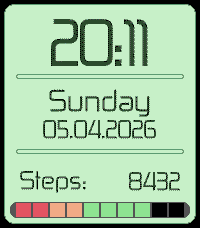
FacesA clean, pixel-art watchface for Pebble Time 2, designed around a fresh green aesthetic and a no-nonsense layout. Features: - Large bitmap time display (HH:MM), centered based on actual glyph width - Weekday name in full (Mon–Sun) - Date in DD.MM.YYYY format - Daily step count via Pebble Health - 10-segment battery bar with color-coded charge level — red (0–20%), orange (30–40%), green (50–100%) Designed for: Pebble Time 2 (emery, 200×228)