 5
5Binary Practice
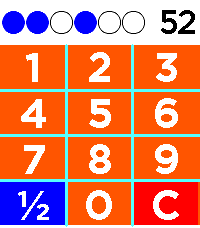
Tools & UtilitiesDo you like watchfaces with binary time representation, but want to get better (faster) at mental conversion to decimal? This watch app prompts you with randomly generated number from 1 to 59 (for 6-bit mode) and you type in your guess. Correct guess is confirmed with vibration, followed shortly by new prompt. Can also be changed to 5- or 4-bit mode. As you go through the rapid fire drill, you will start recognizing patterns in the binary and get faster at converting to decimal!
 7
7AI Girlfriend
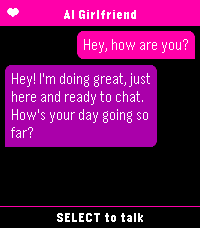
Tools & UtilitiesYou need a fast and easy way to talk to your favourite ai assistant? Look no further than AI Girlfriend. As soon as the app is launched it starts dictation so you can immediately start chatting. Supports openai compatible apis.
 1
1Compound Interest Calculator
Tools & UtilitiesA simple compound interest calculator that accepts Starting value, monthly additions, APY, and duration.
 1
1IP Directory
Tools & UtilitiesHelp log your IP addresses
 3
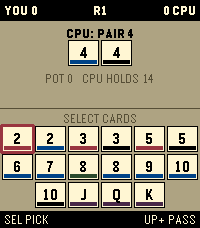
3Haggis
GamesThe shedding game Haggis by Sean Ross
 4
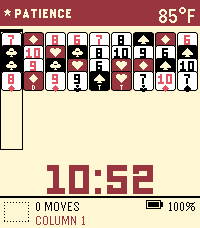
4PATIENT Solitaire
GamesPatient Solitaire, inspired by the incredible Zachtronics Proletariats Patience
 26
26Return to by flwkt
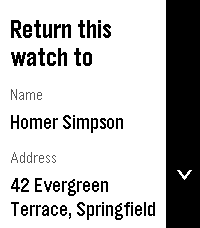
Tools & UtilitiesReturn to by flwkt Lost your Pebble? Make it easy to get back. Return to shows a clear “Return this watch to” screen with your name, address, phone, and email — so whoever finds it knows how to reach you. Set it once in settings and leave it on your app list. When it matters, the info is right there on the wrist. Fill in any combination of: - Name — Who the watch belongs to - Address — Where to return it - Phone — Number to call - Mail — Email address Empty fields are hidden so the screen stays clean. App list subtitle Choose which fields appear under the app name in the launcher (name, address, phone, and/or mail). Selected values are joined with “ / ” so you can spot your contact at a glance without opening the app. Recommendation Pin the app to the top of your app menu so anyone who finds your watch and opens the menu sees it right away: - Open the Pebble app on your phone - Go to Apps - Tap My Apps - Long-press Return to and move it to the very top Features Readable on Time 2, Round 2, Pebble 2, and Pebble 2 Duo — Layout adapts to rectangular and round screens (including B/W), with scroll hints on the action bar when there’s more to see. Configurable — Edit contact details and subtitle options from the phone settings page (Clay). Built for finding your way home — A simple ICE-style contact card for your Pebble, nothing more, nothing less.
 9
9Disc Golf Score Tracker
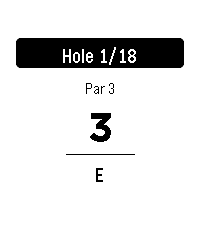
Tools & UtilitiesKeep score on your wrist. Track strokes hole-by-hole against par with your running total updating as you play. Rounds auto-save, so you can quit and resume anytime. In the phone Settings, quick-add any course by name and hole count (pars default to 3). Fix pars on the watch by holding SELECT, and delete courses the same way from the course menu. Import pars from a Disc Golf Metrix via competition section. When you finish, export your round from the watch and copy the text file from the phone Settings.
 7
7Nothing Battery
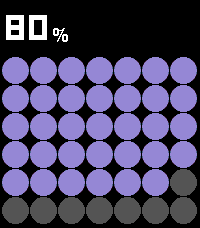
Tools & UtilitiesPebble Battery is a clean, glanceable battery app inspired by the Nothing Phone widget aesthetic. The main screen fills the display with a bold dot grid, purple on dark, red on light, where each circle represents a portion of your remaining charge. The current percentage is displayed prominently at the top using a dot-matrix LED-style font. Press UP or DOWN to open the summary view, which shows your estimated time remaining (or time until full when charging), drain rate in %/HR, and the last recorded delta. Press SELECT to toggle between dark mode (black background, purple dots) and light mode (white background, red dots, gray empty circles), your preference is remembered between sessions. When the battery drops below 20%, the percentage and dots turn red as a low-battery warning. When charging, an animated wave of dots sweeps across the grid.
 1
1Volleyball Score Keeper
Health & FitnessVolleyball Scorer turns your Pebble into a glanceable, sunlight-readable scoreboard. Hold the top button to add a point for US and the bottom button for THEM, and the watch buzzes the moment a set is won at 25 by two. Tapped the wrong team? Press the middle button to arm removal, then press a team to take a point back. Your score saves automatically, so you can close the app mid-match and reopen exactly where you left off, with each team's button sitting right next to its score.
 7
7Hive
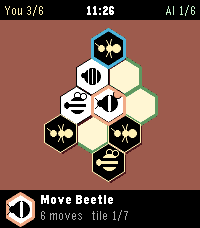
GamesThe game Hive utilizing ideas from these creators AIs https://github.com/jonthysell/Mzinga https://github.com/edre/nokamute If you find any bugs let me know, I will try to continue to work and improve on it. Thanks!
 7
7Ham Locator
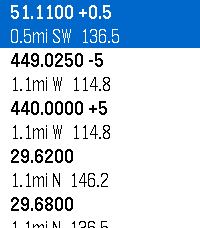
Tools & UtilitiesLocates repeaters within your area and gives you relevant data Uses data sourced from HearHam.com
 15
15Clinch
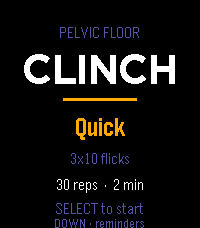
Health & FitnessGuided pelvic floor training, on your wrist. Clinch runs your pelvic floor sets so you don't have to count in your head. Each rep is a guided squeeze and release, cued by vibration, so you can train with your wrist down and your attention somewhere else. Pick a protocol and press start: Mixed — 10 quick reps to train the fast reflex, then 3×10 five-second holds for endurance. The one to run daily. Long holds — 3×10, five seconds on, five off. Straight endurance work. Quick — 3×10 short flicks in about a minute, for when you've only got a moment. While a set runs, a column fills as you squeeze and drains as you release, so a glance tells you where you are without reading a number. A short buzz starts each rep, a double buzz sends you into the release, and a longer pattern marks the end of a set. Pause, skip a rest, or bail out any time. Reminders that fit your day. Set up to three daily nudges and put them at any hour and minute you like — hold to open the editor and scroll each field. When a reminder fires, the watch buzzes and opens straight to a start prompt. It all runs on the watch's own scheduler, so it works whether or not your phone is nearby. Stays on your wrist. No account, no companion app, no data leaving the watch. Your protocol choice and reminder times are saved locally between sessions. Controls Menu: SELECT starts · UP changes protocol · DOWN opens reminders During a set: SELECT pauses · DOWN skips a rest · UP or BACK returns to the menu Reminders: UP/DOWN pick a slot · SELECT toggles it on/off · hold SELECT to set the time ***Medical Disclaimer*** Clinch is a training timer, not medical advice. Pelvic floor exercises are widely recommended, but roughly a third of people doing them from written instructions use the wrong muscles. If you're training for a specific symptom rather than general maintenance, it's worth seeing a pelvic floor physical therapist once to confirm your technique — it'll make every session here count for more.
 12
12QuickTodoist
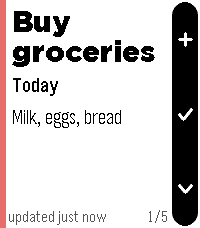
Tools & UtilitiesI wanted a Todoist app that starts instantly, so QuickTodoist caches your tasks and shows them the moment you open the watch. No spinner, no waiting on your phone. It refreshes quietly in the background after that. It's meant for a quick glance at your top tasks and to jot down a new one. Everything else is faster on your phone or desktop, so it's deliberately left out here. FEATURES - Today at a glance: each task is a fullscreen card with due time, project, priority color and description - flip through them with up/down - Instant startup from cache; auto-refresh every time you open the app - Add tasks by voice on watches with a mic (Todoist quick-add understands "buy milk tomorrow p1"); other watches refresh manually instead - Shows Today's tasks, or any Todoist filter you choose - Mark tasks done from your wrist (hold select) - Timeline pins for tasks scheduled at a specific time today - Configure once on your phone: API token, filter, and sort order (Todoist order, priority, or due time) - Text size follows your watch's own Text Size setting No token yet? The app shows sample tasks so you can try it right away. Add your free Todoist API token when you're ready (Todoist: Settings -> Integrations -> Developer). Not affiliated with Doist. Todoist is a trademark of Doist Inc.
 10
10CharWatch
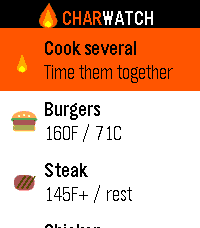
Tools & UtilitiesGrill timers and safe internal temps, right on your wrist. CharWatch turns your Pebble into a BBQ command center. Pick what you're grilling and it walks you through every stage — when to flip, when to add cheese, when to pull it — with a buzz on your wrist at each step, so you're never chained to the grill watching a phone. What it does 11 grill foods with USDA-safe internal temperatures built in Guided cook timers that prompt you to flip, toast buns, add bacon or cheese, rest, and confirm temp Steak, your way — five doneness levels that adjust the sear time Burger thickness — thin, regular, or thick, and the timer scales to match (no more raw-in-the-middle thick patties) Build your plate — toggle buns, bacon, and cheese per burger or dog Cook Several — put the whole spread on one timeline. CharWatch staggers each item so everything finishes together, and merges nearby prompts into a single buzz so you're not pinged six times a minute Confirm-temps reminder before you serve Runs entirely on the watch — no phone, no internet, no account Whether it's two burgers or a full cookout, CharWatch keeps the timing straight so you can focus on the fun part. Designed for the Pebble Time 2. Also builds for classic Pebble models.