 4
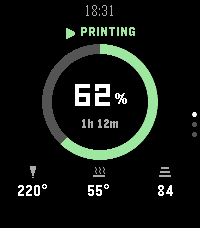
4PrintWrist
Tools & UtilitiesYour Bambu Lab printer, on your wrist, from anywhere. PrintWrist shows your print's progress, time left, temperatures, fans, speed and AMS filament on your Pebble Time 2, over Bambu Cloud, so it works away from home too. No server, no extra app, nothing to host. - Three status layouts: Arc, Big Number, or Dense - Up/Down for Details (temps, fans, speed, layers) and Filament (all 4 AMS slots plus the external spool) - Buzzes when a print finishes, fails, or needs attention, with quiet hours - Chamber light on/off and refresh from the watch Setup: open PrintWrist's settings in the Pebble app and sign in with your Bambu Lab account. Bambu emails you a 6-digit code, which you enter on your phone or on the watch. Your password goes only to Bambu and is never stored; PrintWrist keeps the sign-in token on your phone. Why no pause or stop? Bambu's firmware only accepts those commands from Bambu's own apps, so use Bambu Handy for them. Tested on the P2S. Other cloud-connected Bambu printers should work but are untested. PrintWrist is an independent project, not affiliated with or endorsed by Bambu Lab. It uses Bambu Cloud, which Bambu can change at any time.
 1
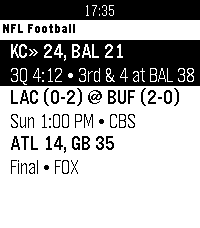
1Football for Pebble
DailyLive NFL football on your wrist featuring real-time down & distance, field position, drive tracking, and score alerts.
 20
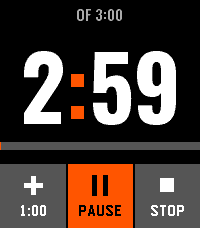
20Clear Timer
Tools & UtilitiesA touch timer for Pebble Time 2: three wheels you turn with a finger, six timers it remembers, and an alarm you silence with a palm.
 1
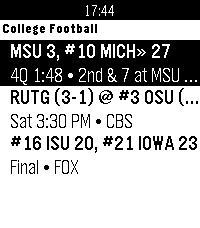
1CFB for Pebble
DailyLive NCAA college football on your wrist featuring AP Top 25 rankings, real-time down & distance, field position, drive tracking, and score alerts.
 1
1Boxing Timer
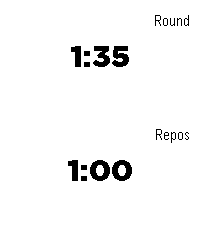
Tools & UtilitiesTimer which alternates between exercice timer and rest timer.
 1
1PebTrader Zero
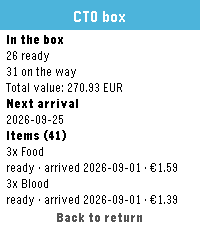
Tools & UtilitiesPebTrader Zero shows the state of your CardTrader Zero orders on your Pebble. • Your orders at a glance: state, item count, total and counterparty • Open an order for its timeline, totals, shipping method and tracking code • Hold Down for your CardTrader Zero box: what's ready, what's on the way and when it arrives • The last snapshot is cached on the watch, so it still works without your phone • Your API token stays on your phone and is never sent to the watch Requires a CardTrader account and an API token, which you paste into the app's settings (CardTrader → Settings → API). Built for Pebble Time 2 (Emery) and Pebble Round 2 (Gabbro). Open source: https://github.com/dottorblaster/pebtrader-zero
 38
38Iron
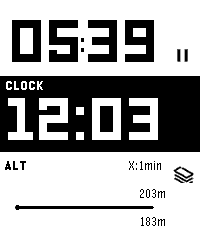
Health & FitnessIron - Workout Companion for Pebble Iron is a high-performance, open-source sports tracker for your Pebble smartwatch. Designed for runners and fitness enthusiasts, it tracks your real-time metrics and seamlessly bridges the gap between your Pebble and modern Android health ecosystems. ⚠️ Important Note: This watch app will not function at all unless used in combination with the Android companion app of "Iron". Also, while designed to support all Pebble platforms, it has not been fully tested on every single model. If you encounter any issues, your feedback is greatly appreciated! 📱 Companion App (Android) To unlock the full potential of Iron, install the companion Android app from Google Play. The companion app runs a stable background service during your workout and securely syncs your Pebble's health data directly to Google Health Connect. Download on Google Play: https://play.google.com/store/apps/details?id=hag1987haaa.pebble.iron&pcampaignid=web_share Zero ads, zero tracking analytics. Requires Location permissions (including background access) to accurately track your GPS routes while your phone is in your pocket. Only writes data to Health Connect with your explicit permission. ✨ Key Features By combining the Pebble app with the Android companion app, you can unlock: Music Control: Intuitively control your music playback directly from the workout screen. Supports swipe gestures on touchscreen models or long-press physical button mapping. Smart Notifications: Get vibration alerts on your wrist for distance laps (e.g., every 1km) or time intervals. Advanced Data Export: Supports both GPX and TCX formats. TCX includes heart rate, calories, and smoothed cadence data—perfect for uploading to Strava or Garmin Connect. Detailed Analytics Charts: View graphs for speed, elevation, heart rate, and steps on your phone. Powerful Automation: Broadcasts intents based on Pebble interactions or app state changes. Fully compatible with automation apps like Tasker. Health Connect Integration: Seamlessly syncs your recorded workout data directly to Android's Health Connect. Voice Assistant Integration: Long-press a button on your Pebble to trigger your phone's default digital assistant (the same one that launches when you hold your phone's power button). Note: Please speak your commands into your phone's or earbuds' microphone. ⚙️ Installation 1. Install this watch app. 2. Download the Iron Companion App for Android from Google Play. 3. Grant the necessary permissions (Location, Health Connect & Notifications) in the Android app. Note: Setting Location permission to "Allow all the time" is highly recommended for stable GPS tracking while your phone screen is off. 4. Start a workout on your Pebble! 🤝 Support & Credits Iron is completely free and open-source. There are no paywalls or locked features. This app was proudly developed with the assistance of Google's AI, Gemini! If you find this app useful for your daily runs, consider supporting the project: ☕ Support me on Ko-fi: https://ko-fi.com/1987haaa 🇯🇵日本語版 (Japanese) Iron - Pebble用ワークアウトコンパニオン Ironは、Pebbleスマートウォッチ用の高性能でオープンソースなスポーツトラッカーです。ランナーやフィットネス愛好家のために設計されており、リアルタイムの数値を追跡しながら、Pebbleと最新のAndroidヘルスケアエコシステムをシームレスに連携させます。 ⚠️ 重要な注意点: 本ウォッチアプリは、Android版『Iron』アプリとセットで使用しない限り機能しません。また、すべてのPebbleプラットフォームで動作するように開発したつもりですが、全モデルでの動作テストは完了していません。もし動かない場合はフィードバックをいただけると非常に嬉しいです! 📱 コンパニオンアプリ (Android) Ironの真の力を引き出すため、Android用のコンパニオンアプリをインストールしてください。安定したバックグラウンドサービスとして稼働し、PebbleのヘルスケアデータをGoogle Health Connectへ安全に同期します。 Google Playストアでダウンロード: https://play.google.com/store/apps/details?id=hag1987haaa.pebble.iron&pcampaignid=web_share 広告ゼロ、トラッキング解析ゼロ。 スマートフォンをポケットに入れた状態でも正確にGPSルートを追跡するため、位置情報(バックグラウンド含む)へのアクセス権限を使用します。 ユーザーの明示的な許可がある場合にのみHealth Connectへデータを書き込みます。 ✨ 主な機能 PebbleアプリとAndroidコンパニオンアプリを組み合わせることで、以下の機能を利用できます。 ミュージックコントロール: ワークアウト画面から直感的に音楽を操作可能。タッチスクリーンでのスワイプ操作や、物理ボタンの長押しに対応しています。 スマート通知機能: 距離ラップ(例:1kmごと)や時間インターバルを振動でお知らせ。 高度なデータ出力: GPX に加え TCX 出力に対応。心拍数、カロリー、平滑化されたケイデンス情報を含み、StravaやGarmin等へのアップロードに最適。 詳細な分析チャート: 速度、高度、心拍数、歩数をスマホでグラフ化。 強力な自動化連携: Pebbleの操作やアプリの状態変化をインテント送信。Tasker等の自動化アプリと連携可能。 Health Connect 完全対応: ウォッチで記録したデータをAndroidのヘルスコネクトへシームレスに同期。 ボイスアシスタント連携: Pebbleのボタン長押しで、スマホの「デフォルトのデジタルアシスタント」(電源ボタン長押しで起動する設定中のアシスタント)を呼び出せます。※アシスタントへの音声指示は、スマホ本体またはイヤホンのマイクで行ってください。 ⚙️ インストール方法 1. 本ウォッチアプリをインストールします。 2. Google PlayからAndroid用Ironコンパニオンアプリをダウンロードします。 3. Androidアプリ内で必要な権限(位置情報、Health Connect、通知)を許可します。 ※画面オフ時にも安定してGPSを追跡するため、位置情報権限は「常に許可」に設定することを強く推奨します。 4. Pebbleでワークアウトを開始してください! 🤝 開発者のサポートとクレジット Ironは完全に無料でオープンソースです。有料の壁はありません。なお、このアプリの開発にはGoogleのAI「Gemini」を活用しています! 毎日のランニングに役立ったと感じていただけた場合は、プロジェクトのサポートをご検討ください。皆様の支援が力になります。 ☕ Ko-fiでサポートする: https://ko-fi.com/1987haaa
 4
4Dictionary - EN
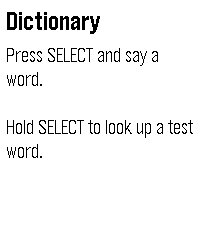
Tools & UtilitiesLook up any English word by saying it. Press SELECT and say a word. Your watch shows what it heard so you can confirm it or try again, then displays up to six definitions. Scroll with the UP and DOWN buttons, or drag the text with your finger. To try it without speaking, hold SELECT to look up a sample word. Requirements Dictation and lookups need your phone to be connected and online. Where the definitions come from Definitions are from Wiktionary (wiktionary.org), extracted by the Wiktextract project (kaikki.org). Wiktionary content is available under the Creative Commons Attribution-ShareAlike 4.0 license (CC BY-SA 4.0). Entries can be incomplete or wrong; anyone can correct them on Wiktionary. Privacy Your speech is converted to text by the Pebble app's dictation service; this app only receives the resulting text. To find its definition, the word is sent over an encrypted connection to the developer's server, along with your IP address, as with any web request. The server may keep standard access logs of these requests. To prevent abuse, it also counts requests per IP address, stored only as a one-way hash, and clears old counts automatically. No account, no ads, no tracking.
 7
7Cloudbreak
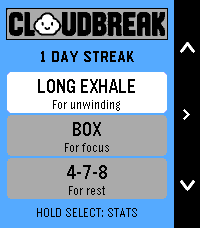
Health & FitnessCloudbreak — A little air. A little less chaos. Your wrist has enough reminders to do things. Here’s one to take a breath. Meet Cloudbreak: guided breathing with a happy little cloud and a whole lot of Pebble personality. Bold outlines, crisp colors, playful expressions and snappy slide-and-bounce transitions make taking a breather feel right at home on your watch. Between meetings, before bed, or after opening your inbox against your better judgment, make a little room in your day to pause. Pick a rhythm, choose your time, and let your cloud handle the counting. SMALL CLOUD. PLENTY OF FEATURES. • Four breathing rhythms: Balanced, Long Exhale, Box and 4-7-8. • Suggested session lengths, plus custom durations from 1 to 15 minutes. • An animated cloud that grows, floats, holds and puffs along with your breath. • Distinct vibration cues for inhale, hold and exhale, plus a session-complete celebration. • A starting heart-rate check, live heart rate and time remaining. • Session summaries with starting, ending and average heart rate, percentage change, duration and completed cycles. • A post-session mood check-in with a cloud face to match. • Saved daily streaks, personal bests and session totals. • 36 rotating daily tips selected around your usage and time of day. No leaderboard for breathing. No cloud judging your lung capacity. Just a small daily pause, with a very good face. Cloudbreak. Give your day some breathing room. Designed for Pebble Time 2. A valid heart-rate reading is required to start a session. Heart-rate changes are descriptive, not a relaxation score or medical assessment. Breathe comfortably; pause if a rhythm doesn’t feel right.
 9
9ChronoKit
Tools & UtilitiesStopwatch and Timer in one app
 21
21Flynformer
Tools & UtilitiesType the flight number on the watch. No hunting through the phone app: two letters, up to four digits, done. It stays until you change it. Meet Flyn — your flight companion. Three pages, in the order you travel. Before the flight — the gate in large type, terminal, departure time, countdown, delay. In flight — time remaining, a segmented progress bar, arrival time, flight time. At the destination — temperature, weather, local time, baggage belt, arrival gate. The app opens on the page that matches the current phase of your flight. It tells you when something changes. Your flight goes into the Pebble timeline as a pin, carrying two reminders: two hours and thirty minutes before departure. Those buzz on their own, without the app running. If the gate, terminal, status, baggage belt or a time changes by more than five minutes, the pin goes out again and the watch lets you know — even with the app closed. Countdowns and progress deliberately don't count as changes: they move on every fetch and would be noise, not news. You bring your own API key. Flight data costs money. Flynformer uses aviationstack, whose free tier allows 100 requests per month.
 2
2Timer / Chrono
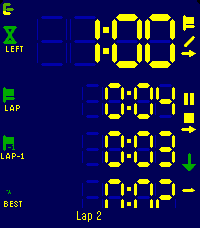
Tools & UtilitiesModes ----- Count up, count down for a duration, or count down until a clock time. The three are distinguishable modes, each with its own screen layout, colours and alarms. Flexible layout --------------- You decide what every line shows. Up to four lines per mode, each one picked from: total time, remaining, current lap, prior lap, fastest, average, the gap between the current lap and any of those, the end time, or the lap count. Pick a size per line: XL, L, M or S. The LCD digits fill whatever space is left. Laps ---- Laps work in both directions and exclude paused time. The lap list shows each lap against the one before, with the fastest marked. Alarms ------ Alarms fire at the end, before the end, at intervals, or when a lap reaches a reference lap. Each one can vibrate, sound, or both. Alarms still fire with the app closed. Buttons ------- Every button shows what a short press and a long press will do, and how far a hold has got. Touch ----- Setup, changing start/end times etc. can be done with gestures too: Click a field and use clockwise to increment, counter clockwise to decrement. Watch/Phone ----------- Everything runs on the watch. Layouts and colours are edited on the phone, where there's room for it, which is a single-setup most of the times. Ready for Pebble Time 2, Pebble Time and Pebble 2.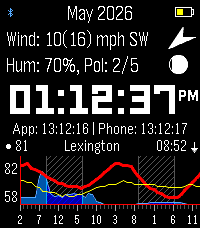 19
19ForeCasWatCompanion
Tools & UtilitiesI made a version of the forecaswatch2 watchface that runs as an app, so you can interact with it and have different info. I found that binding the app to a quicklaunch button helps it feel like a seamless feature of the FCW2 face. Features are: Top screen shows extra weather info, such as wind speed and direction, moon phase, humidity, pollen info (need a key from google cloud maps pollen, otherwise shows barometer), second screen shows personal weather station from wunderground via ID entered in settings screen. Bottom screen shows 48 hour extended forecast with wind line in yellow thanks to cdlenfert on a branch of the original face that has not been implemented there yet. 2nd screen shows 7 day high and low temps with rain chances as bars beside. Middle screen shows time with seconds, or zulu time. Side buttons toggle corresponding screens, as well as touching the top and bottom screen. Holding middle button forces a weather fetch. Last sync shown below clock, will auto sync if older than 10 minutes or location has moved more than 5k. App times out after 30 seconds of interactivity (minus touch screen) and exits back to watchface. Stays open when settings screen is open on phone. All credit to mattrossman for building original watchface, all this was based on forecaswatch2, using google antigravity to code additional features mentioned.
 23
23BAC2Sober
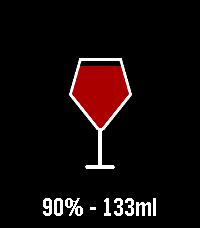
Tools & UtilitiesBAC2Sober BAC2Sober is a premium, real-time blood alcohol tracking companion for your Pebble smartwatch. Built with a focus on speed, privacy, and native Pebble aesthetics, it utilizes the trusted Widmark formula to dynamically calculate your current BAC and estimate the exact time you will be completely sober. Whether you are sipping a craft taster or splitting a full bottle of wine, BAC2Sober makes logging your drinks effortless. Features: - Real-Time Tracking: A live dashboard tracks your current BAC and continuously updates your "Sober By" countdown every minute using the system tick timer. - Dynamic Geometric Graphics: Watch your drinks fill up on the screen! Native 2D vector graphics beautifully replicate standard cans, tallboys, bottles, growlers, and wine glasses—keeping the app incredibly fast and lightweight. - Precision Logging: Dial in exact volumes (Metric or Imperial) and ABV percentages down to 0.1% for maximum accuracy. - Theme Engine: Fully supports Dark and Light modes to match your watch's hardware, highlighted with vibrant Electric Ultramarine and Candy Apple Red colors on the Pebble Time 2. - Privacy First: 100% of your data remains locally on your wrist. No accounts, no cloud sync, no tracking. Liability Disclaimer: The developers of BAC2Sober assume no responsibility for the misuse of this application or the accuracy of its blood alcohol estimates. This application is for entertainment and informational purposes only. It is not a medical device, nor a legal breathalyzer. Its calculations must never be relied upon to determine your ability or fitness to operate a motor vehicle, heavy machinery, or make safety-critical decisions. Always exercise personal responsibility and never drink and drive. AI Disclosure: The source code, geometric vector generation, and user interface for this application were developed in collaboration with an AI language model. The underlying mathematical implementations and firmware integrations were validated against the official PebbleOS open-source SDK.
 1
1YaNaviPeb
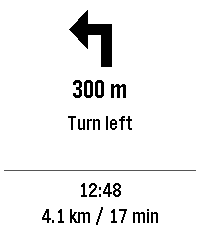
Tools & UtilitiesTurn-by-turn directions from Yandex Maps or Yandex Navigator on your Pebble watch. While you navigate, the watch shows the maneuver arrow, the distance to it, the maneuver text, your arrival time, and the remaining distance and time. The watchapp opens by itself when navigation starts and closes when it ends. REQUIRES AN ANDROID COMPANION APP This watchapp only displays data. The free YaNaviPeb Android app reads the Yandex navigation notification and sends it to the watch via the Pebble app. 1. Install this watchapp. 2. Download the YaNaviPeb Android app (app-release.apk) from https://github.com/DimaK21/YaNaviPeb/releases/latest and grant it notification access. 3. Start a route in Yandex Maps or Navigator and minimize the app. Test without driving via "Start watch demo". IMPORTANT Directions arrive only while the Yandex app is minimized: opening it on the phone hides its navigation notification, and the watch stops updating. REQUIREMENTS • Android 11+ with the Pebble app (coredevices.coreapp). iPhone is not supported. • Yandex Maps, or Yandex Navigator with "Background navigation" ("Фоновая навигация") turned on. • Text appears in the Yandex app's language. For Russian, the watch needs a Cyrillic language pack (Pebble app). • Tested on Pebble Time 2 only. PRIVACY Only the navigation notification of Yandex Maps or Navigator is read. Everything is processed on your phone: no Internet permission, accounts, ads or analytics. Open-source (0BSD). Not affiliated with Yandex, Pebble or Core Devices.