 0
0Should I Run?
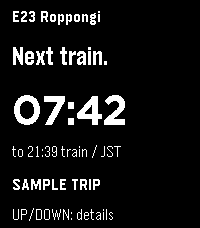
DailyYour next Tokyo Oedo Line train, at a glance. Should I Run mirrors your selected station, direction, departure countdown, estimated outdoor distance and pace from the Should I Run phone app to Pebble Time 2. Select refreshes the trip; Up or Down shows details. Live reports and scheduled estimates are clearly labeled. Development preview: requires the companion Expo app and a reachable local relay. Keep the phone app open while syncing. Advice expires within 30 seconds without fresh data. This version is not a standalone transit service. Walk inside stations; distance and pace are estimates. Screenshots show fictional sample trips.
 58
58MirrorMsg
NotificationsMirrorMsg is the most advanced messaging client for Pebble. Log in to your accounts and see all your live conversations in chat threads that scroll through the entire chat, with rich modern features: thumbnail previews, HQ images, animated GIFs, video playback, emoji reactions, threaded replies and more. Works with Google Messages, WhatsApp, Telegram, Discord and Facebook Messenger natively, with no separate login beyond the app itself. Already on Beeper? Connect Signal, Instagram, Slack, iMessage and more through it too. NEW IN 0.91 - Watch Google Messages videos right on your wrist (Pebble Time 2). Tap to pause or resume. - Animated GIF previews play right in your chats - Color emoji, and GIANT emoji - Touch controls and zoom on Pebble Time 2 SWITCHING ACCOUNTS Every account you connect has its own conversation list. To switch, scroll to the top of your chats and hold UP, then pick an account and press SELECT. On Pebble Time 2, pull down from the top of the screen from anywhere in the list and choose an account. REPLYING Hold SELECT in a chat and the reply menu slides in, with your conversation still visible beside it. Reply by voice, pick a color emoji, or send one of your quick replies. Open a message first to react to it or reply to it directly, where the network supports it. On Pebble Time 2, pull the reply menu in from the right edge of a chat or message, tap to choose, and swipe right to close it. TOUCH AND ZOOM (PEBBLE TIME 2) - Tap a chat to open it, and tap a message to see it in full - Swipe right to go back from any screen - Zoom: double-tap, keep your finger down on the second tap, then drag down to make things bigger or up to make them smaller. Lift your finger to keep the size; every screen remembers its own. EMOJI - The 100+ most popular emoji show in full color in your messages and in the reply menu. - Open a message that's only emoji to see them GIANT: a single emoji shows huge, and two or three show big, two per row. - Pebble's notifications only support 64 emoji; everything else arrives as blank tofu boxes. MirrorMsg swaps unsupported emoji for the closest one Pebble can render, so the message still makes sense instead of turning into "□□". BROWSE DISCORD LIKE A REAL CLIENT Not just DMs: your full server list, channels, per-server notification controls, and infinite scroll through history. You won't miss a meme, because animated GIFs work! Requires an active MirrorMap subscription (Routes or Dash) to unlock message mirroring. Enter your code right here in this watchapp's settings. Get a subscription at mirrormap.app. Android companion app: the MirrorMsg Android app is required and is on the Google Play Store. Search for MirrorMsg or follow the companion app link below. MirrorMsg's Android app is fully open source (AGPL-3.0): github.com/killdano/mirrormsg Emoji art: Twemoji by Twitter/X and contributors, CC-BY 4.0
 11
11Ping
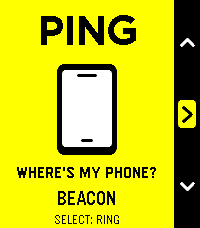
Tools & UtilitiesPING — Lost phone. Found your cool. Your phone is playing hide-and-seek. Your Pebble just became very good at seeking. Under a cushion? In yesterday’s jacket? Somewhere you put it “so you wouldn’t lose it”? Open Ping, press Select, and follow the sound. An essential little utility with unmistakably native Pebble styling: bold outlines, crisp white graphics, cheerful yellow while you search, and orange when your phone starts chiming. - One button to ring. One button to stop. - Three distinctive chimes: Chirp, Doorbell and Beacon. - No extra companion app required: works through the Pebble app already on your Android phone. - Two-minute automatic cutoff. - Perfect for Quick Launch: less searching, more smugly saying, “Found it.” Simple. Essential. Unmistakably Pebble. Requires Android, the Pebble mobile app, and an active Bluetooth connection. Phone media volume must not be silenced—Ping cannot override muted media. Sound follows your phone’s current audio output, including connected headphones or speakers.
 10
10Digivice - Alpha build
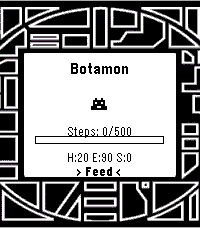
GamesA very early, alpha build of a reworked digivice. I wished this existed for the pebble, so I made one for myself. It is NOT anywhere near completion and it's all MY original code. Took some inspiration from the vital bracelet, as well. I liked the idea of fitness goals to help with evolution, but I'm not going to make you do sit-ups to get a greymon. Just some walking. Or heck, skip it and treat it like a normal digivice and let it eat, sleep, poop, and train and you'll get there. Or try out the battle simulator, which is all 50/50 coin flip rng based with a fun animation. Whatever floats your boat. Final note: Agumon line only, diverging evolutions will come into play at some point. Perhaps the next version, but for sure in the 1.0 release. Give me a few weeks.
 1
1NRL Fan
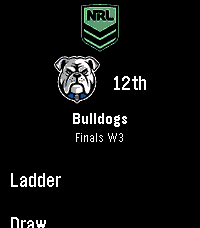
Tools & UtilitiesAn app for Australian NRL fans to keep up with their favourite teams. It features: - Set your favourite team and code (NRL, NRLW + Origin series) - Current ladder and rankings - Upcoming matches list (upcoming games can be pinned to your Pebble's timeline for alerts) - Live game score view (30s updates) with vibrations when a team scores - Results from the current season - Historic results view for all teams from past years - Touch screen enabled Built for Pebble Time 2. Support for other Pebbles added as best I can. If you find a bug or have a suggestion, let me know!
 7
7Simple coffee ratio calculator
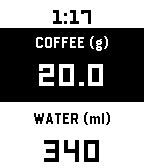
Tools & UtilitiesA coffee-to-water ratio calculator for your wrist. Set your brewing ratio once, then dial in coffee or water to get the matching amount instantly. Perfect for pour-over, when you weigh your beans freely and need the water calculated on the spot. Adjust coffee weight or water amount — the other updates automatically Press Select to switch between adjusting coffee or water Long-press Select to change your ratio (supports 1:10 through 1:25) Tap for precision (0.1g / 1ml), hold to move faster (1g / 10ml) Your ratio and last coffee weight are saved between sessions Defaults to 1:17 ratio, 20g coffee.
 12
12Wrist Dungeon
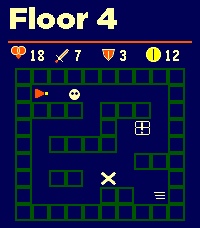
GamesWrist Dungeon is a top-down dungeon crawler and roguelite RPG built for Pebble. Explore changing room complexes, collect treasure, evade patrolling enemies and fight your way through 30 increasingly dangerous floors. Monsters use line-of-sight detection and will pursue you—if they catch you, they attack first. Combat combines your Attack or Defence stat with a dice roll. Every clash displays both calculations and the final totals. Attack, survive the counterattack or flee and risk taking one last hit. Discover weapons, armor and potions as you descend. Compare new equipment with your current gear, equip it immediately, carry it in your six-slot inventory or leave it behind. Drop unwanted items and visit merchants to buy and sell gear using gold. Every run makes you stronger. Earn Shards and Legacy progress, purchase permanent upgrades, unlock new heroes and preserve an heirloom for your next descent. Features: • 30 progressively harder dungeon floors • 20 enemy types, including skeletons, bats, mimics, trolls and drakes • Major bosses on Floors 10, 20 and 30 • Elite encounters and varied room types • Patrolling enemies with line-of-sight detection and pursuit • Dice-based combat with visible Attack and Defence totals • Weapons, armor, healing and stat-boosting potions • Equipment comparisons and six-slot inventory • Gold, treasure chests and merchants • Permanent Shard upgrades and Legacy progression • Three unlockable heroes with different strengths • Heirlooms carried into future runs • Unlockable Depth II for a greater challenge • Optional hit, miss, victory and defeat sounds • Optional haptic feedback • Support for rectangular, round, color and monochrome Pebble watches Floors 1–5 are free to play. A one-time KiezelPay purchase unlocks all 30 floors, every boss, advanced heroes, heirlooms and Depth II. No subscription. More to come...
 36
36Price Watcher
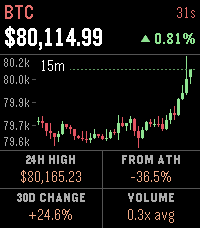
Tools & UtilitiesPrice Watcher keeps live market prices on your wrist: stocks, crypto, ETFs, and commodities, up to 8 symbols at a time. The home screen shows every symbol at a glance. Up and down flip through detail pages, each with a candlestick chart (1 minute, 15 minute, 1 hour, and 1 day intervals, cycled with select), key stats, and the change since the previous close. Stock charts shade pre-market and after-hours trading, and the price keeps tracking extended-hours movement after the close. Stats adapt to the asset. Stocks show the 24h high, 30-day change, previous close, and volume relative to a typical day at this time. Crypto and commodities swap in the distance from the all-time high. Any ticker TradingView knows will work. Type symbols into the settings page on your phone, and pin an exact market with EXCHANGE:SYMBOL (for example KRAKEN:BTCUSD) if the automatic match picks the wrong one. Auto-refresh runs every 1 to 30 minutes, and the watch remembers the last prices so there's something on screen the moment the app opens. A long press of select refreshes everything on demand. Works on every Pebble, from the original to the Time 2 and Round 2.
 5
5PebbleCalc
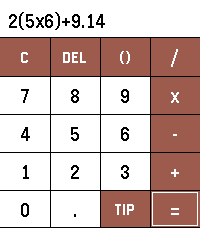
Tools & UtilitiesPebbleCalc brings a simple yet powerful calculator and a smart tip splitter directly to your Pebble watch. [FEATURES] - Full PEMDAS Math Engine: Evaluate standard arithmetic expressions with parentheses, operator precedence, decimals, and negative numbers. - Interactive One-Line Display: Touch anywhere along the equation or long-press UP/DOWN to move the cursor. - Touch & Button Navigation: Full support for touchscreen tapping alongside physical button controls. - Tip & Split Calculation: Use the TIP button to calculate gratuity and split bills. - Quick Tip Presets: Select 10%, 15%, or 20% presets, or press UP/DOWN to fine-tune custom percentages. - Bill Splits: Tap left/right half of the split pane or long-press UP/DOWN to adjust the party count. [REQUIREMENTS] No setup, companion app, or internet access required.
 22
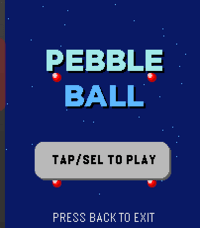
22PebbleBall
GamesThis is a Jezzball clone for the pebble time 2! The classic windows game on your wrist! With touch support! Your goal is to trap all the balls in the smallest boxes that you can. Give it a try!
 45
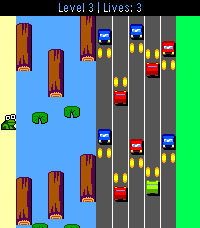
45Froggle
GamesFrogger, but for Pebble! Multiple challenging levels, which get faster as it goes... Can you dodge the cars and hop those logs? You get an extra life for each level you complete.. Good luck! Choose between modern or retro art! Note: Touch screen support is enabled for jumping only. It is only enabled on the new RePebble time 2 for 2026 Special thanks to GitHub user cmbartschat for the graphics overhaul. Absolutely beautiful!
 17
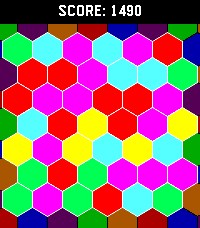
17Pexic
GamesHexic but for pebble! It's the classic you know and love, optimized for Pebble Time 2 (emery) and Pebble Round 2 (gabbro)
 9
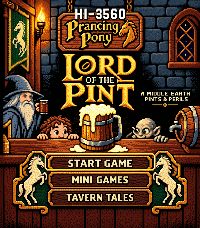
9Lord of the Pint
Games**HAPPY HOBBIT DAY** 🍺 LORD OF THE PINT The road goes ever on… but first, a pint. Step behind the bar as Barliman Butterbur and keep the Prancing Pony running as heroes, villains, wanderers, wizards—and stranger folk—come looking for a drink. 🕹️ Classic arcade action — Pour, serve, catch mugs and survive increasingly chaotic rounds with simple Pebble-friendly controls. 🎲 Three mini-games — Take on Gollum’s Riddles, the Dwarf Drink-Off, and Coin Toss, each with its own challenge and high scores. 🏆 Tavern Tales — Unlock achievements, chase records and prove yourself worthy of One Pint to Rule Them All. 🐉 Secrets & surprises — Special patrons, hidden encounters and unexpected moments reward repeat play. Built with love as a fan-made celebration of Tolkien, classic arcade games and Pebble. Easy to learn. Hard to put down. One more round? 🍻 A Pebble Game of the Year candidate? We’ll let the patrons decide.
 28
28NapBuster
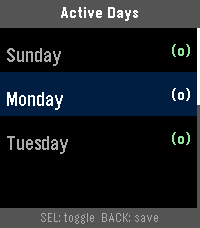
Health & FitnessA Pebble smartwatch app that stops you from napping during the day so you can fall asleep easier at night. When NapBuster sees sustained signs that you may be dozing during your configured no-nap hours, it gives you a gentle nudge. If stronger evidence continues and you do not appear to respond, it escalates to a repeating alarm.
 27
27Parcel Tracking
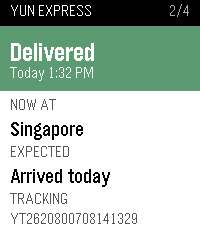
DailyWondering if any parcel is arriving today? This app answers that question in an instant. Open any shipment to check its current status, location, estimated delivery time, and complete past tracking history. Want an instant update? Just long-press to force a refresh. Setup Note: This app requires your own free Ship24 API key (grab one for free at https://www.ship24.com/tracking-api). Enter your key in the app settings on your phone to get started Compatible with all Pebble smartwatches