 3
3PebbleChat
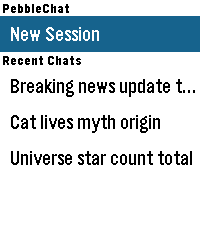
Tools & UtilitiesPebbleChat brings modern AI language models directly to your Pebble watch. Powered by OpenRouter, you can converse with leading models like Gemini, Claude, and GPT simply by speaking into your watch. [FEATURES] - Voice Input: Press SELECT and speak naturally using Pebble's built-in voice dictation to start new sessions or continue ongoing conversations. - Turn History: Long-press UP/DOWN to browse earlier conversation turns. - Session & Turn Rollback: Long-press SELECT in the menu to delete sessions, or inside chat to roll back exchanges up to the current turn. - Multiple Sessions: Save up to 5 recent chat sessions with automatic titles. - Touch & Button Navigation: Full support for touch-swipe scrolling alongside physical button controls. - Online Access: Enable or disable access to the web search tool offered by OpenRouter. - Configurable Settings: Customize models, system prompts, reasoning effort, output tokens, font sizes, and time/location context. [REQUIREMENTS] Requires an OpenRouter API key from openrouter.ai/keys.
 5
5codey
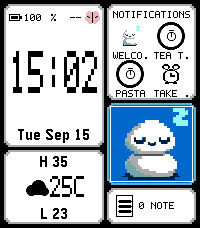
Dailycodey is a personal assistant, powered by codex. Check your calendar, the weather, check off TODOs, or query/instruct your codex agent, all from your wrist. Run the codey-server on your Linux or macOS machine alongside the codex app-server, then use codey as your watchface -- or bind to a "hold" shortcut from your watchface. Dictate to control codex or to take actions on your Pebble such as: - Add a todo ("TODO: blah" or "Set a TODO: blah") - Make a note ("Note: blah" or "Create a note: blah") - Make a calendar event ("Calendar: blah")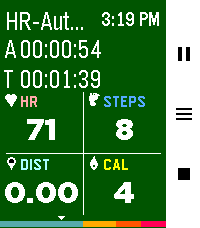 360
360Pebble Fit
Health & FitnessThe fitness tracker you've been looking for! Track 19 different workouts, plus a Pace Trainer, an Interval Trainer, and an Automatic Mode based off heart rate. After a workout, review calories burned, steps taken, distance traveled, records beat, a GPS map of your route, and your heart rate over time. Enable auto-pause in settings to automatically stop tracking during periods of inactivity. Feel free to use your watch as you work out and background your exercise. Export exercises to FIT, GPX and TCX formats. Want heart rate zone awareness? Enable "HR Zone Vibe" in settings to get vibration alerts when you enter a new heart rate zone during your workout. View your workout history, daily/weekly/monthly stats, personal records, and track progress toward daily goals. Full features: - See Monthly/Weekly/Daily workout stats - View 20 past workouts and their specific stats (and see a snazzy GPS map) - Run 19 different workouts, including a pace trainer, an interval trainer and a heart rate adaptive trainer (scales the intensity of calories burnt based off heart rate) - Track active time, total time, heart rate, steps, distance, calories burnt, heart rate zone all from one screen - Additional workout screens for: - Tracking heart rate zone and time spent in each zone (This is the page that vibrates as you leave or enter a new HR zone, see above :) - Track pace (time per mile or km) - Track custom laps - View elevation of your workout and an expected route (if route is uploaded) - View your route as you exercise or see your expected route as you hike - If you get lost, use the path finder to point you back to your uploaded trail - See a fully featured map as you exercise that you can pan and zoom in and out of to see land features - Utilize a cool down timer for when you lift weights - Get notified when you finish a record breaking workout - Get notified if you enter or leave a new heart rate zone while you work out - Track daily goals - See individual workout type records - Auto pause for inactivity during workouts - Background your workout and go about your business then stop it when you're ready - Enable automatic workout detection and the watch will prompt you when you start to work out - Its free! Seriously. I made a tool I wanted to have and decided to share it. At the end of it all - I hope it helps you stay healthy 💪 If you would like to have more of a conversation about features, reach out via the developer link. I try to be responsive! Or let's talk on the Reddit post I made: https://www.reddit.com/r/pebble/comments/1sjvs0i/pebble_fit_a_fully_featured_fitness_app/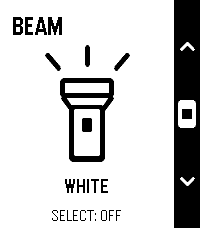 10
10Beam
Tools & UtilitiesBeam — Small app. Bright idea. Your toes called. They’d like fewer surprise meetings with the furniture. Beam turns your Pebble’s screen into a simple flashlight—perfect for finding your way to the fridge when those late-night snacks aren’t going to fetch themselves. Bold outlines. Crisp contrast. That unmistakable Pebble aesthetic. An everyday essential that looks right at home on your wrist. -Launch it and the light is on. -Choose white, amber or red. -Tap Select to switch on or off. -Controls disappear after three seconds for full-screen illumination. No phone connection. No menus to dig through. Just a little light when you need it. Add Beam to Quick Launch and make your next midnight fridge expedition a one-button operation. Simple. Essential. Toe-friendly.
 1
1Better Alarm
Tools & UtilitiesBetter Alarm
 1
1VOLUN-TOLD
Tools & UtilitiesQuickly select a random student in class
 8
8Idle Dungeon
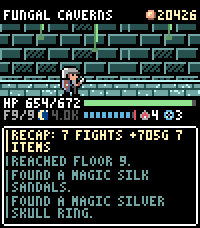
GamesIdle Dungeon turns the steps you take during the day into a dungeon crawl. Pick a dungeon in the morning and go about your day. Every step carries the hero deeper: monsters, traps, fountains and loot all happen while you walk, and the app shows you what you missed when you next open it. Nothing to tap, nothing to grind. - **Steps are the game.** Floors are hundreds of steps apart; the deepest dungeon is 12,000 steps down and the same distance back. Steps taken in town are saved for your next expedition, so a morning walk is never wasted. - **Sleep well and the day goes better.** Six hours of sleep makes the hero Rested, seven makes them Refreshed: more experience, more gold, better finds. - **1000 items to find.** 150 shapes across six materials, plus 64 uniques and 12 three-piece sets with their own art and effects. Rare gear drops unidentified: carry it home to the appraiser, or read an identify scroll where you stand and wear it on the spot - gear can be changed anywhere, dungeon included. - **Hunt what you are missing.** The tavern trades in rumours: pay for a lead and that item starts turning up where it drops. The codex tells you where to look. - **Real risk.** Run out of health and your gear stays where you fell. Walk back for it, or pay someone to fetch it before it is gone for good. - **Also:** a blacksmith who upgrades gear to +10, a 48-slot stash, portal scrolls for the walk home, an auto-return setting, and a morning reminder so you never forget to set out. Runs entirely on the watch. No account, no ads, no in-app purchases; your save never leaves your wrist. Requires a Pebble Time 2 and step data from Pebble Health.
 9.3K
9.3KMusic Boss
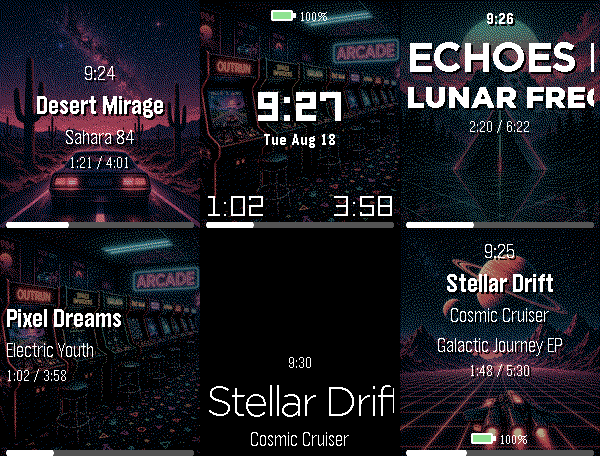
Remotes🎧 Music Boss is a powerful, customizable media controller and music library browser for your Pebble. Works with all your media/music apps*! New here? 🎁 Music Boss includes a fully-featured 3-day free trial through the Music Boss Deluxe phone app - every feature included, nothing held back! 🆕 NEW: Layout Presets - give your watch a whole new look in one tap. Choose from 20+ built-in styles - applied instantly from your phone, then fine-tune anything. Save your own looks too. (Layout Presets & the new UI are for Pebble Time 2 and Pebble Round 2. All other features are for all Pebbles!) 🎵 Play, pause, skip & seek - full media control from your wrist 🔍 Browse & play your whole library - PowerAmp, Podcast Addict, Spotify, Musicolet, GoneMAD, VLC & more 🔄 Switch and launch media apps right from the watch 🔊 Volume on phone, Bluetooth, or while casting 👍 Rate songs - Spotify, YouTube Music, YouTube (more in testing) 📺 Cast control - drive apps sending audio/video to TVs & speakers (Netflix, most music apps) ⚡ Custom per-app controls (e.g. Spotify DJ X) + full Tasker automation ℹ️ Album art, track info & live progress at a glance 🎨 Dynamic art themes that adapt to your cover (colour Pebbles & Pebble 2/2 DUO) 🖼️ Instant album art preview the moment the app opens (no more blank screen!) 🎚️ Image Quality control - Auto / 1 / 4 / 8-bit, plus a custom 1-bit colour theme ⬛ Album-art darkening for crisp text over busy covers ⚙️ Redesigned tabbed phone settings, tailored to your watch 👀 New perk - the new Music Boss watch face preset in Face Boss ✨ Pebble Time 2 & Round 2: 🆕 Brand-new Modern UI - Retro+, Classic & Time layouts in one app, full touch with seek & volume overlays, mix and match to taste 🎨 One-tap Layout Presets - 20+ styles, swap looks instantly, save your own 🎛️ Fully customizable layouts - fonts, colours, sizes, art modes, drop shadow, progress ring & optional solid text backdrops 👋 Wrist-flick gestures - flick forward/back for play, volume, rating & more (adjustable sensitivity; single, double or triple) 🕒 Big-clock display with 9 large fonts 🔒 Quick & Persistent screen lock - double-press BACK 📱 Watch Compatibility - Every Pebble Supported • Pebble Time 2 & Pebble Round 2 • Pebble Time, Pebble Time Steel • Pebble Time Round • Pebble 2 / 2HR / 2 DUO Original Models: • Original Pebble • Pebble Steel Support the Classic UI layout only (no album art). Manual Seek Mode not supported on the original models. For album art on the OG models, please check out "Music Boss Time" on the appstore. Pebble Companion App Compatibility: • Classic Pebble App / Rebble • Core Pebble App • microPebble • Any companion app that supports PebbleKit Classic Thank you for your support - whether you've been with Music Boss since the early days or you're just discovering it now! *Media Browsing/Playback has been tested with: PowerAmp, Podcast Addict, Spotify, Musicolet, GoneMAD and VLC. Works with any app that supports Android Media Browsing. All assets in this listing are original and © Reboot's Ramblings 2013–2026.
 18
18Pacelet
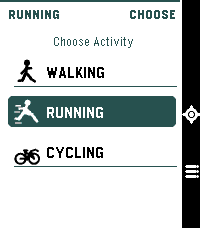
Health & FitnessA simple activity tracker, using phone GPS
 1
1Salat
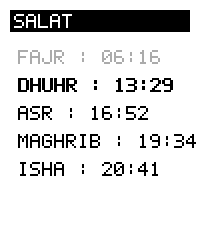
DailyDisplays Salat time for a given latitude. Using lat/lng instead of location in order to avoid using an api key from a geocoding provider.
 32
32Stocks
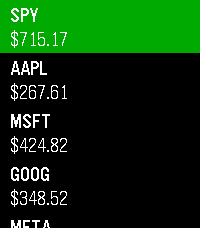
DailyKeep track of the markets on your wrist! Add up to 10 tickers and view prices, daily change, market status, and history at a glance. Data is delayed by a minimum of 2 minutes. Not financial advice. Informational use only. Your Pebble is not a Bloomberg Terminal (yet).
 13
13Counting the Days
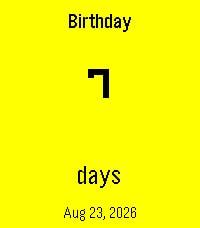
Tools & UtilitiesA simple Pebble countdown tracker for the dates that matter. Birthdays, anniversaries, holidays, trips, goals, or any event you want to keep in view — all in a swipeable card carousel right on your wrist. - Create events directly on your watch with dictation, buttons, or touch. - See a clean countdown in days, months & days, or years, months & days. - Recurring birthdays and anniversaries: set the original date once, and the app automatically shows the next occurrence every year along with the milestone — e.g. "7th Anniversary". - Companion phone settings page for quick edits and batch entry. - Optional Timeline pins so upcoming events appear on your Pebble Timeline. - Available in English, German, French, Spanish, Dutch, and Swedish. - Pick your date format: Jan 12 2027, 12 Jan 2027, 2027-01-12, 01/12/2027, 12/01/2027, or system default. - Ordinal styles for milestones: 1st, 1., 1e, 1:a. - Bold event date option for better readability on any background. Events stay on the watch. The countdown updates automatically, year after year.
 56
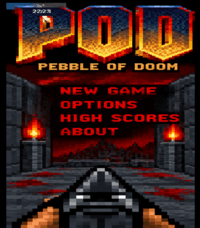
56POD - Pebble Of Doom
GamesA re-imagine of Doom for (Emery) Pebble Time 2 and (Gabbro) Round 2..... 5 levels with a boss at the end, make sure to conserve ammo 😉 Seeing this run on a pebble is a delight to me personally. Active ongoing tweaking is being made, but in the meantime, Enjoy! Acknowledgements: Brick wall texture courtesy of: https://opengameart.org/users/alpharats Everything else was free textures / sprites or modified by me that did not require or ask for a source of approval or credit.
 0
0HealthDash
Health & FitnessAn app to keep you on track.
 18
18BigWeather
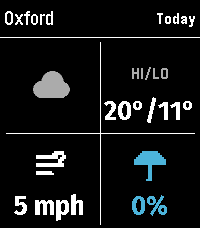
DailyMy eyesight isn't as great as it used to be when I bought the first Pebble watch many moons ago (pesky ageing.......) Anyway it seems like all the weather apps are trying to cram loads of information onto one small screen using tiny icons and small text, so Ive created this app with bigger text which is more suitable for a watch. BigWeather shows current conditions for your location and also any town or city via search, with today, tomorrow, hourly, now/next (+2 hours) and 5-day forecasts with rain, temperature, wind data screens using Open-Meteo (no sign-up, no API key). Features (as of Version 2.0 - August 2026) - Current location, stored and auto-refreshed on open - Improved search with ability to filter preferred location (Phone Settings), - Search any town/city worldwide - Add locations to Favourites - Customisable Today/Tomorrow screens, select which information you want to see (in Phone settings) - Hourly screens (Rain, Temperature, Wind - viewable by pressing Hourly and select to cycle through screens) - 5-day forecasts, per-day detail - Rain forecast (Now/Next) shows next rain, amount and intensity over the daytime, not just the peak % - No API key needed (Open-Meteo); optional OpenWeather with your own key - Units your way: °C/°F, mph/km/h, mm/in, 12/24-hour; large-text mode - Built for the Pebble Time 2 and classic Pebble models If you like this app please heart it, and if you want to buy me a coffee on Ko-Fi you can say thanks here https://ko-fi.com/ben839721