 9
9Brew Buddy (Coffee Timer & Recipes)
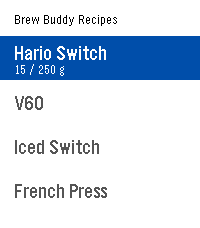
Tools & UtilitiesA custom coffee brewing timer that buzzes so you never miss the next step! Pick (or build) a recipe, select start, and get brewing! Recipes are fully editable and customizable from the settings page on your phone. When the drawdown from a brew finishes, press the select button to get a summary of the timing. Very helpful for dialing in new beans! Ships with presets for the Hario Switch, V60, French press, and AeroPress. Edit, duplicate, or build your own from scratch. Inspired by the work of: Tea's Ready, BrewKinetics, Coffee Timer, and Brew. If you like the app, consider funding my coffee addiction (thank you!) BTC bc1q7esequqkl8sg96je7zu045zyat2sg2x3ey8plu XMR 844dKmmRGpR2KPJd9pSin3NqYu7vH7AtdLFBRRPip8mkcS4NH61JvnKRi3zTHV91TvRerJHMHy8ihPSaso8wpgrhJKqsHN5
 123
123TopoNav
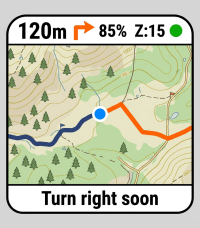
Tools & UtilitiesTopoNav brings offline-style topographic maps and GPX path guidance to your Pebble smartwatch. It streams live outdoor map tiles from your choice of sources (OpenTopoMap, CyclOSM, OpenStreetMap, MtbMap) from your smartphone companion, rendering detailed contour lines, hiking trails, and rivers in Pebble-native 64 colors. Now with full support for Pebble Round displays! Whether you are hiking, walking, or exploring new paths, TopoNav keeps you oriented without needing to pull out your phone. Key Features: 🗺️ Topographic Map Tiles & Sources: Real-time rendering of elevation contours and walking trails with selectable map providers. Toggle Fullscreen Mode to maximize your visible map area. 🥾 On-Watch Route Manager: Swap, start, or deactivate GPX routes directly from a dedicated on-watch menu. 🧭 Navigation View Modes: Choose between a full map view, an Auto-Popup that shows a large turn arrow when approaching a waypoint (< 50m), or a permanent battery-saving Big Arrow mode. 📍 Sensor-Fused Compass Chevron: Real-time direction arrow using the watch's magnetic compass when standing, and switching to GPS-course when walking to filter out wrist-swing jitter. 👣 Live Breadcrumb Trail: Optionally display your real-time traveled route on the map to easily retrace your steps. ⏺️ Activity Recorder: Long-press the Select button on your watch to record your walk. View your completed trips on an interactive map in the settings webview, analyze metrics, and download or copy the standard .gpx file. 📊 Fully Dynamic Dashboard: Customize your view by selecting up to 4 fields from 10 different metrics (Speed, Average Speed, Distance, Elevation Gain/Loss, Duration, Altitude, Watch Battery, Heading, Distance to Destination) alongside live GPS coordinates. The layout intelligently auto-scales to fit your choices perfectly! 🔊 Directional Vibration Alerts: Stay on track with intuitive haptic feedback—distinct vibration patterns tell you whether to turn left or right without even looking at your wrist. You also get 3 rapid pulses if you drift more than 50 meters off-route. Requirements: Requires a persistent connection to your phone's Pebble app with GPS and Internet access enabled. Built as an interactive Vibe-Coding project! 🎸✨
 6
6Pushup Reminder
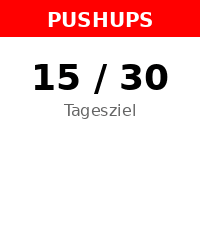
Health & FitnessA 100% Vibe Coding Project - built entirely with AI! 🤖 Get stronger every day right from your wrist! Pebble Pushups is your ultimate personal trainer for the Pebble Smartwatch. Whether you are stuck at a desk or working from home, this app ensures you stay active by gently reminding you to knock out a set of pushups at custom intervals. Features: 📈 Adaptive Daily Goals: The app intelligently learns from your performance! Crush your goals to trigger an 'Overload' day with a higher target, or get a 'Deload/Recovery' day if you need a break. You can always override the target manually! ⏰ Smart Reminders: Set your active time window and reminder intervals. The app uses the reliable Pebble Wakeup API so it doesn't drain your battery while waiting in the background. ⚡ Quick Log: Easily and reliably log your completed pushups with a few clicks. Your daily count is tracked seamlessly. 📊 Smartphone Dashboard: Dive into your workout history! Check out a beautiful 14-day performance chart right inside the Pebble app settings on your phone, and export your data as CSV. 🌐 Fully Offline & Bilingual: No cloud dependencies! The settings menu renders completely offline. Available in English and German. Transform your daily routine and build healthy habits—one pushup at a time!
 2
2SupCycle
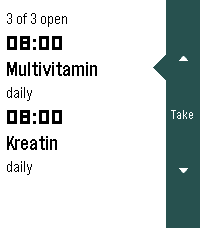
Health & FitnessPräparate im Blick behalten: was heute ansteht, und wo die zyklischen gerade in ihrem Zyklus stehen. Die Oberfläche folgt der Sprache der Uhr (Deutsch und Englisch, Englisch als Rückfall) und dem Timeline-Look der Schwesterapps: weisser Grund, schwarze Schrift, dunkle Seitenleiste rechts. Läuft auf emery, flint und gabbro.
 0
0BT Guard
Tools & UtilitiesKeeps your phone on a tight leash. The app runs as a background app, monitoring the bluetooth connection to your phone. If the bluetooth connection is lost, it will buzz you, repeatedly until the connection is re-established. When the connection is first lost, the alert will repeat every 30 seconds, but an interface is presented for you to make this less frequent, or to turn it off altogether. In any case the alert frequency resets to 30 seconds next time the connection is lost. This approach means you can decide not to go back and get your phone immediately, while still keeping an occasional reminder so you don't forget entirely, and without the possibility that you forget to turn it on again.
 2
2Long Run Stopwatch
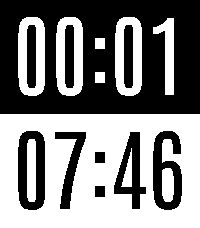
Tools & UtilitiesA stopwatch for long runs. Elapsed time on top. Time of day on bottom. Features: * Battery efficient (updates once per minute) * Large text
 0
0Basalt Fitness Pro
Health & FitnessThis app is ment for fitness without and need for the phone
 8
8Dug Digger
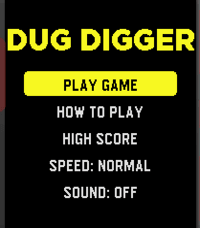
GamesThis is a re-imagining of the game Dig Dug. The metal grinding plate at the top keeps approaching........can you keep digging, collecting coins, killing enemies and escape the ever approaching doom? Good luck! It's a first release, so feel free to give it a try! It will be improved going forward.
 1
1Sliders
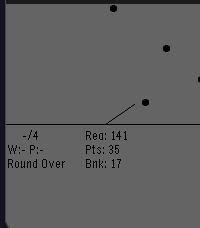
GamesSliders is a simple rouge-lite where you need to score points by bouncing pucks off of walls or off of other pucks! Buy special pucks in between rounds and try to outlast the score requirements!
 2
2Classic Snake
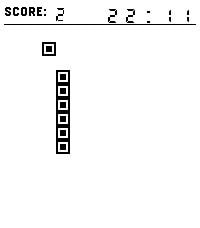
GamesEnjoy a nostalgic Snake experience with a visual style inspired by classic Tetris blocks. Guide the pixel-style snake, collect square food, grow longer, and beat your highest score. Features: Two control methods: buttons or swiping. Time display — so you can keep track of the time while playing (after all, it is a watch). Visuals inspired by Tetris Picking up an apple is accompanied by a sound (this can be disabled). Enjoy the game!
 12
12Clear Alarm
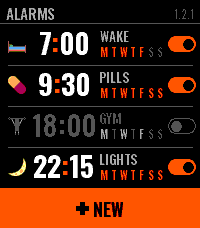
Tools & UtilitiesClear Alarm is an alarm clock for Pebble Time 2 that you can read at a glance. Each alarm has a face — a small picture you choose on the watch — beside its time, its name and the days it keeps, and a switch that shows whether it is on. A tap on the row turns it on or off right there in the list; a hold opens it. Setting one is two wheels, hours and minutes, that turn under your finger and run on when you flick them; the side buttons step and, held, run through the values. The week comes as four shapes — daily, weekdays, weekends, custom — and the buzz as four patterns you pick by feeling each one. When it rings you get the face, the name, the hour, and two keys: SNOOZE and one big OFF. A palm on the watch silences it. Snooze puts the alarm off by 5, 10, 20 or 30 minutes, an hour or two hours. After OFF or a snooze the app steps aside within ten seconds and your watchface is back. An alarm that repeats rings again on its next day, and one that does not switches itself off. Names are typed on the phone, in Latin or Cyrillic, and the watch sets them in capitals. Everything else can be set on the phone too, and what you set on the watch shows up there. The faces are Twemoji (CC-BY 4.0), reduced to the watch's colours.
 0
0Sports Timer
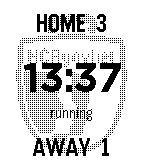
Health & FitnessSports Timer is a match timer for field hockey on your wrist. It counts down each quarter and keeps the score of the home team and the away team. At 0:00 the watch vibrates, then the time counts up as overtime. You can do all of this with one hand, without your phone. You can upload a photo of your team or club. The photo shows faint behind the timer and full screen as a screensaver between quarters/half-time. The app is for Pebble, Pebble Steel, Pebble 2 and Pebble 2 Duo. Manual - Up: home +1. Double-click: -1. Hold: 0. - Down: away +1. Double-click: -1. Hold: 0. - Select: start or pause the time. Stop the alarm. - Hold Select: reset the time. Hold again: settings. - Hold Up + Down: reset the time and the scores.
 0
0Schoolwatch-Schooltimer-Schultimer-Schul
Dailyupdate
 10
10EyeRef
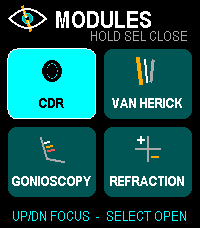
Health & FitnessOffline ophthalmology reference and refraction calculator for Pebble Time 2. Browse cup-to-disc ratio, Van Herick grading, gonioscopy landmarks and Shaffer grades, plus refraction tools for transposition, spherical equivalent, optical cross, retinoscopy working-distance correction, and vertex conversion. Designed for fast button and touch navigation and stores no patient data. Educational reference only; not a diagnostic or treatment system.
 2
2Stechuhr
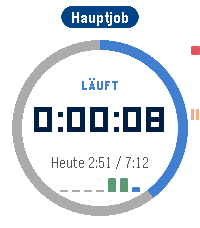
DailyBESCHREIBUNG ENGLISCH ---------------------------------------------------------------- Punch (Stechuhr) makes tracking your work hours on Pebble Time 2 effortless. Tap. Work. Done. - One button: Up starts and stops, Select pauses. A double buzz confirms the start, a long buzz the stop. - A calm watch face that comes alive: the progress ring fills up towards your daily target and turns green once you reach it. A mini bar chart shows your week. - The timer keeps running when you leave the app. The launcher shows "Running 1:23" at a glance. - Forgot to clock in? Add or edit entries on the watch with a scroll wheel - or much faster on your phone. - Projects as jobs: up to 8, each with its own daily target, break rule (none, fixed or German law) and optional hourly wage. - Light, dark or automatic theme. - Optional backup to our server (no IP, no name, deletable at any time). Full version (one-time purchase via KiezelPay): PDF timesheet for your boss, client or tax advisor - with daily totals, overtime per project, earnings and signature lines. Tracking, lists, phone page and backup are free forever. BESCHREIBUNG DEUTSCH ---------------------------------------------------------------- Die Stechuhr macht Arbeitszeiterfassung auf der Pebble Time 2 angenehm. Antippen. Arbeiten. Fertig. - Ein Knopf: HOCH startet und stoppt, AUSWAHL pausiert. Doppelt kurz vibrieren beim Start, lang beim Stopp. - Ein ruhiges Zifferblatt, das lebendig wird: Der Ring füllt sich bis zum Tagesziel und wird grün, wenn es erreicht ist. Kleine Balken zeigen die Woche. - Die Zeit läuft weiter, auch wenn du die App verlässt. In der App-Liste steht "Läuft 1:23". - Vergessen einzustempeln? Einträge auf der Uhr per Scrollrad nachtragen oder bearbeiten - oder viel schneller am Handy. - Projekte als Jobs: bis zu 8, jedes mit eigener Sollzeit, Pausenregel (keine, fest oder nach ArbZG) und Stundenlohn. - Hell, dunkel oder automatisch. - Optionale Sicherung auf unserem Server (keine IP, kein Name, jederzeit löschbar). Vollversion (einmaliger Kauf über KiezelPay): PDF-Arbeitszeitnachweis für Chef, Kunde oder Steuerberater - mit Tagessummen, Über- und Minusstunden je Projekt, Verdienst und Unterschriftszeilen. Erfassen, Listen, Handy-Seite und Sicherung bleiben dauerhaft kostenlos.