 2
2Red Flagr
DailyWould you like to know if he's the one, or just one more red flag? Red Flagr is the magic 8-ball for your love life, and it lives on your wrist. Shake your Pebble and it reveals a red flag about him, like "Emotionally unavailable," "Still follows his ex's mom" or "Says he's not into labels," with a short buzz as it appears. Need a second opinion? Press the bottom button for honest advice, from "RUUUN" to "Why are you surprised?" to "Block. Delete. Heal." Press the top button to start fresh with the next date. With 30+ red flags and 20 pieces of advice, it never shows the same line twice in a row. It has a bold red and black look on colour watches, a clear black and white look on older Pebbles, and big centered text that fits both round and rectangular screens. Use it on first dates, last dates and in the group chat. For entertainment only. Red Flagr has never been wrong. Probably.
 17
17Twine
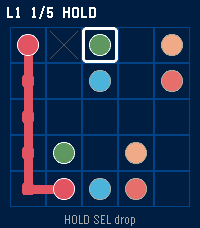
Games1024 flow puzzles on your wrist. Daily board, undo, hint, mid-save. Each colour sings a different note.
 61
61Streaks
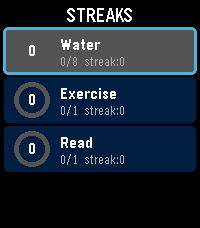
Health & FitnessTrack your daily habits and build streaks right from your wrist. Streaks is a simple, colorful habit tracker for Pebble that helps you stay consistent with up to 6 customizable daily goals. Set up habits like drinking water, exercising, reading, meditating -- anything you want to do every day. Each habit gets a vibrant progress ring that fills as you tap toward your daily goal. Complete your goal and feel the satisfying buzz. Keep going day after day to build your streak. Features: Track up to 6 daily habits Customizable names, goals (1-20), and colors for each habit Visual progress rings with completion animations Streak counter tracks consecutive days Best streak memory to beat your personal record Quick-tap to increment from the list, or open detail view for full stats Works on rectangular (Emery) and round (Chalk) Pebble watches Settings configurable from your phone via Clay Build better habits, one day at a time.
 36
36Five
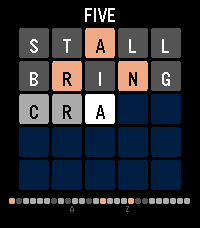
GamesA daily word puzzle for your wrist, a wordle clone ;). Guess the five-letter word in 5 tries. Letters turn green (correct), yellow (wrong spot), or gray (not in word). One new puzzle every day -- play it on the go in seconds. Tracks your stats, win percentage, and streak. Supports Pebble Time 2 and Pebble Time Round.
 4
4Phone Sound Mode
Tools & UtilitiesYou can control.
 2
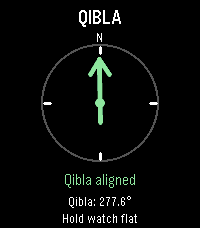
2Qibla Compass
Tools & UtilitiesFind Qibla direction.
 1
1Satellite Overpass
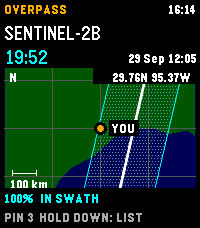
Tools & UtilitiesPlan Landsat 8/9 and Sentinel-2A/B/C passes over your location on Pebble Time 2. See a countdown, hourly cloud forecast, and modeled cross-track coverage. A 30-day history reports matching Earth Search scenes, whole-scene cloud cover, product-lag status, or a catalogue no-match. No-match does not prove that no acquisition occurred. The regional map shows your center, selected ground track, and nominal imaging swath; predictions and maps are cached for offline use. The map is an overview, unavailable above 80° latitude, and not live navigation. Sentinel-2A has a partial acquisition plan. Coverage and swath-edge status are geometric heuristics, not probabilities or guarantees. Cloud forecasts over five days have little skill. Refresh sends current coordinates to Open-Meteo for cloud forecasts and Element 84 Earth Search for scene history. Pin records stay in phone storage and are not included in those requests; open app settings to copy them as GeoJSON. Requires location permission for fresh local predictions and an internet connection for forecasts and scene history. Controls: UP/DOWN selects a pass; hold DOWN switches map/list; SELECT saves a timestamped pin; hold SELECT refreshes. Data: CelesTrak, Open-Meteo (CC BY 4.0), Element 84 Earth Search, Natural Earth (public domain). Source: https://github.com/globe-and-atlas/overpass-watch
 4
4Sprinkle Do
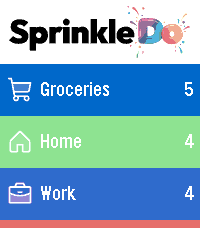
Tools & UtilitiesSprinkle Do is your shopping lists and to-dos, right on your wrist. Browse your sections at a glance, check off shopping items with a single tap, and add new tasks by voice - all synced live with the Sprinkle Do web and Android app.
 3
3Constellation
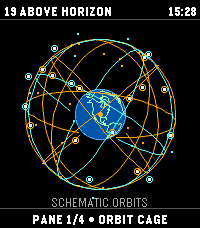
Tools & UtilitiesAn educational orbital-geometry watchapp for Pebble Time 2. Constellation propagates public CelesTrak GP/TLE element sets with SGP4 to plot modeled GPS, Galileo, GLONASS, and BeiDou positions. It is not a GNSS receiver: it does not receive satellite signals, produce a navigation fix, or estimate real-world positioning accuracy. TLE elements do not include an accuracy estimate. FOUR VIEWS • Orbit globe: modeled satellite positions; orbital-plane rings are schematic guides, not fitted to the TLEs. • Skyplot: modeled azimuth and elevation from the selected center. Bars show elevation only, not signal strength. • Geometry: DOP derived from modeled directions; singular or insufficient geometry displays N/A. DOP describes geometry, not position accuracy. • World map: simplified coastlines, selected center, and modeled sub-satellite points; no reception-radius circle. Phone coordinates are used on-device and are not sent to CelesTrak. Choose phone location or validated manual coordinates. A location failure is shown without a substitute location. TLE age is displayed; fresh elements require internet access. Cached elements can be viewed offline. Controls: hold UP/DOWN to change panes; click UP/DOWN on the globe to rotate; SELECT toggles catalog-number labels; hold SELECT refreshes. Data: CelesTrak GP/TLE. Source: https://github.com/globe-and-atlas/constellation-watch
 4
4Signals
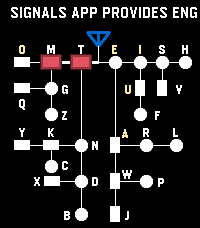
Tools & UtilitiesSignals — Touch. Learn. Play. Practice English and Korean Morse code with touch input, sound, and visual guidance. Save and replay sentences, then challenge yourself in Game Mode as letters advance and speed increases. Track your typing speed and game history in Settings. Choose which codes to enable: - English user can disable Korean Code in practice mode. - Korean requires a Korean language pack. --- [Practice Mode — Default Buttons] - single-down : Switch enabled codes. - double-down : Toggle sound. - long-down : Enter Game Mode. - single-back : Exit the app. - double-back : Open MENU. - single-up : Cancel the current character. - long-up : Clear all input. - single-select : Replay the remembered sentence. - double-select : Remember the current sentence. - long-select : Clear the replay memory. During replay, single SELECT stops playback. Cancel Character and Clear All Input can be reassigned in MENU → Secondary Buttons. You can see the REPLAY feature in action in the Reddit post below: https://www.reddit.com/r/pebble/comments/1wsfat9/signals_a_touchbased_morse_code_trainer/ --- [Touch Input - Completing Characters & Adding Spaces] By default, the bottom half enters dots and dashes, while the top half completes input. - English: Tap the completion area to finish the current letter. Tap again when no letter is pending to add a space. - Korean: Tap to finish the current Morse code for a consonant or vowel. Once the syllable is ready, tap again to commit it. Tap with no pending input to add a space. Each tap performs one step. If a step has already completed automatically, the tap performs the next step. Change the split direction and input area in MENU → Input Gestures & Key Mapping. --- [Game Mode] - Touch : Start the game, then enter Morse code. - single-down : Switch enabled codes. - double-down : Toggle sound. - single-back : End the game and return to practice. - long-down : End the game and return to practice. - double-back : Open MENU and pause the game. Replay controls are unavailable during gameplay. [Inside MENU] - UP / DOWN : Navigate. - SELECT : Open a submenu or change an option. - BACK : Return. --- [How to Play] 1. Save your sentences. In practice mode, double-click SELECT to remember the current sentence. It is also sent through PebbleKit JS (PKJS) and stored for the Settings browser. These saved sentences supply the game. 2. Fetch game sentences. Open MENU → Game → Fetch Sentences. Choose the sentence count in the same menu. Each fetch loads the next batch of saved sentences, wrapping around when it reaches the end. 3. Start playing. Hold DOWN to enter Game Mode, then touch the screen to start. Letters appear on the left and advance toward your input position on the far right. 4. Clear the letters. Enter and complete a character in Morse code to remove the rightmost matching visible letter. Clear every letter in every loaded sentence to win. If a letter reaches your input position, the game ends. Single-click DOWN to switch enabled codes. Configure starting speed, minimum speed, and speed reset behavior in MENU → Game. View your game history and successful characters per minute in Settings. Type a Sentence in Settings Enter a sentence in Settings and tap Send to Watch. The watch immediately remembers it, ready for REPLAY with a single SELECT click. To add it to the browser’s saved game sentences, display it in practice and double-click SELECT.
 42
42Simple Notes
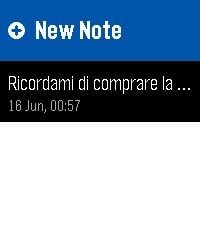
Tools & UtilitiesFast, minimalist voice notes right on your wrist. Simple Notes is a clean productivity app designed for Pebble smartwatches. No clutter, no endless menus: just a fast way to capture your thoughts using your voice. Key Features: Instant Voice Dictation: Speak to your Pebble to transcribe reminders into text in seconds One-Click Quick Launch: Assign the app to a Quick Launch. It will open straight to dictation, save your note, and close automatically. Zero extra clicks. Smart Layout: The main list displays text previews with exact dates and times right below them. High Contrast UI: Features dynamic color inversion on the selected row for perfect readability under direct sunlight. How It Works (With touchscreen and buttons!) Record: Tap New Note or press SELECT (or use Quick Launch), then speak. Review: Swipe up/down or use UP/DOWN to browse your saved notes. Tap or press SELECT to open one. Delete: Tap a note to open it, then tap anywhere or press SELECT to delete it. Swipe left/right or use BACK to navigate between notes.
 107
107Authenticator
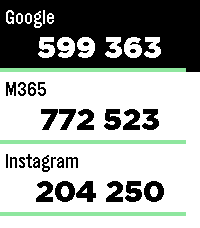
Tools & UtilitiesPebble Authenticator brings your Two-Factor Authentication (2FA/TOTP) codes directly to your Pebble smartwatch. No need to reach for your phone to unlock your accounts, just glance at your wrist. Key Features: • Easy Setup: Quickly import multiple accounts at once using otpauth:// links, or add them manually via the Pebble app settings. • High Capacity: Store up to 100 different authenticator accounts. • Privacy First: 100% offline and secure. Your secret keys are stored purely locally on your phone and your smartwatch. No cloud sync, no tracking, and no external servers. • Easy Management: View and delete specific accounts directly from the app configuration page. • Touch Support for the new Watches. Disclaimer: This application was developed with the assistance of Google's **Gemini AI** and Anthropic's **Claude**. It helped in bridging the gap between modern JavaScript configuration tools (Clay) and the Pebble C SDK. If you encounter any bugs, have ideas for new features, or want to suggest improvements, please feel free to send me a message! I am always happy to receive feedback and make the app even better.
 0
0My First watch
Dailyexperimenting with building watchface
 5
5Orationes
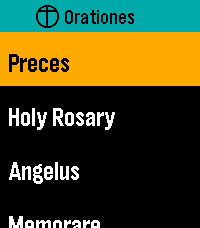
DailyMake time for prayer. On your wrist. Available offline. Orationes is a Catholic prayer book for Pebble Time 2. Large text and clear contrast help you focus on the words. Your prayers stay on your watch, ready without a phone or internet connection. PRAY THROUGHOUT YOUR DAY Start with Latin Preces, Holy Rosary, Regina Caeli, Angelus, and Memorare. Explore Come, Holy Spirit, the Litany of Humility, blessing and grace at meals, 92 Aspirations, 14 Prayer Cards, the Litany of Loreto, psalms, prayers before work, preparation for Confession, and more. The Rosary mystery reference previews today's set and weekday before opening it. All Mysteries separates each set's name from its weekday details. KEEP YOUR PRAYERS CLOSE Choose and arrange up to seven shortcuts to individual prayers or collections. Personalize them on the watch or through Settings in the Pebble mobile app. Browse All Prayers and press Select to open a prayer directly; hold Select and release for Open/Pin options. A readable first-use hint explains where the gesture works. Settings → Help offers eight selectable topics covering navigation, reading, resuming, pinning, layout, phone settings, Rosary, and reminders. Scroll through each topic with Up/Down; Select or Back returns to topics. PICK UP WHERE YOU LEFT OFF With Remember Place On, opening a prayer from any menu resumes its saved position, or starts at the beginning if none exists. With it Off, prayers always start at the beginning and saved places are cleared. Continue displays your last saved prayer name prominently and opens it directly. Recent Prayers keeps separate places for up to eight prayers. Enable Continue First at the top of watch Settings or in phone Settings to put Continue above your shortcuts; the setting stays synchronized between both. Both Settings pages show their bundled app version at the bottom. READ YOUR WAY New installations start with Dark appearance, Ocean title accent, and Lime navigation highlight. Choose Large or Extra Large text, Light or Dark appearance, and independent title and navigation colors. Existing preferences are preserved on upgrade. Prayer text retains strong black-and-white contrast, with clearer response blocks and stanza spacing. The Litany of Humility attribution stays in small print. Compact headers, submenu chevrons, and a narrow list-position indicator make menus easier to browse. Compact Menus fits short rows into 36 pixels instead of the spacious 54-pixel default, keeping full-size text and expanding longer names. Short Settings labels and values share a line when they fit. Compact Menus is available on the watch and in Clay and syncs in both directions. Opening phone Settings requests current watch values; if the watch does not reply, cached values are clearly labelled. Open Orationes on the watch and reopen phone Settings to refresh. The Preces blessing cross is supported in both text sizes. RESTORE YOUR DEFAULTS One Restore Defaults action resets shortcuts and shared preferences: Dark/Ocean/Lime colors, Large text, Remember Place On, Continue First Off, Compact Menus Off, and the noon reminder Off with a 10-second duration. Saved prayer positions are kept. On the phone, tap Save Settings to apply the reset. MOVE AT YOUR PACE Swipe to scroll, tap Up or Down, or hold either button to move faster. Press Select while reading for Start again or Jump to section where available. Aspirations offers ten jump groups covering all 92 entries. Double-press Select while reading to return to your watchface. PAUSE AT NOON Enable an optional vibration reminder for Angelus or Regina Caeli, selected automatically for the season. EXPLORE THE PRAYER DIRECTORY https://github.com/ewijaya/pebble-orationes/blob/main/docs/prayer-list.md
 17
17Fatal Run
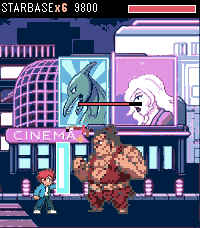
GamesFatal Run is a side-scrolling brawler for Pebble Time 2. You auto-run the street. Punch, kick, and jump-kick through ten stages, then finish the boss. Combos go up to six hits Fill the yellow bar with landed hits, then hold the bottom two (SELECT + DOWN) for FIRE PUNCH. FEATURES • Time 2 only • 10 photo stages, four enemy types, foes drop and stay • Street props from the full sheet: crate, pipe, barrel, logs, cones, bottle, hydrant, drum, boxes • Random street clutter with per-prop damage; mid-stage burger restores half your health • HP bars on every fighter • Six-hit combo meter, two-button block, and FIRE PUNCH special • Fatality sequences on every boss • Boss Run: all ten bosses, unlocked after campaign clear • Sound, music, vibrate, volume