 58
58home assistant pebble
Transform your Pebble into the ultimate smart home remote

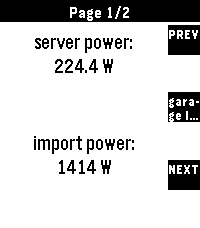
Home Assistant for Pebble is a professional-grade integration designed for speed, reliability, and universal compatibility. Whether you're on a classic Pebble, a Pebble Round, or the high-res Pebble Time 2, this app provides a seamless, responsive experience.

Setup Instructions:
1.  Open the settings for this app in the Pebble mobile app.
2.  Enter your Home Assistant URL and a Long-Lived Access Token.
3.  (Optional) For the best experience, add `cors_allowed_origins: - https://joshsg3.github.io` to your Home Assistant `configuration.yaml` to enable the "Load Full List Now" button.
- If you don't want to do this, save the config page, and open it again, the first 350 entities will be preloaded
4.  Configure your dashboard pages and sync!

Not affiliated with home assistant

If you like this and want to support me: https://buymeacoffee.com/joshsg
 34
34Pebble Hooks
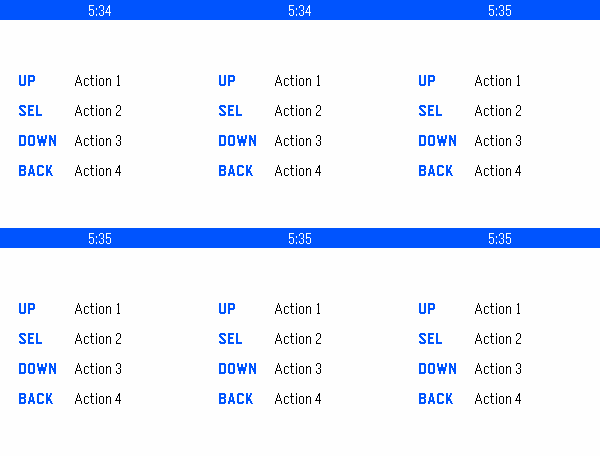
Pebble Hooks lets you send HTTPS requests from your watch using the four Pebble buttons. Each button can be configured separately from the Pebble mobile app.

For each action, you can set a label, HTTP method, URL, authentication, optional headers, and an optional request body. Supported auth types include Bearer, Basic, and custom header-based auth.

The watch shows simple status feedback when a request is sent or completed. To exit the app, hold the Back button.
 4
4Talk to the Void
Simple app that sends your Voice Dictation and displays the response without saving anywhere. Quick Launching it starts the dictation automatically and exits 3 seconds after displaying the response. Used for a personal project to route around the built in Cloud APIs and send .wav files to a personal server.
 3
3BasicOpenHab
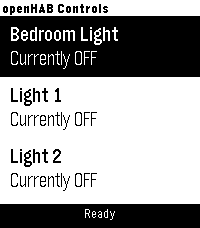
A simple app for toggling OpenHAB items.

You can configure your OpenHAB server address and port, along with item display titles and exact item names. Item names must match those defined in your OpenHAB setup. Max of 10 items currently

The app controls items by sending HTTP POST requests to the OpenHAB REST API, for example:
http://192.168.1.69:8080/rest/items/bedroom_light
body: "ON" or "OFF"

Designed for use on a local LAN only (no OpenHAB Cloud support).
no automatic discovery of OpenHAB items (yet?)
Hope it works for you!

Like the watch face? Help by buying me a coffee
 Support the project: https://ko-fi.com/chrishardwick17402
 Every contribution, big or small, is greatly appreciated.
 16
16Tesla Control
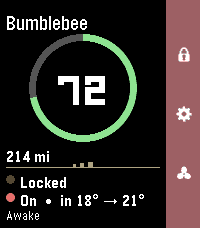
Your Tesla, on your wrist. Tesla Control turns your Pebble into a slim remote for your car. A clean status card shows your vehicle at a glance, and a right-side action bar maps the everyday controls to the buttons you already know. Status card - Your car's name and a bold battery ring with range - Doors (locked / unlocked) and climate (on, with inside → target temp) - Power state — Awake, Asleep, or Waiting for sleep — read live without waking the car - The accent color matches your car's paint (red, white, black, blue, silver, grey) on color watches Controls (action bar) - Up — Lock / Unlock (the padlock icon reflects the current state) - Down — Climate On / Off - Select — More Controls: Temperature ±1°, Open Frunk, Open Trunk, Charge Port, Refresh — plus a Wake option when the car's asleep Smart about sleep Tesla commands only work when the car is awake, so Tesla Control checks first and wakes the car for you ("Waking…") before sending a command — no failed taps. Temperature your way See and set cabin temperature in °C or °F. Works on Pebble color watches (Time / Time 2 / Time Round) and black-and-white models. Requirements - A Tessie account (with your vehicle linked and an active subscription) - Your Tessie API token and vehicle VIN, entered once in the Pebble phone app's Settings Privacy Your Tessie token and VIN are stored only in the Pebble phone app's local storage and sent directly to Tessie over HTTPS. The token is masked after you save it and is never shown again. Not affiliated with, endorsed by, or sponsored by Tesla, Inc. or Tessie. "Tesla" is a trademark of Tesla, Inc.; "Tessie" is a trademark of its respective owner. Requires a separate Tessie subscription.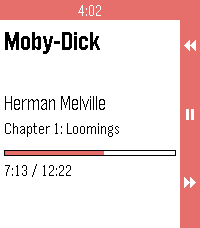 2
2Voice
Voice for Pebble controls an Android audiobook player from the wrist. One watchapp drives two players: Voice, the open-source audiobook player, and Audible. It runs on Pebble 2 Duo and Pebble Time 2, and needs a small companion app on your phone, available from the project's GitHub Releases.

ON THE WATCH

Now playing. Book, author, chapter, a progress bar, and the cover when the player offers one.

Transport. Up / down skip back / forward by the player's skip time. Long-press for the previous / next chapter. Select is play / pause. Long-press select opens the actions menu.

Actions. Browse books, Source (switch between Voice and Audible), Volume up, Volume down.

Browse. The player's library, with a cover thumbnail on each row the player provides a cover for.

ON THE PHONE

Voice: full transport, browse, chapter skip and the now-playing cover.

Audible: grant notification access to "Voice for Pebble" for full control, titles, cover and chapters. Without it the companion sends media buttons (skip, chapter, play/pause) and the watch shows "Buttons only". The companion reads no notifications.

STATUS

Tested on a Pebble Time 2 with Audible in buttons-only mode. The Voice app itself and Audible with notification access are not yet tested on hardware.

REQUIREMENTS

- Voice or Audible on your Android phone
- The Core Devices Pebble app paired to your watch
- The Voice for Pebble companion APK (installed by hand from the project's GitHub Releases, one time)

SOURCE AND SUPPORT

Source and companion APK: https://github.com/P1R4N351/voice-for-pebble

NOT AFFILIATED

This project is not affiliated with Voice, Audible, Amazon or Core Devices. Names are trademarks of their respective owners.
 6
6Tuya Lights
Tuya Lights — control your smart lights from your wrist.

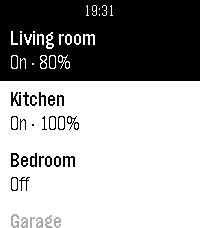
See all your Tuya / Smart Life lights in one list and switch them on or off with a tap. Open a light to adjust its brightness and colour temperature. The list keeps your most-used lights on top and greys out any that are offline, and optional quick-toggle and auto-return settings keep control fast. Set up your Tuya cloud account once from your phone.
 27
27Hueble
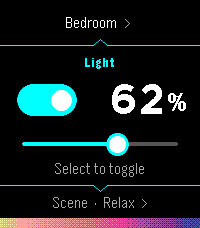
Hueble is a focused, watch-first remote for Philips Hue. Open it directly into your last room, toggle its lights, adjust brightness, or activate a scene without reaching for your phone. Rooms and scenes are designed for quick repeat use: Hueble remembers where you were, shows scene previews derived from the colors reported by your bridge, and supports both hardware buttons and touch gestures.

Pairing also happens from the watch, follow the directions and press the physical button on your bridge. There is no separate settings page. Hueble connects directly from PebbleKit JavaScript on the paired phone to a Hue Bridge on the same local network. It has no backend, accounts, advertising, analytics, or trackers.

A Hue Bridge v2 (model BSB002) with local HTTP access enabled is required. Hue Bridge Pro (BSB003) and other HTTPS-only bridges are not supported because PebbleKit JavaScript cannot install Hue's private certificate authority. The watch and phone must be connected, and the phone must be able to reach the bridge over local Wi-Fi.

Hueble is an independent companion and is not affiliated with or endorsed by Signify or Philips Hue.
 1
1Landy Remote
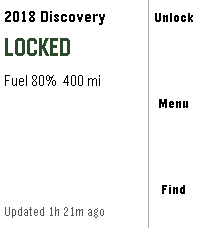
Lock, unlock and find your Jaguar Land Rover from your wrist.

**Anonymous usage statistics are collected and can be turned off in settings —
see Privacy below.**

**What it does**

- Lock and unlock — unlock asks you to confirm first
- Honk and flash to find the car in a car park
- Find my car — compass arrow and distance to its last reported position
- Remote climate — start and stop, with the cabin temperature set on the watch
- At-a-glance status — locked or unlocked, fuel and range, doors or windows
  left open, and how fresh the data is
- Tyre pressures, mileage, service and AdBlue distances, fluid warnings
- Miles or kilometres, °C or °F, kPa, bar or psi

Buttons for anything your vehicle or subscription does not support are not
shown — the app asks your car what it can do rather than assuming.

**You need**

- A Jaguar or Land Rover with an active InControl subscription
- The Pebble Core phone app
- Lock, unlock and honk also need InControl Remote Premium-class service and
  your vehicle PIN

**Safety**

If the app cannot confirm you are stationary, the controls disappear and only
information is shown. It will not send a command to a vehicle that might be
moving. Expect this if location permission is off, or indoors with a poor GPS
fix.

**Privacy**

Your credentials and vehicle data go straight from your phone to Jaguar Land
Rover. This app has no server in between, and your password is never stored —
only renewable tokens, on your phone.

Anonymous usage statistics are collected by default and can be switched off in
settings. Counted: app opens and version, which feature was used, whether a
command succeeded or failed, whether the safety lock-out triggered, which
services your vehicle supports, and the country of the request. Never
collected: your VIN, your car's location, speed or distance, your email, PIN
or tokens, or any vehicle status such as fuel, mileage or lock state.

**Honestly**

Remote commands go via Jaguar Land Rover's servers to the car's mobile
connection. They take 5–20 seconds and sometimes fail, more often on older
vehicles. The app tells you which happened — the car refused it, the car did
not answer, or it could not be reached — because those need different
responses from you.

This app uses an interface Jaguar Land Rover provides for their own web app.
It is not a published API and carries no compatibility guarantee, so a change
at their end can stop it working until the app is updated.

**Unofficial software. Not affiliated with, endorsed by, sponsored by, or
supported by Jaguar Land Rover Limited. "Jaguar", "Land Rover" and "InControl"
belong to their respective owners and are used only to describe what this app
works with.**

Source: https://github.com/ankur22/landy-remote
 10
10Tasker Trigger 1
Just a simple app that does nothing except show up in the logcat on your phone so you can trigger Tasker tasks. The UUID is
07f97c4f-82a2-4ae2-9c74-c512cc4e8f61
 570
570Playback for Spotify
Playback for Spotify
Control Spotify from your wrist without reaching for your phone.

Features
-Now Playing: Track info, live progress bar, and album art (full color, dithered B&W, or full-screen on round displays).
-Library Access: Browse and play from your Playlists, Saved Albums, Followed Artists, and Liked Songs.
-Queue Support: Access your upcoming tracks directly from your wrist.
-Advanced Playback Menu: Long-press 'Now Playing' on the main menu to easily toggle Shuffle and Repeat modes.

Controls
-SELECT: Open queue, press it one more time to Play / Pause
-UP / DOWN: Next / Previous track
-Hold UP / DOWN: Volume Up / Down (only works while playing on external speakers because of API limitation)
-Hold SELECT: Toggle UP/DOWN buttons to Volume Mode (auto-reverts after 3 seconds)
-Use touchscreen on supported watches(PT2, PR2)

Setup & Requirements
-Requires a Spotify Premium account and active playback on any device.
-Setup uses secure OAuth (PKCE) and requires a free Spotify Client ID (a built-in tutorial will guide you).

Supported Platforms: Aplite, Basalt, Chalk, Diorite, Emery, Flint, Gabbro.

Open Source
-Playback is fully open source. Check out the code, report issues, or contribute on GitHub: https://github.com/alex523ap/Playback-for-Spotify
 28
28Pebble MA
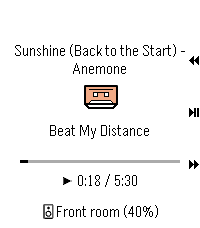
Pebble Music Assistant client
 3
3Sprue
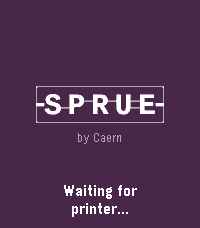
Keep an eye on your print without hovering over it. Sprue connects to your FlashForge printer over your local network and surfaces the essentials right on your Pebble: print status, nozzle and bed temperatures, current layer, progress, and estimated time remaining. Whether you're across the house or just across the room, a quick glance tells you everything.

The watch polls your printer automatically Press the select button to refresh on demand. Filenames scroll if they're too long to fit.

Set it up once from the Pebble app on your phone - enter your printer's local IP address, serial number, and access code - and Sprue handles the rest. You may need "Local LAN only" setup to enable the API access.

*Note: Claude Code was used in the generation of this app.*
 4
4HTTPS-Menu
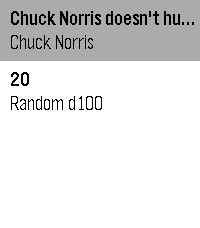
Up to five entries on your wrist, each one an HTTP(s) request.
The reply appears directly in that row.
Optionally configure POST data, Authorization header and auto-exit per entry.
 6
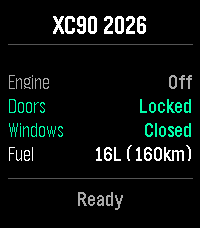
6ReVolver
Remote control your Volvo car from your wrist.

ReVolver — Remote Volvo controller. Also "volver" (Spanish): "to return/come back" to your car.

Control your Volvo from your Pebble watch via the official Volvo Connected Vehicle API.

Monitor:
Engine, Doors, Windows, Fuel & Range

Commands:
Flash, Honk, Lock/Unlock, Engine Start/Stop, Climate Start/Stop

Highlights:
- Dynamic menu based on your car's capabilities
- Confirmation for sensitive actions
- Vibration feedback
- Auto token refresh

Setup:
Enter VIN > Log in with Volvo ID > Done.

Privacy:
Tokens stay on your phone. Open-source auth proxy — no data stored server-side.